

Xaero's Minimap Mod for Minecraft - Download & Install
Download Xaero's Minimap Mod for Minecraft to add a unique rotating square minimap that retains vanilla aesthetics. Explore with ease using 15+ customization options. Get it free from IQMOD!
Everything About Xaero's Minimap Mod for Minecraft - Download & Install
Read the full article about the mod
What is Xaero's Minimap?
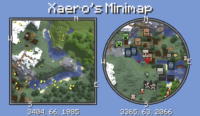
Xaero's Minimap is a highly acclaimed and essential Minecraft mod for the Java Edition, designed to revolutionize player navigation and world exploration. It introduces a dynamic, rotating square minimap directly onto the game's Head-Up Display (HUD), providing players with an immediate and clear overview of their surroundings. This mod stands out for its unique ability to maintain the aesthetic integrity of vanilla Minecraft while offering a powerful suite of mapping features. It helps players easily locate villages, identify resource-rich areas, navigate complex cave systems, and track entities, making the overall gameplay experience significantly more efficient and enjoyable. Developed by Xaero, this mod is compatible with a wide range of Minecraft versions.
The significance of Xaero's Minimap in the Minecraft modding community cannot be overstated. It was the first mod to introduce a rotating square minimap, a feature that many players now consider indispensable. Unlike other minimap mods that might clutter the interface or drastically alter the game's visual style, Xaero's Minimap is meticulously crafted to blend seamlessly with the existing Minecraft UI. This commitment to a vanilla-friendly design is a major reason for its popularity, appealing to players who value immersion without sacrificing functionality. Beyond basic navigation, the mod enhances survival and adventure by providing critical information about nearby entities, custom waypoints, and biome identification, transforming how players interact with and understand their vast Minecraft worlds.
Key Features and Highlights
- Unique Rotating Square Minimap: Xaero's Minimap pioneered the concept of a square minimap that dynamically rotates with the player's perspective. This innovative feature offers an intuitive and natural sense of direction, allowing players to navigate their world more effectively and immerse themselves deeper into the game without constantly pausing to check a full-screen map.
- Vanilla-Friendly Aesthetics: A core principle of this mod is its dedication to preserving Minecraft's original visual style. The minimap integrates flawlessly with the game's existing HUD, ensuring that no intrusive or out-of-place elements disrupt the classic Minecraft experience, making it a favorite for purists.
- Extensive Customization Options: Players gain unparalleled control over their minimap experience with over 15 distinct customization settings. You can adjust the minimap's size, position on the screen, zoom level, transparency, entity display, and even specific color schemes to perfectly match your gameplay style and visual preferences.
- Advanced Entity Radar System: The minimap actively displays nearby entities, including other players, hostile mobs, passive animals, and even dropped items. These settings are highly configurable, allowing you to filter which entities appear, providing a crucial tactical advantage in combat or when searching for lost items.
- Comprehensive Waypoint Management: Create, save, and manage custom waypoints at any location in your world. These markers are invaluable for pinpointing bases, valuable mining spots, villages, or any other significant point of interest. Waypoints can be named, colored, and have custom icons for easy identification and navigation back to them.
- Real-time Biome Display: The mod clearly indicates the name of the current biome you are in directly on the minimap. This feature is incredibly useful for players seeking specific resources or structures that are exclusive to certain biomes, streamlining the exploration process.
- Accurate Coordinates Display: Xaero's Minimap provides a constant display of your current X, Y, and Z coordinates on the screen. This eliminates the need to open the debug menu (F3), which is essential for precise building, coordinating with friends in multiplayer, or recording important locations.
- Automatic Death Point Marker: Upon death, the mod automatically places a temporary waypoint at your last known location. This feature is a lifesaver for recovering lost items quickly before they despawn, significantly reducing frustration and item loss after an unexpected demise.
- On-the-Fly Settings Adjustment: All of Xaero's Minimap's settings can be accessed and modified directly within the game, without requiring a restart. This flexibility allows you to adapt the minimap's functionality to your changing needs, whether you're exploring, engaging in combat, or constructing elaborate builds.
- Broad Minecraft Version Compatibility: Xaero's Minimap supports a wide array of Minecraft Java Edition versions, ranging from older releases like 1.7.10 up to the very latest versions such as 1.20.4, ensuring accessibility for nearly all players regardless of their preferred game version.
- Optimized Performance: Designed with efficiency in mind, the mod is lightweight and has minimal impact on game performance. It strives to maintain high frame rates, even on less powerful systems, ensuring a smooth and enjoyable experience for all users.
- Multiplayer Player Tracking: On servers, Xaero's Minimap can track and display the locations of other players, provided the server's settings permit. This is invaluable for cooperative play, easily finding teammates, or engaging in strategic PvP encounters.
- Optional Cave and Underground Mapping: An advanced feature allows the minimap to display explored caves and underground passages. This is a game-changer for miners, helping them avoid re-exploring areas and efficiently locate new ore veins and dungeons.
- Zoom Functionality: Easily zoom in and out of the minimap to view closer details of your immediate surroundings or to get a broader overview of a larger area, adapting to your current exploration needs.
- Dynamic Light Level Display: Optionally, the minimap can show approximate light levels, which is incredibly useful for identifying areas where hostile mobs might spawn, helping you secure your base or mining tunnels.
How to Download and Install Xaero's Minimap
Installing Xaero's Minimap in Minecraft is a straightforward process that requires a mod loader like Forge or Fabric. Ensure you have the correct version of your chosen mod loader that matches your Minecraft game version. Here’s a detailed step-by-step guide:
- Download a Mod Loader (Forge or Fabric): Your first step is to acquire a mod loader. Visit the official Minecraft Forge website (files.minecraftforge.net) or FabricMC (fabricmc.net/use/installer) and download the installer (.jar file) that corresponds to your specific Minecraft version. Always opt for the 'Installer' option.
- Install the Mod Loader: Once the Forge or Fabric installer .jar file is downloaded, run it. Select 'Install Client' and follow any on-screen prompts. This process will set up the necessary files in your Minecraft directory and add a new profile to your Minecraft Launcher.
- Download Xaero's Minimap Mod: Now, head over to the Xaero's Minimap download page on IQMOD. Here, you'll find secure and direct download links. Make sure to select and download the Xaero's Minimap .jar file that is compatible with both your Minecraft version and the mod loader (Forge or Fabric) you just installed.
- Place the Mod File in the 'mods' Folder: Locate your Minecraft installation directory. On Windows, you can quickly access it by typing
%appdata%into the Run dialog (Windows Key + R) and pressing Enter, then navigating into the.minecraftfolder. Inside.minecraft, you should find a folder namedmods. If this folder does not exist, simply create it. Drag and drop the Xaero's Minimap .jar file you downloaded into thismodsfolder. - Launch Minecraft: Open your Minecraft Launcher. From the profile dropdown menu, usually located in the bottom-left corner, select the Forge or Fabric profile you installed in step 2. Click the 'Play' button. Xaero's Minimap should now be active within your game, and you'll see the minimap appear on your screen.
For a complete guide, check out our Minecraft Mods Installation Guide.
System Requirements and Compatibility
- Minecraft Version: Xaero's Minimap boasts extensive compatibility, supporting numerous Minecraft Java Edition versions from 1.7.10 up to the very latest releases like 1.20.4. For optimal performance and access to the newest features, it is always recommended to use an up-to-date version of the mod that matches your Minecraft client.
- Mod Loader: The mod is highly versatile and works flawlessly with both Forge and Fabric mod loaders. You have the flexibility to choose whichever loader you prefer or already have installed. Ensure the mod version you download is specifically for your chosen loader.
- Platform: This mod is exclusively designed for Minecraft Java Edition. It is not compatible with Minecraft Bedrock Edition, consoles, or mobile platforms.
- Dependencies: Xaero's Minimap operates as a standalone mod and does not require any other mods to function. However, it can be seamlessly integrated with Xaero's World Map for an enhanced and more comprehensive mapping experience, or with OptiFine for improved game performance and graphics.
Pro Tips for Using Xaero's Minimap
To truly master your Minecraft exploration and navigation with Xaero's Minimap, consider these advanced tips:
- Strategic Waypoint Placement: Go beyond just marking your base. Use waypoints to pinpoint valuable ore veins, specific mob spawners for farming, unique structures like Woodland Mansions, or even the boundaries of your explored territory. Utilize different colors and icons to categorize them (e.g., red for dangerous areas, green for farms, blue for villages).
- Dynamic Minimap Sizing and Transparency: Adjust the minimap's size and transparency based on your current activity. During intense combat or precision building, a smaller, more transparent map can reduce visual clutter. When exploring vast new biomes, enlarge the map and increase its zoom level for a broader overview of the terrain.
- Leverage the Entity Radar for Situational Awareness: Keep a close eye on the entity radar for approaching hostile mobs in dark caves or other players in PvP-enabled servers. Customizing entity icons can help you quickly identify threats or allies, giving you a significant tactical advantage in various scenarios.
- Efficient Death Recovery: After an unfortunate demise, immediately check your minimap for the automatically placed death point. Prioritize reaching it quickly before your items despawn (default 5 minutes). Knowing the general direction and using the minimap's guidance can save you valuable gear.
- Combine with Xaero's World Map for Ultimate Exploration: For the most comprehensive mapping experience, install Xaero's World Map alongside Xaero's Minimap. These two mods are designed to work in perfect synergy, providing you with a full-screen, zoomable world map in addition to your minimap, making long-distance journey planning and identifying unexplored regions much easier.
- Performance Tuning for Smooth Gameplay: While generally lightweight, if you experience any performance dips, you can fine-tune the minimap's settings. Consider reducing the update frequency or limiting the number of entities displayed on the map to minimize its impact on your frame rate, especially on lower-end systems.
Is Xaero's Minimap Safe and Free?
Yes, Xaero's Minimap is completely safe and free to use for all Minecraft players. All mods available on IQMOD undergo rigorous scanning and vetting by our team to ensure they are free from any malware, viruses, or malicious code, and Xaero's Minimap is no exception. We source our mod files directly from the original developer's trusted platforms (such as Xaero's official CurseForge page), guaranteeing that the versions we provide are clean, authentic, and pose no threat to your system or data. It is crucial to exercise caution and avoid downloading mods from unofficial or unknown websites, as they may distribute compromised or unsafe versions. IQMOD remains your trusted and secure portal for all Minecraft mod downloads. Important Note: The original mod developer explicitly warns against using "XaeroPlus" with Xaero's Minimap. XaeroPlus is not affiliated with the original developer and is known to cause critical, untrackable bugs and crashes. Furthermore, it is allegedly associated with a server griefing group, which could put your server builds and data at significant risk. Always download Xaero's Minimap from trusted sources like IQMOD.
Why Download from IQMOD?
IQMOD is the leading destination for both Arabic and English-speaking Minecraft players seeking safe, reliable, and easy mod downloads. When you choose to download Xaero's Minimap from IQMOD, you benefit from several key advantages: Firstly, we provide direct, high-speed download links, entirely free from intrusive ads, annoying pop-ups, or confusing redirection pages that hinder your experience. Secondly, we ensure that all our mods are consistently updated to be compatible with the latest Minecraft versions, guaranteeing a stable and seamless gameplay experience. Thirdly, every mod on our platform is thoroughly vetted for safety and integrity, giving you peace of mind that your game and system remain secure. Lastly, the dedicated IQMOD support team is always available to assist you with any questions or installation issues you might encounter. Don't delay, download Xaero's Minimap from IQMOD today and elevate your Minecraft exploration to new heights!
Xaero's Minimap Mod for Minecraft - Download & Install Minecraft Mod Screenshots
View images and verify quality before download
Image Gallery
Xaero's Minimap Mod for Minecraft - Download & Install Technical Information
Learn technical details, version, and supported platform
Technical Specifications

Your Own Minecraft Server! 🎮
Start your own server with friends on BisectHosting — insane performance, one-click mod installs, and 24/7 support. Use the discount code and start at the lowest price!
Download and Share
Download for free or share it with friends
Additional Files Required
This mod requires additional files to work properly
Get the advantage!
Subscribe for early access to exclusive mods and direct downloads without timers or ads.
Mod not opening in Minecraft? This applies to Bedrock edition only (mobile/console) — the issue is your file manager, not the mod. Use our app IQ OpenMC to open the file and it will give you the option to open it in Minecraft directly. (Java players don't need this step)