

Wan's ShapeMiner Mod for Minecraft - Download & Install
Download Wan's ShapeMiner mod for Minecraft! It adds advanced shape-based hammers for 3x3, 5x5, 7x7 mining and instant tunnels, revolutionizing large excavation projects. Speed up your digging with this utility mod. Get it free from IQMOD!
Everything About Wan's ShapeMiner Mod for Minecraft - Download & Install
Read the full article about the mod
What is Wan's ShapeMiner?
Wan's ShapeMiner is an innovative Minecraft mod designed to revolutionize the traditional mining experience. It introduces advanced hammers that enable players to break blocks in various predefined patterns, such as 3x3, 5x5, or 7x7 areas, and even create instant deep tunnels with a single click. This mod is developed to be compatible with recent Minecraft versions and crucially, it allows achievements to remain enabled in your worlds, making it an indispensable utility for large excavation projects and rapid resource gathering.
Before the advent of Wan's ShapeMiner, mining in Minecraft could often be a tedious and time-consuming process, especially when dealing with vast cave systems or aiming to level large sections of terrain. This mod addresses that challenge by providing powerful, shape-based tools that drastically cut down on mining time. It allows players to focus more on building, exploration, and other creative aspects of the game, rather than the grind of manual block-by-block digging. Falling under the 'Utility' and 'Vanilla+' categories, it enhances core gameplay mechanics without fundamentally altering the game's essence, making it perfect for players seeking greater efficiency without a radical overhaul.
Key Features and Highlights
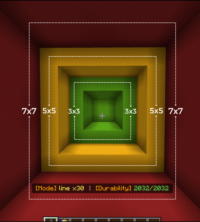
- Variable-Shape Mining Hammers: The mod introduces a suite of advanced hammers that allow you to switch between different mining patterns. You can choose to mine a 3x3 area for focused resource collection, a 5x5 area for medium-sized clearings, or even a massive 7x7 area for rapidly excavating large sections of terrain. This versatility offers unprecedented flexibility in tackling various mining projects.
- Instant Tunneling Capability: This unique feature enables you to create long, straight tunnels instantly. Once activated, the hammer will efficiently clear a path ahead of you, allowing for rapid descent to deeper levels or swift traversal across vast underground distances. It's perfect for establishing extensive transport networks or quickly reaching diamond layers.
- Full Achievements Compatibility: A significant advantage of Wan's ShapeMiner is that it ensures all your in-game achievements remain enabled. Unlike many other mods that might disable this core Minecraft feature, you can enjoy the benefits of advanced, rapid mining without any concerns about losing progress or being unable to earn new achievements in your world.
- Massive Time and Effort Savings: This mod drastically reduces the time and effort required for large-scale mining operations. Instead of spending hours meticulously digging block by block, you can now complete tasks that would typically take days in mere minutes, freeing up your time for building, exploration, and other enjoyable aspects of the game.
- Ideal for Large-Scale Projects: Whether you're planning an epic underground base, flattening an entire mountain, or creating extensive resource farms, Wan's ShapeMiner is the perfect tool. Its power to remove vast quantities of blocks makes it indispensable for any player aiming to execute ambitious construction projects that demand significant terrain modification.
- Customizable Mining Area Control: The mod provides intuitive controls, allowing you to easily switch between different mining patterns using a dedicated hotkey. This means you can adapt to various terrains and situations on the fly, transitioning from a narrow tunnel to a wide clearing with a simple button press, offering a highly flexible and controlled mining experience.
- Optimized Resource Gathering: By utilizing the shape-based hammers, you can target specific ore veins more efficiently. For instance, a 3x3 pattern is ideal for concentrated diamond mining, while a 7x7 can quickly clear large areas for coal or iron, maximizing your resource yield and minimizing wasted effort.
- Enhanced Survival Gameplay: In survival mode, resource acquisition is the backbone of progression. This mod significantly lessens the grind associated with gathering essential materials, allowing you to focus on other survival challenges like combat, farming, and exploration. It makes the overall survival experience smoother and more enjoyable.
- Craftable with Various Materials: Wan's ShapeMiner hammers can be crafted from all standard Minecraft materials, ranging from wood and stone to diamond and Netherite. This ensures that the mod seamlessly integrates with your game progression, allowing you to consistently upgrade your tools to match your current power level and available resources.
- User-Friendly and Intuitive Interface: The mod is designed for ease of use. There are no complex configurations or confusing menus; simply craft the hammer and begin using it, with the ability to switch mining patterns quickly and efficiently with a single keybind.
- Performance-Friendly Optimization: Despite its advanced capabilities, Wan's ShapeMiner is optimized to be light on system resources. This ensures a smooth gameplay experience without significant frame rate drops, even when utilizing the larger hammer patterns to excavate massive areas.
- Consistent Update Support: The mod is regularly updated to maintain compatibility with the latest Minecraft versions. This ensures its continued functionality, provides the best user experience, and addresses any potential bugs or performance issues that may arise over time.
- Fosters Creative Building Opportunities: By offering the power to quickly and precisely shape terrain, the mod opens up new avenues for creative building. You can now design intricate landscapes or carve out expansive interior spaces for your architectural projects with a fluidity that was previously impossible.
- Excellent Compatibility with Other Mods: Wan's ShapeMiner is designed to coexist peacefully with most other Minecraft mods, especially those that add tools or improve inventory management. This makes it a valuable addition to your modpack without causing significant conflicts.
- Solution to Repetitive Mining: If you find traditional, repetitive mining tedious, this mod offers an effective solution. It transforms the task from a chore into a fast-paced and rewarding experience, bringing back the fun to one of Minecraft's fundamental activities.
How to Download and Install Wan's ShapeMiner
To install Wan's ShapeMiner mod and embark on a revolutionary mining experience, you'll need to ensure you have the appropriate mod loader, such as Forge, installed on your system. Follow these steps to successfully install the mod:
- Download a Mod Loader (Forge): If you don't already have Forge installed, download the version compatible with your desired Minecraft game version (e.g., 1.20.1 or 1.19.2) from the official Forge website. Run the installer (.jar file) and follow the on-screen prompts to complete the installation process.
- Download Wan's ShapeMiner Mod: Visit the Wan's ShapeMiner page on IQMOD (or another trusted source) and ensure you download the correct mod file (.jar) that matches your installed Minecraft and Forge versions. Always choose the latest compatible version for the best features and performance.
- Locate Your Minecraft 'mods' Folder: After downloading the mod file, you need to place it into your Minecraft 'mods' folder. You can access this folder by opening your Minecraft Launcher, navigating to the 'Installations' tab, selecting the Forge profile you installed, and clicking the folder icon (Open Folder) next to the game directory path. This will open your main game folder, where you should find a folder named 'mods'. If it doesn't exist, simply create one.
- Transfer the Mod File: Drag and drop the downloaded Wan's ShapeMiner .jar file into the 'mods' folder you located or created in the previous step. Ensure the file is placed directly inside the 'mods' folder and not within any subfolders.
- Launch Minecraft: Finally, open your Minecraft Launcher again. Make sure the Forge profile you installed is selected from the 'Installations' tab or the dropdown menu in the bottom-left corner of the launcher. Click 'Play' to start the game. Wan's ShapeMiner should now be active in your world, ready for you to enjoy its features.
For a more comprehensive guide on installing various types of Minecraft mods, including detailed instructions for different mod loaders, please refer to our Minecraft Mods Installation Guide on IQMOD.
System Requirements and Compatibility
To ensure a smooth and enjoyable experience with Wan's ShapeMiner, please verify that your system meets the following requirements:
- Minecraft Version: Compatible with Minecraft Java Edition versions 1.19.2, 1.20.1, 1.20.4, and potentially newer releases (always check the mod's page for the most current compatibility).
- Mod Loader: Forge (recommended, as it is the most common loader for mods of this nature).
- Platform: Minecraft Java Edition.
- Dependencies: Wan's ShapeMiner does not require any other core mods or libraries to function independently.
Pro Tips for Using Wan's ShapeMiner
To maximize your efficiency and enjoyment with Wan's ShapeMiner, transforming your mining experience into something truly exceptional, consider these advanced tips:
- Select the Optimal Shape for Each Task: Don't default to the 7x7 pattern for everything. For targeted resource hunting, like finding diamonds in specific layers, a 3x3 pattern is more precise and reduces the chance of missing valuable blocks. Reserve the 5x5 for broader clearings and the 7x7 for rapid terrain removal or creating expansive underground spaces.
- Leverage Instant Tunnels for Swift Travel: Instead of laboriously building long bridges or staircases to reach distant areas within caves, utilize the instant tunneling feature. This can save you immense amounts of time in traversal, allowing you to explore new regions or quickly return to base with unparalleled speed.
- Plan Your Excavations in Advance: Before embarking on a massive mining project, take a moment to plan the desired shape and depth. This forethought will help you use your hammer more efficiently, prevent unnecessary digging, and conserve your tool's durability and your precious time.
- Combine with Inventory Management Mods: Since you'll be collecting vast quantities of blocks, pairing Wan's ShapeMiner with an inventory management mod like 'Backpacks' or 'Storage Drawers' can be incredibly beneficial. This will help you organize collected blocks and prevent your inventory from filling up too quickly.
- Assign a Convenient Hotkey for Shape Switching: Map the shape-switching function to an easily accessible hotkey. This allows you to adapt quickly to varying terrain and situations without needing to open your inventory or navigate menus, thereby enhancing the fluidity and speed of your mining operations.
- Experiment with Different Hammer Materials: Don't limit yourself to iron or diamond hammers. Progress to Netherite hammers for maximum durability and efficiency. Conversely, consider using hammers made from less valuable materials in the early game to conserve precious resources for other essential gear.
Is Wan's ShapeMiner Safe and Free?
Yes, Wan's ShapeMiner is completely safe and free to download and use. At IQMOD, we prioritize the safety and security of our users. All mods available on our portal are rigorously scanned and verified to ensure they are free from any malicious software or viruses. This mod is provided by trusted developers within the Minecraft community, guaranteeing you receive a high-quality, risk-free addition to your game.
In addition to being safe, Wan's ShapeMiner is available to everyone at no cost. There are no hidden fees, premium features, or paid subscriptions required to access its core functionalities. You can download and install it in your game without any worries, enjoying an enhanced mining experience without any financial barriers. Trust IQMOD as your reliable source for safe, free, and high-quality Minecraft mods.
Why Download from IQMOD?
When you choose to download Wan's ShapeMiner from IQMOD, you are ensuring a hassle-free and trustworthy experience. We provide direct and fast download links, meaning you won't waste time navigating complex pages or dealing with intrusive ads and pop-ups that plague many other mod websites. Our goal is to offer straightforward and immediate access to the mods you need, enhancing your Minecraft gameplay without unnecessary frustration.
Furthermore, IQMOD is committed to providing the latest versions of mods, ensuring that Wan's ShapeMiner is always compatible with the most current Minecraft releases. Our files are regularly updated, and you can rely on us for the most stable and best-performing mod versions. We also offer dedicated support should you encounter any issues during installation or use. Don't hesitate, download Wan's ShapeMiner from IQMOD today and step into a Minecraft world with an unparalleled mining experience!
Wan's ShapeMiner Mod for Minecraft - Download & Install Minecraft Mod Screenshots
View images and verify quality before download
Image Gallery



Wan's ShapeMiner Mod for Minecraft - Download & Install Technical Information
Learn technical details, version, and supported platform
Technical Specifications

Your Own Minecraft Server! 🎮
Start your own server with friends on BisectHosting — insane performance, one-click mod installs, and 24/7 support. Use the discount code and start at the lowest price!
Download and Share
Download for free or share it with friends
Get the advantage!
Subscribe for early access to exclusive mods and direct downloads without timers or ads.
Mod not opening in Minecraft? This applies to Bedrock edition only (mobile/console) — the issue is your file manager, not the mod. Use our app IQ OpenMC to open the file and it will give you the option to open it in Minecraft directly. (Java players don't need this step)