

TNT Destructive Addon for Minecraft Bedrock - Download
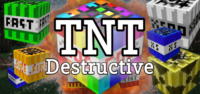
Download TNT Destructive Addon for Minecraft Bedrock! Unleash 20 new, incredibly powerful TNT types, including x500 and Nuke TNT. Elevate your destructive gameplay with extreme explosions. Get it free from IQMOD now!
Everything About TNT Destructive Addon for Minecraft Bedrock - Download
Read the full article about the mod
What is TNT Destructive Addon?
The TNT Destructive Addon is a groundbreaking content pack for Minecraft Bedrock Edition that introduces over 20 new and highly innovative TNT blocks, empowering players with unprecedented destructive capabilities. Designed specifically to enhance gameplay in modern Minecraft Bedrock versions, this addon offers a vast array of explosive options, from surgical demolitions to landscape-altering cataclysms.
This addon is the ultimate choice for players eager to unleash immense explosive power within their worlds. Whether you aim to flatten mountains, excavate deep tunnels in mere seconds, or dismantle enemy bases in PvP with unparalleled weaponry, the TNT Destructive Addon provides the tools you need. It fundamentally changes how you interact with the environment, adding a new dimension of strategy and chaotic fun to your Minecraft adventures. It stands out from vanilla TNT by offering not just scaled power, but also unique elemental and utility effects that open up entirely new gameplay possibilities.
Key Features and Highlights
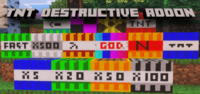
- Multi-Tiered Explosive Power (TNT x5 to x500): This addon introduces a comprehensive range of TNT blocks, starting from TNT x5 (five times the power of vanilla TNT) all the way up to TNT x500. This tiered system allows players to choose the exact level of destruction required, from precise small-scale demolitions to wiping out vast areas, making it versatile for both quick excavation and large-scale terraforming projects.
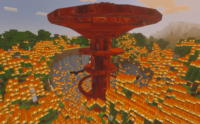
- Nuke TNT: The pinnacle of destructive force, the Nuke TNT creates a colossal crater and widespread devastation across an immense radius. Accompanied by unique visual effects and a thunderous sound, it simulates a true nuclear explosion, capable of eradicating entire structures or landscape features. It's not just powerful; it's a game-changing event that demands strategic deployment.
- Elemental TNT Variants (Fire, Water, Lava): Expand your environmental control with these specialized TNTs. Fire TNT ignites its surroundings, perfect for creating fire traps or clearing vegetation. Water TNT instantly fills craters with water, useful for flood defenses or creating instant lakes. Lava TNT, conversely, spawns molten lava, creating hazardous zones and unique traps.
- Void TNT: A unique explosive that doesn't just destroy blocks but removes them entirely from existence, as if they fell into the void. This is invaluable for clean excavation, precise architectural adjustments, or creating perfectly flat build areas without any debris or uneven terrain left behind. It’s a builder’s dream for pristine demolition.
- Lightning TNT: Upon detonation, Lightning TNT summons multiple lightning strikes within its blast radius. This adds an electrical element to destruction, capable of setting mobs ablaze, charging creepers, or adding an extra layer of chaos and visual spectacle to any explosion. It's an excellent tool for both damage and dramatic effect.
- Gravity TNT: This innovative TNT variant doesn't explode outwards but instead pulls entities and loose blocks towards its center before detonating. It's incredibly useful for grouping enemies together for a focused attack, clearing debris by consolidating it, or creating unique traps that draw in unsuspecting players or mobs.
- Forcefield TNT: Instead of immediate destruction, Forcefield TNT generates a temporary, invisible barrier around its blast zone that repels entities and projectiles. This can be used defensively to create temporary safe zones, push back advancing foes, or protect specific areas from external threats without causing permanent structural damage.
- Time-Stop TNT: A highly experimental and unique TNT that, upon detonation, briefly freezes all entities and projectiles within its radius. While not destructive in the traditional sense, it offers tactical advantages in PvP by immobilizing opponents, or in PvE for escaping dangerous situations or setting up precise attacks on frozen mobs.
- Anti-Block TNT: This peculiar TNT type is designed to specifically target and destroy certain categories of blocks (e.g., only natural blocks, or only player-placed blocks) while leaving others intact. This precision allows for highly selective demolition, such as clearing out a cave without harming your base, or removing artificial structures while preserving the landscape.
- Impact TNT: An alternative to timed fuses, Impact TNT detonates immediately upon impact with any surface after being thrown or dropped. This allows for more dynamic and responsive explosive attacks, perfect for quick demolition on the go or surprise attacks in fast-paced combat scenarios.
- Explosion-Proof TNT: A specialized TNT that is immune to the blast effects of other explosives. This feature enables complex chain reactions and intricate explosive designs, allowing players to strategically place TNTs that will only detonate when triggered manually, rather than by a nearby explosion.
- Compact TNT: Don't let its size fool you; Compact TNT packs a significant punch in a smaller block. Ideal for confined spaces, discreet demolitions, or when you need powerful explosive force without the visual bulk of larger TNT blocks. Its efficiency makes it a go-to for many precise tasks.
- Enhanced Crafting System: All new TNT types come with balanced and intuitive crafting recipes, seamlessly integrating them into the survival experience. Players will need to gather specific resources to craft these powerful explosives, adding a progression element to acquiring ultimate destructive power.
- PvP and PvE Advantage: The diverse range of TNTs offers unparalleled strategic options for both player-versus-player combat and player-versus-environment challenges. From raiding enemy bases with Nuke TNT to clearing out monster spawners with elemental blasts, the addon provides tools for every combat scenario.
- Performance Optimized: Despite the massive scale of some explosions, the TNT Destructive Addon is designed with performance in mind. It aims to minimize lag and maintain a smooth gameplay experience, even when multiple powerful TNTs are detonated simultaneously, ensuring that destructive fun doesn't come at the cost of playability.
How to Download and Install TNT Destructive Addon
Installing the TNT Destructive Addon is a straightforward process, but it requires activating specific options within your Minecraft Bedrock world settings to ensure proper functionality. Always ensure you have the latest version of Minecraft Bedrock for optimal compatibility and performance.
- Download the Addon File (.mcaddon): Begin by downloading the addon file from the IQMOD website. The file will typically be in the .mcaddon format, which is a specialized package for Minecraft Bedrock that simplifies the installation process. Make sure to download the version that is compatible with your specific Minecraft Bedrock version.
- Open the Addon File: Once the download is complete, simply click or tap on the .mcaddon file. In most cases, Minecraft Bedrock will launch automatically and begin the import process. You should see an in-game notification confirming that the addon has been successfully imported into your game.
- Activate Behavior and Resource Packs: After successful import, open Minecraft and navigate to the "Play" menu. Choose to either "Create New World" or "Edit Existing World." Within the world settings, locate the "Behavior Packs" and "Resource Packs" sections. Activate the "TNT Destructive Addon" in both sections to ensure all its features and textures are loaded correctly.
- Enable Experimental Gameplay Features: For many modern Bedrock addons, including this one, you must enable "Experimental Gameplay Features" in your world settings. Scroll down to the "Game Settings" section and activate all experimental toggles. This step is crucial for the addon to function fully and access its advanced functionalities.
- Start Playing: With the addon activated in both packs and all required experimental features enabled, you can now create your new world or load your existing one. All the new TNT types will be available in your creative inventory or through crafting recipes in survival mode, depending on the addon's design. Enjoy unleashing unprecedented destruction!
For a complete guide with visuals and troubleshooting tips, check out our Minecraft Mods Installation Guide on IQMOD.
System Requirements and Compatibility
- Minecraft Version: Compatible with Minecraft Bedrock Edition version 1.20.70 and above. It is always recommended to use the latest stable version of Minecraft Bedrock for the best performance and compatibility with addons.
- Mod Loader: No external mod loader is required. This addon is designed to function directly as a content pack within Minecraft Bedrock Edition's native addon system.
- Platform: Minecraft Bedrock Edition across all supported platforms, including Windows 10/11, Xbox, PlayStation, Nintendo Switch, Android, and iOS.
- Dependencies: No additional mods or addons are required to run the TNT Destructive Addon. It operates as a standalone content pack.
Pro Tips for Using TNT Destructive Addon
To maximize your enjoyment and effectiveness with the TNT Destructive Addon while avoiding unintended consequences, consider these advanced tips:
- Always Backup Your Worlds: Before deploying any of the highly destructive TNTs like Nuke TNT or TNT x500, always create a backup of your world. These explosives can drastically alter landscapes, and a backup ensures you can revert if the results aren't as desired or if an unexpected issue arises.
- Test in a Safe, Isolated Area: Never test new TNT types directly within your main base or a critical build. Create a dedicated test world or find a remote, unimportant area in your existing world to experiment with each TNT's blast radius and effects. This provides a safe understanding of their power before critical deployment.
- Strategic Use in PvP Scenarios: The diverse TNT types offer immense tactical advantages in player-versus-player combat. Use Nuke TNT for overwhelming base destruction, Lightning TNT to strike foes with unexpected electrical damage, or Gravity TNT to pull enemies into a concentrated blast zone. Planning your explosive assaults can turn the tide of battle.
- Creative Demolition and Terraforming: Beyond simple destruction, these TNTs are powerful tools for creative builders. Use Void TNT for clean, precise excavations, or multi-tiered TNTs to rapidly terraform large areas for new construction projects. The ability to reshape your world quickly opens up endless creative possibilities.
- Combine Elemental Effects: Experiment with combining different elemental TNTs. For example, detonating a Fire TNT followed by a Water TNT can create interesting effects or quickly clear fire hazards. Lava TNT can be used to create defensive barriers or hazardous zones. Understanding these interactions can lead to unique gameplay mechanics.
- Resource Gathering Efficiency: High-power TNTs like x100 or x500 can be incredibly efficient for rapid resource gathering in specific scenarios. Blast open large cave systems, clear massive areas for strip mining, or quickly expose valuable ore veins. Just be mindful of the resources you might accidentally destroy in the process!
Is TNT Destructive Addon Safe and Free?
Yes, the TNT Destructive Addon is completely safe to use and entirely free to download. At IQMOD, we are committed to providing high-quality, thoroughly scanned content to ensure it is free from any malicious software or viruses. All files available on our portal are regularly checked and verified, guaranteeing a secure and enjoyable gaming experience for you. You can download this addon with full confidence that it will not harm your device or your game files.
In addition to being safe, the addon is completely free, meaning you can enjoy all its features and destructive power without any cost. We believe that exceptional content should be accessible to everyone, which is why we offer this fantastic addon at no charge, allowing you to enhance your Minecraft experience with complete freedom.
Why Download from IQMOD?
IQMOD stands as the premier destination for Minecraft players seeking the best mods and addons, both in Arabic and English. When you download the TNT Destructive Addon from our portal, you are guaranteed a seamless and reliable experience. We provide direct, fast download links, free from intrusive ads and pop-ups that hinder your browsing. Our files are consistently updated to ensure compatibility with the latest Minecraft Bedrock versions, meaning you always get the most current and optimized version of the addon.
Furthermore, IQMOD offers dedicated support and an active community to assist you with any questions or issues you might encounter during installation or usage. We strive to create a safe, trustworthy, and user-friendly environment for all your Minecraft modding needs. Don't waste your time searching unreliable sources; download the TNT Destructive Addon now from IQMOD and embark on a world of endless explosions in Minecraft Bedrock!
TNT Destructive Addon for Minecraft Bedrock - Download Minecraft Mod Screenshots
View images and verify quality before download
Image Gallery


TNT Destructive Addon for Minecraft Bedrock - Download Technical Information
Learn technical details, version, and supported platform
Technical Specifications

Your Own Minecraft Server! 🎮
Start your own server with friends on BisectHosting — insane performance, one-click mod installs, and 24/7 support. Use the discount code and start at the lowest price!
Download and Share
Download for free or share it with friends
Get the advantage!
Subscribe for early access to exclusive mods and direct downloads without timers or ads.
Mod not opening in Minecraft? This applies to Bedrock edition only (mobile/console) — the issue is your file manager, not the mod. Use our app IQ OpenMC to open the file and it will give you the option to open it in Minecraft directly. (Java players don't need this step)