

Ranzie's Overgrown Cities 1.2 Mod for Minecraft - Download
Download Ranzie's Overgrown Cities 1.2 Mod for Minecraft 1.20.1. Generates vast abandoned cities reclaimed by nature, with detailed buildings and valuable gun loot. Ideal for survival horror. Get it free from IQMOD!
Everything About Ranzie's Overgrown Cities 1.2 Mod for Minecraft - Download
Read the full article about the mod
What is Ranzie's Overgrown Cities 1.2 - Houses Update?
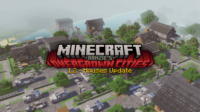
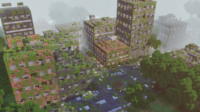
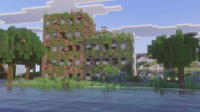
Ranzie's Overgrown Cities 1.2 - Houses Update is a transformative Minecraft mod that introduces a haunting new dimension to your game world. It procedurally generates massive, abandoned cities completely reclaimed by nature, where dense vines, towering trees, and pervasive decay have consumed once-thriving streets and structures. Designed for modern Minecraft versions like 1.20.1, this mod, created by Ranzie, offers a uniquely challenging survival horror experience, forcing players to navigate treacherous urban ruins.
This mod stands out by offering a distinct blend of exploration, scavenging, and combat within a post-apocalyptic setting. Unlike typical biome generation, Ranzie's Overgrown Cities crafts intricate urban landscapes, each with its own secrets and dangers. Its focus on detailed buildings and valuable loot, particularly gun loot, elevates it beyond simple structure generation, positioning it as an essential addition for players seeking to intensify their Minecraft survival gameplay, reminiscent of popular zombie apocalypse scenarios and hardcore exploration mods.
Key Features and Highlights
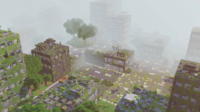
- Massive Procedurally Generated Cities: The mod dynamically creates vast urban sprawls across your Minecraft world. Each city is unique, ensuring endless replayability and fresh challenges with every new seed or exploration. These aren't small villages, but sprawling metropolises.
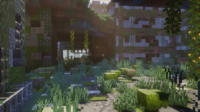
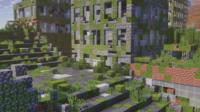
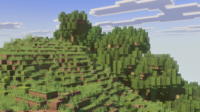
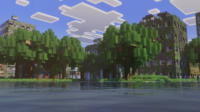
- Nature's Reclamation: Experience a visually stunning and eerie atmosphere as nature aggressively reclaims urban structures. Expect to see buildings entangled with thick vines, trees bursting through concrete, and widespread decay, creating a sense of a world long forgotten.
- Detailed Architectural Variety: Explore a diverse array of highly detailed buildings, including residential houses, commercial shops, office complexes, and public facilities. The 'Houses Update' specifically enhances the realism and complexity of domestic structures, offering more intricate interiors to navigate.
- Valuable Gun Loot System: Discover a comprehensive loot system focused on firearms and ammunition. Scavenge through abandoned buildings to find rare and powerful weapons, essential for surviving the dangers lurking within the overgrown ruins.
- Seamless Weapon Mod Compatibility: Ranzie's Overgrown Cities is designed for excellent compatibility with leading gun mods like Aplok Guns, Kreps tacZ Port, and Advance Tactical Gear. This integration ensures that loot found within the cities is directly usable with these popular firearm additions.
- Optimized for Zombie Apocalypse Gameplay: This mod pairs perfectly with zombie apocalypse experiences, especially when combined with mods like Rise and Survive. The dense urban environments become ideal battlegrounds for intense skirmishes against hordes of the undead, amplifying the horror and survival aspects.
- High-Risk, High-Reward Scavenging Zones: Every structure in an overgrown city becomes a high-stakes scavenging zone. While valuable loot awaits, players must contend with increased dangers, including hostile mobs and environmental hazards, making each foray a calculated risk.
- Immersive Environmental Storytelling: The detailed decay and natural overgrowth tell a silent story of a civilization lost. The atmosphere evokes a sense of desolation and mystery, encouraging players to piece together narratives through their exploration.
- Challenging Urban Navigation: The complex layout of collapsed buildings, blocked streets, and dense foliage presents unique navigation challenges. Players must strategize their routes, utilize parkour skills, and maintain situational awareness to avoid getting lost or ambushed.
- Enhanced Exploration Incentive: With vast areas to uncover and rare loot to find, the mod provides a strong incentive for continuous exploration. Unlocking new sections of a city or finding a hidden cache offers a rewarding sense of discovery.
- Dynamic World Interaction: The decay isn't just visual; certain elements might be destructible or traversable in unique ways, allowing for dynamic player interaction with the environment to create new paths or uncover secrets.
- Unique Mob Spawning Opportunities: The dark, enclosed spaces and overgrown exteriors of the cities create prime conditions for unique and challenging mob spawns, adding an extra layer of difficulty and surprise to the exploration.
- Architectural Diversity: Beyond just houses, the update and general design ensure a good mix of building types – from small residential homes to larger apartment blocks and commercial complexes, each with distinct layouts and loot tables.
How to Download and Install Ranzie's Overgrown Cities 1.2 - Houses Update
Installing Ranzie's Overgrown Cities 1.2 is a straightforward process, provided you have the correct mod loader. For this mod, Forge is typically recommended due to its stability and wide compatibility. Follow these steps to get your overgrown adventure started:
- Install Minecraft Forge: First, ensure you have the correct version of Minecraft Forge installed for your desired Minecraft version (e.g., 1.20.1). You can download the Forge installer from its official website. Run the installer and follow the prompts to complete the installation.
- Download the Mod File: Download the
Ranzie's Overgrown Cities 1.2 - Houses Update.jarfile from a reputable source like IQMOD. Always double-check that the mod version is compatible with your installed Minecraft and Forge versions to avoid conflicts. - Locate Your Minecraft 'mods' Folder: Open your Minecraft directory. On Windows, you can usually do this by typing
%appdata%/.minecraftinto your file explorer's address bar. Inside the.minecraftfolder, you should find a folder namedmods. If it doesn't exist, simply create a new folder and name itmods. - Transfer the Mod File: Drag and drop the downloaded
Ranzie's Overgrown Cities 1.2 - Houses Update.jarfile into themodsfolder. Do not extract the file; it needs to remain in its.jarformat. Ensure no incompatible or duplicate mod files are present that could cause issues. - Launch Minecraft with Forge: Open your Minecraft Launcher. Before clicking 'Play', select the Forge profile (e.g., 'Forge 1.20.1') from the version dropdown menu. Launch the game, and the mod should now be active, generating overgrown cities in any new world you create or existing chunks you explore.
For a complete guide on troubleshooting and advanced mod installations, check out our comprehensive Minecraft Mods Installation Guide on IQMOD.
System Requirements and Compatibility
To ensure a smooth and enjoyable experience with Ranzie's Overgrown Cities 1.2, consider the following technical specifications:
- Minecraft Version: 1.20.1 (or other versions as specified by the mod developer)
- Mod Loader: Forge (highly recommended for stability and widespread compatibility)
- Platform: Minecraft Java Edition
- Dependencies: While not strictly required for core functionality, for the full experience, compatibility with Aplok Guns, Kreps tacZ Port, and Advance Tactical Gear is crucial for gun loot. Rise and Survive is recommended for an integrated zombie survival scenario.
Pro Tips for Using Ranzie's Overgrown Cities 1.2 - Houses Update
Navigating and surviving in Ranzie's Overgrown Cities requires more than just basic Minecraft skills. Here are some advanced tips to help you thrive in these desolate urban landscapes:
1. Prioritize Stealth and Evasion: Combat in tight urban spaces can quickly become overwhelming. Instead of engaging every threat, prioritize stealth. Use the dense foliage and collapsed structures for cover, and learn to identify and avoid high-traffic areas for mobs. A quiet approach often yields better results and conserves resources.
2. Establish a Forward Operating Base (FOB): Before deep dives into the city, set up a small, secure base on its outskirts. This FOB can serve as a safe zone for crafting, repairing gear, storing valuable loot, and resupplying. It reduces travel time and provides a critical fallback point when expeditions go south. Consider a fortified underground bunker or a repurposed, heavily secured building.
3. Master Verticality and Parkour: The multi-story buildings and uneven terrain of the overgrown cities offer unique advantages. Utilize parkour skills to scale buildings, cross gaps, and gain high ground for scouting or sniping. Vertical movement can provide escape routes, tactical advantages in combat, and access to otherwise unreachable loot caches. Always look up and down for hidden paths.
4. Strategic Resource Management: Loot is abundant but often specialized. Prioritize gathering essential survival resources like food, water (if using realistic survival mods), and medical supplies first. Then focus on weapon parts, ammunition, and rare crafting materials. Learn which buildings are likely to yield specific types of loot to optimize your scavenging runs.
5. Map and Mark Explored Areas: The cities can be disorienting. Carry a map and dynamically mark areas you've cleared, points of interest, high-loot zones, and potential dangers. This helps prevent getting lost, revisiting empty areas, and planning future expeditions more efficiently. Consider using different color markers for different types of locations.
6. Leverage Mod Synergies: If you're using compatible gun mods, understand their mechanics deeply. Practice with different weapon types to find what suits your playstyle. When combined with a zombie mod like Rise and Survive, strategize how to best handle large hordes in urban choke points, perhaps by using explosives or setting up defensive perimeters within buildings. The right combination of mods can transform the challenge.
Is Ranzie's Overgrown Cities 1.2 - Houses Update Safe and Free?
Yes, Ranzie's Overgrown Cities 1.2 - Houses Update is both completely safe to download and free to use. At IQMOD, we meticulously scan all mods for any malicious software or viruses to ensure the integrity and security of your Minecraft experience. We are committed to providing high-quality, trusted content from reliable sources, so you can download and play without any concerns about hidden costs or subscriptions. Enjoy this incredible mod without any financial burden.
Why Download from IQMOD?
Choosing IQMOD for your Ranzie's Overgrown Cities 1.2 download guarantees a superior and hassle-free experience. We provide direct, high-speed download links, eliminating the frustration of intrusive advertisements, pop-ups, or endless redirects. Our mod library is consistently updated to ensure compatibility with the latest Minecraft versions, and our dedicated support team is always ready to assist with any installation or gameplay issues you might encounter. Join our thriving community of Minecraft enthusiasts and enhance your game today. Download Ranzie's Overgrown Cities 1.2 - Houses Update now from IQMOD and embark on your ultimate urban survival adventure!
Ranzie's Overgrown Cities 1.2 Mod for Minecraft - Download Minecraft Mod Screenshots
View images and verify quality before download
Image Gallery


Ranzie's Overgrown Cities 1.2 Mod for Minecraft - Download Technical Information
Learn technical details, version, and supported platform
Technical Specifications

Your Own Minecraft Server! 🎮
Start your own server with friends on BisectHosting — insane performance, one-click mod installs, and 24/7 support. Use the discount code and start at the lowest price!
Download and Share
Download for free or share it with friends
Get the advantage!
Subscribe for early access to exclusive mods and direct downloads without timers or ads.
Mod not opening in Minecraft? This applies to Bedrock edition only (mobile/console) — the issue is your file manager, not the mod. Use our app IQ OpenMC to open the file and it will give you the option to open it in Minecraft directly. (Java players don't need this step)