

KwZ's Connected Glass — Update 4.1.0 Mod for Minecraft - Download & Install
Download KwZ's Connected Glass Mod for Minecraft, adding seamless glass with texture pack support for enhanced visuals. Enjoy a refined aesthetic effortlessly. Available free on IQMOD!
Everything About KwZ's Connected Glass — Update 4.1.0 Mod for Minecraft - Download & Install
Read the full article about the mod
What is KwZ's Connected Glass — Update 4.1.0?
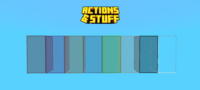
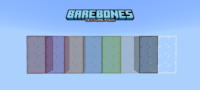
KwZ's Connected Glass is a distinctive add-on for Minecraft Bedrock Edition that transforms ordinary glass blocks into seamlessly connected glass, eliminating distracting borders and creating a unified, aesthetically pleasing appearance. This add-on supports various texture packs for a comprehensive visual experience and automatically converts glass blocks upon placement, making it an essential enhancement for refining your architectural designs in Minecraft.
Aesthetics play a crucial role in the Minecraft experience, and players often find the default glass's segmented look to be visually disruptive. KwZ's Connected Glass add-on masterfully addresses this issue, offering a sleek visual solution that significantly enhances the beauty of buildings and glass facades without compromising game performance. It integrates flawlessly into the Minecraft Bedrock world, providing a visual upgrade that makes a substantial difference in both large-scale and intricate building projects, facilitating the creation of modern and realistic designs with ease.
Key Features and Highlights
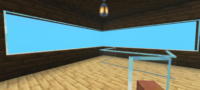
- Seamless Glass Textures: This add-on delivers an unparalleled visual experience by removing the jarring borders between glass blocks. The result is a single, continuous glass surface that adds a touch of elegance and modernity to any construction. This enhancement makes builds look more professional and appealing, whether you're constructing a contemporary skyscraper or a rustic cottage with glass elements.
- Extensive Texture Pack Support: A standout feature of KwZ's Connected Glass is its broad compatibility with various resource packs. This means you can continue using your favorite texture packs while enjoying connected glass, ensuring the new glass textures harmonize with your world's overall artistic style and opening up new avenues for custom designs.
- Automatic Block Transformation: There's no need for additional steps or special crafting recipes. As soon as you place any glass block, the add-on automatically and instantly transforms it into connected glass. This feature streamlines the building process, making it faster and more fluid, saving you the time and effort of manually adjusting each block.
- In-Game Settings Menu: The add-on provides an intuitive settings menu, allowing you to control different aspects of the connected glass. You can quickly access this menu by sneaking (crouching) while holding any glass block and interacting with the air, or by using the
/function kwzglass_configcommand in chat, giving you flexibility to customize your experience. - Overall Visual Enhancements: Beyond simply connecting glass, this add-on improves the general appearance of glass in the game, making it look more transparent and realistic. This enhancement boosts natural lighting within structures and adds visual depth to your spaces, creating a more immersive environment.
- Lightweight Performance: KwZ's Connected Glass is designed to be highly performant, meaning it will not significantly impact your frames per second (FPS) or cause game lag. You can enjoy the visual improvements without worrying about performance degradation, even on moderately specced devices.
- Simple Add-on Installation: As an add-on for Minecraft Bedrock, the installation process is straightforward and does not require any additional mod loaders (like Forge or Fabric), making it easily accessible to all players without complex setup.
- Vanilla-Friendly Integration: The add-on blends seamlessly with the core Minecraft 'vanilla' experience. It doesn't introduce any alien elements or alter fundamental gameplay mechanics, focusing solely on enhancing the visual aspect of glass, preserving the authentic Minecraft feel.
- Versatile Building Applications: This add-on unlocks new design possibilities, whether you're constructing glass farms, sky domes, shop fronts, or entire glass houses. Connected glass grants you greater freedom to express your architectural creativity in diverse builds.
- Continuous Updates and Support: The add-on is regularly updated, as evidenced by Update 4.1.0, ensuring compatibility with the latest Minecraft Bedrock versions and providing ongoing improvements and bug fixes. This reflects the developer's commitment to delivering the best possible experience.
- Enhanced Immersion: Thanks to the smooth, realistic appearance of the glass, you'll feel a greater sense of immersion in your world. Visual distractions are reduced, and your structures appear more cohesive and beautiful, enhancing the joy of exploration and building.
- Improved Lighting and Views: Connected glass not only improves aesthetics but also enhances how light passes through windows and glass roofs, creating brighter, more inviting interior environments. Views through the glass appear clearer and more striking, making your landscapes pop.
- Low Resource Footprint: Unlike some more complex mods, this add-on doesn't require massive resource packs or specialized drivers. This makes it an excellent choice for players who want to enhance their visual experience without unnecessary complications.
- Community Support: As a popular add-on, KwZ's Connected Glass benefits from good community support, making it easier to find help or share ideas and designs with other players worldwide.
- Ideal for Creative Projects: If you're a building enthusiast passionate about designing cities and luxurious homes, this add-on provides the perfect tool to add a professional and sophisticated finishing touch to your projects, elevating the level of detail in your creations.
How to Download and Install KwZ's Connected Glass — Update 4.1.0
Installing KwZ's Connected Glass is incredibly simple, especially since it's an add-on for Minecraft Bedrock. It doesn't require any complex mod loaders. Follow these steps:
- Download the Add-on File: Begin by downloading the add-on file (typically in
.mcpackor.mcaddonformat) from our website, IQMOD. Ensure you download the latest version compatible with your Minecraft edition. - Locate the File: Once the download is complete, navigate to your device's downloads folder (whether it's a PC, smartphone, or tablet) and find the add-on file you just downloaded.
- Initiate the Import Process: Double-click the
.mcpackor.mcaddonfile. This action will automatically launch Minecraft and begin importing the add-on into your game. A confirmation message will appear within the game indicating a successful import. - Activate the Add-on in World Settings: After importing, open Minecraft and click 'Play'. Select the world where you wish to activate the add-on, or create a new world. In the world settings, navigate to the 'Resource Packs' and 'Behavior Packs' sections, and activate the KwZ's Connected Glass add-on in both if it includes behavior packs (often it's just a resource pack).
- Start Playing and Enjoy: With the add-on activated, launch your world. You'll notice that all glass blocks you place will automatically transform into seamless, connected glass, giving your world a fresh and improved look.
For a complete guide, check out our Minecraft Mods Installation Guide.
System Requirements and Compatibility
- Minecraft Version: Latest Minecraft Bedrock Edition versions (1.18 and above recommended).
- Mod Loader: None (functions as a native add-on for Bedrock Edition).
- Platform: Minecraft Bedrock Edition (available on Windows 10/11, Xbox, PlayStation, Nintendo Switch, Android, iOS).
- Dependencies: No other mods or add-ons are required to run KwZ's Connected Glass.
Pro Tips for Using KwZ's Connected Glass — Update 4.1.0
To maximize your experience with KwZ's Connected Glass and elevate your building projects, consider these advanced tips:
- Experiment with Diverse Texture Packs: Given its excellent texture pack support, don't hesitate to try different resource packs. You might find that certain texture packs highlight the beauty of connected glass more effectively, offering a unique aesthetic for your structures. Look for realistic or modern-themed texture packs to complement the seamless glass.
- Master the Settings Menu: Explore the add-on's custom settings menu (by sneaking, holding glass, and interacting with air, or using
/function kwzglass_config). It may contain options to fine-tune glass behavior or adjust visual aspects, giving you precise control over the final appearance of your glass. - Combine with Decorative and Lighting Add-ons: For a fully integrated visual experience, pair connected glass with decorative add-ons that introduce modern furniture or advanced lighting elements. Seamless glass will enhance the look of these additions, creating a cohesive and harmonious interior and exterior design.
- Construct Grand Glass Facades: With connected glass, large glass facades no longer appear disjointed or unappealing. Leverage this feature to build sprawling commercial complexes, towering skyscrapers, or luxurious mansions with vast glass exteriors that overlook stunning landscapes without any visual breaks.
- Design Glass Floors and Walkways: Consider using connected glass not just for windows and walls, but also for glass floors or transparent walkways in high-rise buildings or underwater structures. The seamless appearance allows you to create breathtaking visual effects that accentuate the beauty and details of your world.
- Troubleshooting Compatibility Issues: If you encounter any compatibility issues with specific texture packs, try temporarily disabling the texture pack to determine if the connected glass functions correctly. Sometimes, you may need to adjust the order of resource packs in your world settings (placing the glass pack higher or lower) to resolve minor conflicts.
Is KwZ's Connected Glass — Update 4.1.0 Safe and Free?
Yes, KwZ's Connected Glass is completely safe and free to download and use. At IQMOD, we are committed to providing thoroughly vetted content that is free from any malicious software or viruses. All mods and add-ons available on our portal are regularly scanned to ensure the safety of your gaming experience. You can download this add-on with complete confidence, enjoying fantastic visual enhancements at no cost, as it is freely available to all Minecraft players.
Why Download from IQMOD?
When you choose to download KwZ's Connected Glass from IQMOD, you ensure the best possible experience. We provide direct and fast download links, free from intrusive ads and annoying pop-ups that hinder your access. We consistently update all mods and add-ons to their latest versions to guarantee compatibility with Minecraft, and we offer technical support to assist you with any questions or issues you might encounter. Join thousands of players who trust IQMOD as their primary source for safe, free, and up-to-date Minecraft mods. Download now and enjoy seamless glass in your world!
KwZ's Connected Glass — Update 4.1.0 Mod for Minecraft - Download & Install Minecraft Mod Screenshots
View images and verify quality before download
Image Gallery

KwZ's Connected Glass — Update 4.1.0 Mod for Minecraft - Download & Install Technical Information
Learn technical details, version, and supported platform
Technical Specifications

Your Own Minecraft Server! 🎮
Start your own server with friends on BisectHosting — insane performance, one-click mod installs, and 24/7 support. Use the discount code and start at the lowest price!
Download and Share
Download for free or share it with friends
Get the advantage!
Subscribe for early access to exclusive mods and direct downloads without timers or ads.
Mod not opening in Minecraft? This applies to Bedrock edition only (mobile/console) — the issue is your file manager, not the mod. Use our app IQ OpenMC to open the file and it will give you the option to open it in Minecraft directly. (Java players don't need this step)