

Just Zoom Addon for Minecraft - Download & Install
Download the Just Zoom addon for Minecraft, enabling screen zoom without a spyglass for easier exploration. Features customizable controls and sound effects. Compatible with latest versions. Get it free from IQMOD!
Everything About Just Zoom Addon for Minecraft - Download & Install
Read the full article about the mod
What is Just Zoom?
Just Zoom is an innovative addon for Minecraft Bedrock Edition that introduces an instant screen zoom feature, allowing players to magnify their view without the need for a spyglass. Developed to significantly enhance exploration and survival gameplay, it enables you to spot distant details with greater clarity and identify targets from vast distances. The addon offers extensive customization options for activation methods and associated visual/auditory effects, making it an indispensable tool for anyone looking to improve their field of view in the expansive world of Minecraft.
The ability to zoom is a fundamental feature often lacking in vanilla Minecraft, which makes exploring vast terrains or locating rare structures a significant challenge. Just Zoom effectively addresses this gap, providing a powerful and convenient utility that integrates seamlessly with the original gameplay. Unlike the spyglass, which requires equipping and holding, this addon offers instantaneous access to the zoom function, making it invaluable for explorers, builders, and combatants alike. It adds a new layer of dynamic interaction to the game, empowering players with enhanced situational awareness and tactical advantages in various scenarios.
Key Features and Highlights
- Instant and Seamless Zoom Functionality: Just Zoom allows you to magnify your screen instantly without requiring any additional in-game items like the spyglass. This means you can navigate freely and explore more efficiently, switching between normal and magnified views fluidly. This feature not only reduces inventory clutter but also saves valuable time during critical gameplay moments, providing a smooth and uninterrupted experience.
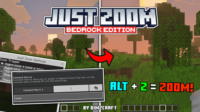
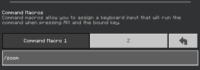
- Fully Customizable Keybinds for PC Players: For keyboard and mouse users, the addon enables you to bind the zoom function to any preferred key (e.g., Alt + Z) using the in-game Macro Command system. This flexibility allows you to tailor your gaming experience to your personal playstyle, ensuring that the zoom is always within easy reach and provides quick, comfortable interaction with your environment.
- Comprehensive Mobile Gesture Support: Recognizing the diverse player base, Just Zoom offers a simple activation method for mobile players. By double-sneaking (tapping the sneak button twice), mobile users can effortlessly toggle the zoom function. This ensures that all players, regardless of their platform, can enjoy the benefits of this addon without any limitations, making gameplay accessible and intuitive.
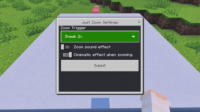
- Multiple and Adjustable Trigger Options: The addon provides the ability to set other zoom triggers by simply typing “setting” in the in-game chat. This feature allows you to choose from a variety of activation methods, adding an extra layer of customization to suit your personal preferences. Whether you prefer a specific button, a chat command, or a unique gesture, Just Zoom offers the flexibility to configure it your way.
- Toggle Zoom Sound Effect: If you prefer a quieter zooming experience, Just Zoom gives you the option to disable the audio cue that typically accompanies the zoom function. This is particularly useful for players who prefer to focus on the ambient sounds of the game or who find the sound effect distracting, providing a more peaceful and immersive experience.
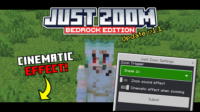
- Disable Cinematic Effect: The addon also allows you to turn off the subtle cinematic effect (a slight camera movement or slow-down) that might occur during zoom transitions. Disabling this ensures that the transition between zoom levels is instantaneous and direct, without any additional camera movements that could break immersion or distract you, leading to a smoother and more focused zoom experience.
- Significantly Enhanced Exploration and Scouting: With Just Zoom, you can easily spot distant villages, temples, cave entrances, or even enemy bases from afar. This reduces the time spent wandering aimlessly and significantly increases the efficiency of your exploration trips, making you more effective at finding crucial resources and structures. It allows for strategic planning before venturing into unknown territories.
- Achieve Pinpoint Precision in Building: Whether you're constructing a colossal fortress or meticulously decorating a small home, the ability to zoom provides unparalleled precision in block placement and fine detail work. This ensures that your creations are as perfect as you envision them, meeting the highest standards of quality and aesthetics. It helps in aligning distant blocks and intricate redstone wiring.
- Gain a Tactical Advantage in Combat: In combat scenarios, Just Zoom offers a clear tactical edge. You can accurately target mobs like skeletons or zombies, or even other players, from greater distances using bows and arrows. This significantly increases your chances of survival and allows you to avoid dangerous close-quarter engagements, turning you into a more formidable long-range combatant.
- Lightweight and Performance-Friendly: The addon is designed to be lightweight and does not negatively impact game performance. It integrates seamlessly with Minecraft Bedrock, ensuring a smooth and lag-free gameplay experience, even on devices with moderate specifications. This means you can enjoy enhanced vision without sacrificing game fluidity.
- No External Mod Loader Required: As a Bedrock addon, Just Zoom does not require the installation of any external mod loaders like Forge or Fabric. It installs directly as a behavior pack, making the installation process incredibly simple and straightforward for all players, regardless of their technical expertise.
- Broad Compatibility with Resource Packs: Just Zoom works exceptionally well with the vast majority of available resource packs. This means you don't have to sacrifice your preferred visual aesthetic or texture pack to enjoy the benefits of the zoom feature, allowing for a fully customized visual and functional experience.
- Vanilla+ Gameplay Experience: The addon introduces a significant quality-of-life improvement without altering the core essence or visual style of the original game. This makes it ideal for players who prefer an enhanced Minecraft experience that stays true to the vanilla feel, adding utility without compromising familiarity.
- Continuous Updates and Community Support: The developers are committed to providing regular updates for the addon, ensuring its compatibility with the latest Minecraft versions and addressing any potential issues. Active community support is also available to assist players with any queries or problems they might encounter, fostering a reliable and evolving experience.
How to Download and Install Just Zoom
Downloading and installing the Just Zoom addon for Minecraft Bedrock is a straightforward process that doesn't require any complex tools or mod loaders. All you need is the addon file itself and a copy of Minecraft Bedrock Edition installed on your device.
- Download the Addon File: Begin by downloading the Just Zoom addon file from the direct and secure link provided on the IQMOD website. The file will typically be in
.mcaddonor.mcpackformat. Make sure to save the file in an easily accessible location on your device, such as your Downloads folder. - Import the Addon into Minecraft: Once the download is complete, simply double-click on the addon file you just downloaded. This action will automatically launch Minecraft and initiate the addon import process. You will see an in-game notification confirming the successful import of the addon into your game.
- Create a New World or Edit an Existing One: Open Minecraft and navigate to the “Play” menu. You can either create a brand-new world or modify the settings of an existing world where you wish to activate the addon. Select “Create New World” or choose an existing world and click the “Edit” (pencil icon) button next to it.
- Activate Behavior and Resource Packs: In the world settings screen, scroll down to the “Behavior Packs” and “Resource Packs” sections. Look for “Just Zoom” among the available packs and activate it. Ensure that the addon is active in both sections (if it appears in both) to guarantee its proper functionality within your chosen world.
- Configure In-Game Settings: After activating the addon and entering your world, you can customize the zoom settings. If you’re on PC, you can bind the zoom to a specific key via the Macro Command system. For mobile players, simply double-sneaking will activate it. To adjust other trigger options or disable effects, type “setting” in the chat and follow the on-screen instructions. Enjoy your enhanced vision in Minecraft!
For a complete guide, check out our Minecraft Mods Installation Guide.
System Requirements and Compatibility
- Minecraft Version: Compatible with the latest Minecraft Bedrock Editions (preferably 1.20 and newer versions).
- Mod Loader: None (operates as a direct Bedrock addon).
- Platform: Minecraft Bedrock Edition (Windows 10/11, Xbox, Mobile, Nintendo Switch, PlayStation).
- Dependencies: None (standalone addon).
Pro Tips for Using Just Zoom
To maximize your advantage with the Just Zoom addon in your Minecraft adventures, here are some advanced tips that will enhance your experience and make you more efficient in exploration, building, and combat:
1. Strategic Area Scouting: Before embarking on a long expedition into an unknown territory, use the zoom feature from a high vantage point (like a mountain or a watchtower) to survey the horizon. This allows you to spot villages, temples, rare resources, or even enemy bases from a safe distance, enabling you to plan your journey more effectively and avoid unforeseen dangers. For instance, you can discover a distant village with a blacksmith or pinpoint a ruined nether portal before committing to travel there.
2. Customize Zoom Key for Rapid Response: Configure your zoom key to an easily accessible location on your keyboard or adjust the activation trigger on mobile to suit your playstyle. For PC players, a side mouse button or a dedicated key near WASD might be ideal. This ensures you can toggle zoom on and off with lightning speed while navigating or amidst combat, giving you a crucial tactical edge in critical situations, such as quickly identifying a distant creeper or a hidden enemy player.
3. Disable Effects for Enhanced Focus and Performance: If you are engaged in PvP combat or prefer a distraction-free gameplay experience, consider disabling both the zoom sound effect and the cinematic effect. This will make the transition between zoom levels instantaneous and silent, maintaining your focus on the gameplay and preventing any potential performance hitches that these effects might cause, especially on lower-end devices. A silent, instant zoom can be crucial in competitive play.
4. Coordinate with Your Team in Multiplayer: In multiplayer environments, Just Zoom can be a powerful communication tool. Use the zoom feature to pinpoint enemy locations, resource deposits, or key points of interest and share this information with your teammates. For example, you can call out a distant mob spawner or an approaching hostile player group, allowing your team to prepare defenses or plan a coordinated attack with precise information.
5. Improve Building Accuracy for Complex Constructions: When working on building projects that demand high precision and intricate details, use Just Zoom to place blocks with utmost accuracy. Whether you're constructing a colossal statue, wiring complex Redstone circuits, or detailing an interior design, the ability to zoom will help you perceive the subtlest differences and ensure every block is perfectly aligned. This minimizes errors and saves time on corrections, ensuring your grand designs are executed flawlessly, even when spanning long distances.
6. Efficiently Locate Rare Resources: Leverage the zoom feature while searching for valuable rare resources like diamonds, emeralds, or even extensive cave systems rich in coal and iron. By scanning cave walls and ceilings from a distance, you can identify ore veins more effectively. This increases your mining efficiency and reduces the need to approach dangerous areas too closely, allowing you to gather more resources in less time and with greater safety, especially when exploring vast underground caverns.
Is Just Zoom Safe and Free?
Yes, the Just Zoom addon is completely safe and free to use. At IQMOD, we prioritize the safety and security of our users above all else. Therefore, all mods and addons available on our portal are rigorously scanned and verified to ensure they are free from any malicious software or viruses. Just Zoom has been thoroughly tested by our team and originates from trusted sources within the developer community, guaranteeing a secure and reliable gameplay experience. You are not required to pay any fees to download or utilize it, making it an excellent and accessible addition for anyone looking to enhance their Minecraft adventures.
Why Download from IQMOD?
When you choose to download the Just Zoom addon from IQMOD, you are ensuring a hassle-free and trustworthy experience. We provide direct and fast download links, saving you the trouble of navigating through other websites filled with intrusive ads and pop-ups. All mods and addons on our site are regularly updated to ensure compatibility with the latest Minecraft versions, meaning you will always receive the most stable and current release. Furthermore, our dedicated support team is always ready to assist you should you encounter any issues during installation or use. Don't hesitate, download Just Zoom now from IQMOD and elevate your Minecraft experience to a new level of exploration and precision!
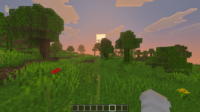
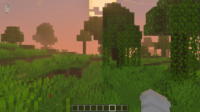
Just Zoom Addon for Minecraft - Download & Install Minecraft Mod Screenshots
View images and verify quality before download
Image Gallery
Just Zoom Addon for Minecraft - Download & Install Technical Information
Learn technical details, version, and supported platform
Technical Specifications

Your Own Minecraft Server! 🎮
Start your own server with friends on BisectHosting — insane performance, one-click mod installs, and 24/7 support. Use the discount code and start at the lowest price!
Download and Share
Download for free or share it with friends
Get the advantage!
Subscribe for early access to exclusive mods and direct downloads without timers or ads.
Mod not opening in Minecraft? This applies to Bedrock edition only (mobile/console) — the issue is your file manager, not the mod. Use our app IQ OpenMC to open the file and it will give you the option to open it in Minecraft directly. (Java players don't need this step)