

Jade 🔍 Mod for Minecraft - Download & Install
Download Jade 🔍 Mod for Minecraft to display block, entity, and inventory info. Adds 15+ QoL features and works with Forge/Fabric. Get it free from IQMOD!
Everything About Jade 🔍 Mod for Minecraft - Download & Install
Read the full article about the mod
What is Jade 🔍?
Jade 🔍 is a highly functional and essential information HUD (Heads-Up Display) mod for Minecraft, designed to provide players with detailed, real-time data about the blocks, entities, and inventories they are looking at in the game world. It serves as the spiritual successor to the popular Hwyla and Waila mods, offering a refined user experience and a robust API for seamless integration with other modifications. While Jade 🔍 can be installed client-side only for basic functionalities, many of its advanced features, such as displaying item storage contents, brewing stand fuel amounts, or the number of bees in a beehive, require the mod to also be present on the server side to function fully.
This mod has emerged as a crucial tool in modern Minecraft, addressing the need for instant, contextual information without interrupting gameplay. It enhances the overall quality of life for players by streamlining data access, whether they are exploring new biomes, constructing complex contraptions, or managing vast resource stockpiles. Jade 🔍 is celebrated for its flexibility, allowing players to customize its display to fit their preferences, and its broad compatibility across different mod loaders like Forge, Fabric, and NeoForge ensures it can be incorporated into almost any modded Minecraft setup. Its intuitive design and powerful features make it an indispensable companion for both casual players and seasoned modpack enthusiasts.
Key Features and Highlights
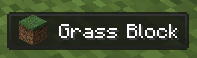
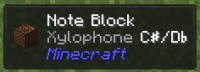
- Comprehensive Block Information: Jade 🔍 provides immediate, detailed information about any block you gaze upon, including its name, type, the mod it originates from, and its harvestability requirements. This is invaluable for identifying unfamiliar blocks, planning mining operations efficiently, and ensuring you use the correct tools to avoid resource waste.
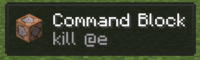
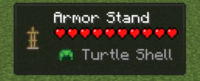
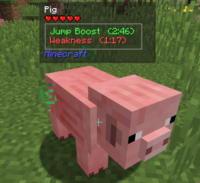
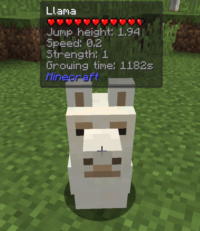
- Entity and Mob Details: When looking at any entity or mob, the mod displays its name, current health, status effects (positive or negative), and its originating mod. This feature is critical for strategic combat planning, monitoring the health of your farm animals, or identifying rare or custom mobs from other mods.
- Inventory Contents at a Glance: One of Jade's most powerful features is its ability to show the contents of chests, furnaces, enchanting tables, brewing stands, and other container blocks without needing to open their GUI. This significantly speeds up resource management, especially in large bases or on multiplayer servers where quick inventory checks are essential.
- Brewing Stand Fuel & Furnace Progress: The mod conveniently displays the remaining fuel in brewing stands, allowing players to efficiently manage potion brewing without constant manual checks. Similarly, it shows the progress and fuel status of furnaces, helping optimize smelting operations.
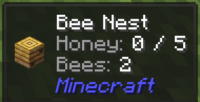
- Beehive Population Tracking: For beekeeping enthusiasts, Jade 🔍 offers a unique feature to display the exact number of bees currently residing within a beehive or bee nest. This helps determine when a hive is ready for harvesting and contributes to more efficient honey production.
- Fluid Information Display: Gain insights into liquid blocks such as water and lava, including their source, flow direction, and quantity. This is particularly useful for understanding complex fluid mechanics, designing irrigation systems, or constructing lava traps.
- Advanced NBT Data Visibility: Jade 🔍 can expose NBT (Named Binary Tag) data for blocks and entities. This highly technical detail is invaluable for mod developers, advanced users, and server administrators for debugging, understanding mod interactions, and fine-tuning game mechanics.
- Harvestability Indicators: The mod clearly shows which tool is appropriate for harvesting a specific block and whether the block is currently harvestable. This prevents players from wasting time or durability on incorrect tools.
- Redstone Signal Strength: For redstone engineers, Jade 🔍 displays the current redstone signal strength of blocks and components. This visual feedback is crucial for designing and troubleshooting complex redstone circuits.
- Seamless JEI Integration: Jade 🔍 integrates perfectly with Just Enough Items (JEI). By pressing a configured hotkey (default Keypad 3), you can instantly view the crafting recipes of the item you're looking at, or (default Keypad 4) see its uses directly within the JEI interface.
- Highly Customizable User Interface: The mod offers extensive customization options for its HUD display. Players can adjust the position, font size, colors, background, and transparency to match their aesthetic preferences and ensure the information doesn't obstruct their view of the game world.
- Configurable Hotkeys: Jade 🔍 comes with several customizable hotkeys, including toggling the entire overlay, switching liquid display, and opening the configuration screen. This allows for quick and efficient control over the information displayed.
- Multi-Loader Support: Compatible with Forge, Fabric, and NeoForge, Jade 🔍 ensures broad accessibility across different modding ecosystems, making it a versatile choice for almost any modded Minecraft setup.
- Performance Optimized: Despite its rich feature set, Jade 🔍 is designed to be lightweight and efficient, ensuring minimal impact on game performance. This allows for a smooth gameplay experience even when displaying a large amount of information simultaneously.
- Developer API: A robust API is provided for mod developers, enabling other mods to easily integrate with Jade 🔍 and display their custom information, significantly extending its utility and collaborative potential within the modding community.
How to Download and Install Jade 🔍
Installing Jade 🔍 is a straightforward process, but it requires careful attention to detail to ensure proper functionality. Before you begin, confirm that you have the correct Java version installed for Minecraft and that you have a compatible mod loader (Forge, Fabric, or NeoForge) for your desired Minecraft version.
- Prepare Your Environment: Ensure you have Java installed on your computer. You will also need a Mod Loader (Forge, Fabric, or NeoForge) for the specific Minecraft version you intend to play. Download and install the appropriate loader from its official website. For example, if you're using Forge, download the Forge installer matching your Minecraft version and run it to install the client.
- Download Jade 🔍: Navigate to the Jade 🔍 mod download page on IQMOD. Locate the version of Jade 🔍 that is compatible with your Minecraft version and your chosen mod loader (Forge/Fabric/NeoForge). Click the direct download button to save the `.jar` file to your computer.
- Locate Your `mods` Folder: After installing your mod loader, launch Minecraft at least once using the newly created mod loader profile (e.g., 'Forge' or 'Fabric Loader'). This action typically generates the `mods` folder within your main `.minecraft` directory. To find this directory, type
%appdata%into your Windows search bar, hit Enter, and then open the `.minecraft` folder. - Transfer the Mod File: Copy the downloaded Jade 🔍 `.jar` file and paste it into the `mods` folder you located in the previous step. If the `mods` folder does not exist for some reason, you can manually create a new folder named `mods` inside your `.minecraft` directory and then paste the mod file there.
- Launch Minecraft: Re-open your Minecraft Launcher. Make sure the correct mod loader profile (Forge, Fabric, or NeoForge) is selected from the version dropdown menu. Click the "Play" button. Jade 🔍 should now load with your game, and you will see its information overlay appear in-game when you look at blocks or entities.
For a complete guide, check out our Minecraft Mods Installation Guide.
System Requirements and Compatibility
- Minecraft Version: Jade 🔍 supports a wide range of modern Minecraft Java Edition versions, including 1.16.5, 1.17.1, 1.18.2, 1.19.2, 1.19.4, 1.20.1, 1.20.4, 1.20.6, and 1.21. Always ensure you download the specific version of Jade 🔍 that matches your Minecraft client.
- Mod Loader: Compatible with Forge, Fabric, and NeoForge. One of these mod loaders must be installed on your system to run Jade 🔍.
- Platform: Java Edition. This mod is exclusively designed for the Java Edition of Minecraft and is not compatible with Minecraft Bedrock Edition.
- Dependencies: Jade 🔍 generally runs independently without strict dependencies. However, for enhanced functionality, particularly for displaying recipes and usages, it is highly recommended to install Just Enough Items (JEI). For Fabric users, Mod Menu is also useful for accessing Jade's configuration options directly from the game.
Pro Tips for Using Jade 🔍
To maximize your experience with Jade 🔍 and truly leverage its capabilities in Minecraft, consider these advanced tips:
- Optimize Your HUD Layout: Dive into Jade's configuration screen (default Keypad 0). Experiment with different positions for the information display, adjust font sizes, change colors, and modify background transparency. For instance, you might move the HUD to a less obtrusive corner during combat or change the color scheme to better match your resource pack, ensuring it enhances rather than distracts from your gameplay.
- Master JEI Integration: If you have Just Enough Items (JEI) installed, Jade 🔍 becomes an even more powerful tool. When looking at any block or item, use the hotkeys (default Keypad 3 for recipes, Keypad 4 for uses) to instantly jump to the corresponding JEI entry. This is incredibly useful for learning new crafting recipes, discovering the potential uses of unfamiliar items, or quickly accessing detailed item information.
- Leverage Server-Side Features: Remember that advanced features like displaying container contents (chests, barrels) or brewing stand fuel levels require Jade 🔍 to be installed on the server as well. If you play on a multiplayer server, communicate with the server administrator to ensure Jade 🔍 is installed server-side, unlocking a wealth of time-saving information for all players.
- Explore Jade Addons: The Minecraft modding community often creates dedicated 'add-on' mods that extend Jade's functionality to specific other mods. Search for "Jade Addons" on modding platforms to find integrations for popular mods like farmers delight, create, or other tech/magic mods, allowing Jade 🔍 to display custom information relevant to those modifications.
- Utilize Developer/Debug Mode: For mod developers or those interested in technical details, enable the advanced NBT data display in Jade's settings. This will show raw data tags for blocks and entities, which can be invaluable for debugging mod conflicts, understanding game mechanics at a deeper level, or creating custom commands.
- Performance Tweaks: While Jade 🔍 is optimized, if you experience any performance dips on lower-end systems, you can adjust the level of detail displayed or disable less critical features in the configuration menu. This allows you to maintain smooth frame rates while still benefiting from essential information.
Is Jade 🔍 Safe and Free?
Absolutely, Jade 🔍 is completely safe to use and entirely free of charge. It is an open-source project, developed and maintained by the dedicated Minecraft modding community, and undergoes regular updates and reviews to ensure compatibility with the latest Minecraft versions and to address any potential issues. All files available for download on IQMOD, including Jade 🔍, are thoroughly scanned for malware and viruses to guarantee a secure downloading experience for our users. You can download and enjoy this fantastic utility mod with complete peace of mind, enhancing your Minecraft experience without any cost.
Why Download from IQMOD?
IQMOD is the premier destination for Minecraft players seeking reliable and high-quality mods, and downloading Jade 🔍 from our platform ensures you get the best experience. We provide direct, lightning-fast download links, eliminating the frustration of intrusive ads, deceptive redirects, or slow file hosts often found on other sites. We are committed to keeping all our mods, including Jade 🔍, consistently updated to ensure compatibility with the newest Minecraft versions, delivering the latest features and bug fixes. Furthermore, our dedicated support team is always ready to assist you with any questions or issues you might encounter during download or installation. Choose IQMOD for a seamless, secure, and up-to-date modding experience. Download Jade 🔍 now and transform your Minecraft gameplay!
Jade 🔍 Mod for Minecraft - Download & Install Minecraft Mod Screenshots
View images and verify quality before download
Image Gallery



Jade 🔍 Mod for Minecraft - Download & Install Technical Information
Learn technical details, version, and supported platform
Technical Specifications

Your Own Minecraft Server! 🎮
Start your own server with friends on BisectHosting — insane performance, one-click mod installs, and 24/7 support. Use the discount code and start at the lowest price!
Download and Share
Download for free or share it with friends
Get the advantage!
Subscribe for early access to exclusive mods and direct downloads without timers or ads.
Mod not opening in Minecraft? This applies to Bedrock edition only (mobile/console) — the issue is your file manager, not the mod. Use our app IQ OpenMC to open the file and it will give you the option to open it in Minecraft directly. (Java players don't need this step)