

Gravestone & Death Coordinates Mod for Minecraft - Download & Install
Download Gravestone & Death Coordinates Mod for Minecraft. It creates a grave upon death, provides coordinates, and a key for teleportation. Recover items easily. Get it free from IQMOD!
Everything About Gravestone & Death Coordinates Mod for Minecraft - Download & Install
Read the full article about the mod
What is Gravestone & Death Coordinates?
The Gravestone & Death Coordinates mod is an incredibly practical and essential utility addon specifically designed for Minecraft Bedrock Edition, aiming to fundamentally simplify the often-frustrating process of item recovery after death. Developed by dedicated community creators, this addon automatically generates a distinct gravestone at the exact location where a player perishes. Crucially, it immediately provides the player with precise X, Y, Z coordinates via an in-game message, enabling them to easily navigate back and retrieve all their valuable inventory items. This mod is fully compatible with the latest Minecraft versions, offering a robust and elegant solution to the perennial problem of losing hard-earned resources.
For many Minecraft players, losing an entire inventory of carefully collected items after an unexpected death can be one of the most disheartening experiences in the game. This is particularly true after long mining expeditions, challenging boss fights, or deep explorations into uncharted territories. Gravestone & Death Coordinates directly addresses this pain point, providing players with peace of mind. It allows them to venture into dangerous biomes, confront formidable mobs, and explore vast, unknown landscapes without the constant dread of losing everything. By adding this layer of security, the mod not only reduces frustration but also actively encourages more adventurous and daring gameplay, making it an indispensable quality-of-life improvement for both new players learning the ropes and seasoned veterans seeking a smoother, more enjoyable Minecraft journey.
Key Features and Highlights
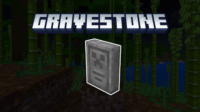
- Automatic Gravestone Creation at Death: This is the core functionality. Upon a player's demise, a visually distinct and durable gravestone instantly materializes at their exact death location. This gravestone serves as an unmistakable marker, eliminating the need for players to manually remember coordinates or place temporary beacons, which can often be forgotten or missed.
- Instant Death Coordinate Notification: As soon as the gravestone appears, the player receives a concise in-game message displaying the precise X, Y, Z coordinates of their death spot. This immediate feedback is vital for efficient navigation, ensuring players can return directly to their last position without wasted time or aimless searching.
- Effortless Item Recovery from Gravestone: Interacting with the gravestone is straightforward. A simple tap or click will automatically transfer all items that were in the player's inventory at the time of death directly back into their current inventory. This seamless process saves players the tedious task of meticulously collecting scattered items, especially in hazardous environments.
- Optional Gravestone Key for Teleportation: One variant of this mod introduces a special item called the "Gravestone Key." When used, this key instantly teleports the player to their most recent death location. This feature is a game-changer for recovering items from extremely distant or difficult-to-reach areas, significantly reducing travel time and effort.
- Enhanced Gravestone Texture and Model: The developers have updated the visual aesthetics of the gravestone, providing a refreshed and more detailed texture. This ensures that the addon not only performs its function flawlessly but also integrates visually with the Minecraft world, maintaining an appealing in-game appearance.
- Simplistic Installation and User Experience: Designed as a Bedrock Edition addon, Gravestone & Death Coordinates boasts a straightforward installation process, requiring no complex mod loaders or command-line configurations. It functions effectively once activated in world settings, making it accessible to players of all technical proficiencies.
- Broad Compatibility with Latest Minecraft Versions: The mod is consistently updated to ensure compatibility with the newest iterations of Minecraft Bedrock Edition. This commitment to ongoing support means players can enjoy the addon without worrying about compatibility issues arising from game updates.
- Significant Reduction in Player Frustration: By safeguarding inventory items, the mod dramatically lowers the stress and disappointment associated with player death. This fosters a more positive and engaging gameplay loop, allowing players to focus on exploration and creation rather than item management anxiety.
- Flexible Version Choices Available: Currently, the addon offers two distinct versions: one that includes the teleportation Gravestone Key and another that does not. This flexibility allows players to select the version that best suits their preferred playstyle and server rules, with future plans for in-game configuration options.
- Seamless Integration with Bedrock Game Mechanics: The mod operates as a native addon, meaning it integrates smoothly with Minecraft Bedrock's core systems. It handles death mechanics and item storage in a stable and efficient manner, without causing conflicts with other game elements.
- Lightweight Performance and Stability: Engineered to be resource-efficient, Gravestone & Death Coordinates has minimal impact on game performance. Players can expect consistent frame rates and smooth gameplay, even on less powerful devices, ensuring a stable experience.
- Ideal for Both Single-Player and Multiplayer Worlds: Whether you're adventuring solo in your personal world or collaborating with friends on a server, this mod offers universal benefits. It eliminates disputes over lost items and empowers every player to recover their belongings independently.
- Promotes Fearless Exploration: With the assurance that lost items can be easily retrieved, players are more likely to venture into unknown territories, deep caves, and dangerous dimensions, transforming daunting explorations into exciting opportunities.
- Reduces Reliance on Cheats or Console Commands: Instead of resorting to game-mode changes or console commands to recover items, this mod provides an organic, in-game solution that aligns with the spirit of survival gameplay.
- Community-Driven Development and Support: The creators demonstrate an ongoing dedication to improving the mod, often incorporating community feedback and suggestions to refine features and enhance the overall user experience.
How to Download and Install Gravestone & Death Coordinates
Installing addons in Minecraft Bedrock Edition is a straightforward process. Follow these steps carefully to ensure the Gravestone & Death Coordinates mod is successfully integrated into your game:
- Download the Addon File: Begin by downloading the mod file from the IQMOD website. Look for the direct download button, which will typically provide a file with a
.mcaddonor.mcpackextension. Ensure you are downloading the version compatible with your specific Minecraft Bedrock Edition. - Open the Downloaded File: Once the download is complete, navigate to your device's downloads folder. On Windows, simply double-clicking the
.mcaddonfile will usually prompt Minecraft to launch automatically and begin the import process. For mobile devices (Android or iOS), you might need to use a file manager application to locate the file and then tap on it, selecting Minecraft as the application to open it with. - Confirm Successful Import: Minecraft will display a message (usually at the top of the screen) indicating that the resource pack and behavior pack have been successfully imported. If you encounter any errors, double-check that the file is not corrupted and that your Minecraft version is up-to-date.
- Activate the Mod in World Settings: After successful import, you will need to apply the addon to a world. You can either create a new world or modify an existing one. Enter the "World Settings" for your chosen world.
- Enable Experimental Gameplay Options: This is a crucial step for many Bedrock addons. Within the world settings, scroll down to the "Experimental Gameplay" section. You must activate the following toggles: "Beta APIs," "Holiday Creator Features," and potentially "Molang Features" or any other experimental options specifically mentioned in the mod's description. Activating these ensures the mod has access to advanced game features required for its functionality.
- Apply Resource & Behavior Packs: Still within the world settings, navigate to the "Resource Packs" section and then the "Behavior Packs" section. In both sections, locate "Gravestone & Death Coordinates" and activate it by clicking on it and moving it from the "Available Packs" list to the "Active Packs" list. It is vital to activate both the resource and behavior components for the mod to function correctly.
- Launch Your World: Once all the necessary options and packs are enabled, load your world or start your new world. The Gravestone & Death Coordinates mod should now be active and ready to enhance your Minecraft experience.
For more detailed instructions and troubleshooting tips, refer to our comprehensive Minecraft Mods Installation Guide on IQMOD.
System Requirements and Compatibility
- Minecraft Version: This mod requires recent versions of Minecraft Bedrock Edition. It is always recommended to use the latest stable release (e.g., 1.20.x and above) for optimal compatibility and performance.
- Mod Loader: Gravestone & Death Coordinates does not require any external mod loaders (such as Forge or Fabric) as it is designed as a native addon for Minecraft Bedrock Edition.
- Platform: Exclusively compatible with Minecraft Bedrock Edition across all supported platforms, including Windows 10/11, Xbox One/Series X|S, PlayStation 4/5, Nintendo Switch, Android, and iOS.
- Dependencies: No other mods are specifically required to run Gravestone & Death Coordinates. However, it is essential to activate the "Experimental Gameplay" options (such as Beta APIs and Holiday Creator Features) within the world settings for the mod to function as intended.
Pro Tips for Using Gravestone & Death Coordinates
To maximize your experience with the Gravestone & Death Coordinates mod, here are some advanced tips that will further enhance your Minecraft gameplay:
- Utilize the Gravestone Key Strategically (If Available): If you're using the version of the mod that includes the "Gravestone Key" for teleportation, treat it as a valuable resource. Reserve its use for critical situations, such as recovering rare items from extremely distant or dangerous locations. Avoid using it for every minor death; instead, save it for when the journey back would be exceptionally long or perilous. Consider keeping a backup key in an Ender Chest or a secure base.
- Always Place Manual Waypoints as Backup: While the mod provides coordinates, it's a good practice to still place manual waypoints on your map or jot down coordinates in an external notebook or screenshot the death message. This provides a crucial backup in case of an unexpected game crash or a rare mod malfunction, ensuring you never truly lose your valuable gear.
- Understand Environmental Limitations: Although the mod protects your items from despawning, be aware that certain environmental hazards can destroy items *before* the gravestone even forms. For instance, dying in lava or the void can still incinerate or erase your items. Always exercise caution in these extreme environments, even with the mod active.
- Leverage Its Power in Multiplayer Worlds: This mod is incredibly beneficial in multiplayer servers and realms. It eliminates common disputes and frustrations among players regarding lost items, as each player can independently recover their own gear without interference or the need for administrative intervention. This fosters a more cooperative and enjoyable multiplayer environment.
- Activate in All Relevant Worlds: Don't hesitate to enable the Gravestone & Death Coordinates mod in all your survival worlds, adventure maps, or even creative testing grounds. It can save you significant time and effort in various gameplay scenarios, making it a universal quality-of-life improvement.
- Combine with Exploration-Focused Addons: When paired with other mods or addons that encourage deep exploration, new dimensions, or challenging boss encounters, Gravestone & Death Coordinates becomes even more invaluable. It mitigates the inherent risks of venturing into uncharted or dangerous territories, allowing you to explore with greater confidence and less fear of permanent loss.
Is Gravestone & Death Coordinates Safe and Free?
Yes, the Gravestone & Death Coordinates mod is completely safe to use and entirely free to download. At IQMOD, we are committed to providing high-quality, thoroughly vetted content to ensure a secure and enjoyable gaming experience. All mods and addons available on our platform undergo rigorous scanning for viruses, malware, and other malicious software before being made available for download. This particular mod originates from trusted community sources and has been widely tested by the Minecraft community for its stability and security. As a free addon, it delivers exceptional value without any financial cost, making it an excellent choice for all players looking to enhance their Minecraft experience without concerns about safety or payment.
Why Download from IQMOD?
When you choose to download the Gravestone & Death Coordinates mod from IQMOD, you are opting for an unparalleled downloading experience that prioritizes your safety and convenience. We provide direct and high-speed download links, completely free from intrusive advertisements, annoying pop-ups, or deceptive redirects that often plague other mod sites. Our mods are consistently updated to ensure compatibility with the very latest Minecraft versions, guaranteeing you access to the newest features without compatibility headaches. Furthermore, our dedicated technical support team is always available to assist you with any questions or issues you might encounter during installation or usage. Choose IQMOD for this mod and countless other fantastic addons, and elevate your Minecraft experience with confidence and security! Download now and embark on your adventures worry-free!
Gravestone & Death Coordinates Mod for Minecraft - Download & Install Minecraft Mod Screenshots
View images and verify quality before download
Image Gallery


Gravestone & Death Coordinates Mod for Minecraft - Download & Install Technical Information
Learn technical details, version, and supported platform
Technical Specifications

Your Own Minecraft Server! 🎮
Start your own server with friends on BisectHosting — insane performance, one-click mod installs, and 24/7 support. Use the discount code and start at the lowest price!
Download and Share
Download for free or share it with friends
Get the advantage!
Subscribe for early access to exclusive mods and direct downloads without timers or ads.
Mod not opening in Minecraft? This applies to Bedrock edition only (mobile/console) — the issue is your file manager, not the mod. Use our app IQ OpenMC to open the file and it will give you the option to open it in Minecraft directly. (Java players don't need this step)