

Seraphic Glowing Ores Mod for Minecraft - Download & Install
Download Seraphic Glowing Ores Mod for Minecraft Bedrock. Enhances ores with realistic PBR textures and dynamic glow, optimized for RTX. Transform your world's visuals now, free from IQMOD!
Everything About Seraphic Glowing Ores Mod for Minecraft - Download & Install
Read the full article about the mod
What is Seraphic Glowing Ores?
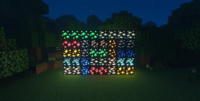
Seraphic Glowing Ores is a captivating visual addon for Minecraft Bedrock Edition, meticulously crafted to leverage the power of Ray Tracing (RTX) technology. This mod fundamentally transforms the appearance of all mining ores in the game, including diamonds, gold, iron, coal, and Netherite, making them emit realistic light and feature stunning Physically Based Rendering (PBR) details. It introduces a new dimension of beauty and realism to the cave exploration and mining experience, turning ordinary resource gathering into an immersive visual spectacle. The mod aims to make ores not just solid blocks, but glowing light sources that dynamically interact with their surroundings, significantly enhancing visual immersion for RTX-capable systems.
This addon serves as a crucial visual upgrade for players who own RTX-compatible hardware and seek to maximize the realism and aesthetic appeal of their Minecraft world. It does not introduce new gameplay elements or alter core mechanics; instead, its sole focus is on elevating the visual experience, ensuring that every discovery of a valuable ore becomes a breathtaking moment. Seraphic Glowing Ores works harmoniously with other PBR-enabled resource packs to deliver a comprehensive, high-fidelity graphical experience, making it a must-have for visual enthusiasts.
Key Features and Highlights
- Dynamic & Realistic Ore Illumination: This mod causes all major ores in Minecraft (Diamond, Emerald, Gold, Iron, Coal, Lapis Lazuli, Redstone, Netherite) to glow and emit their own light. This isn't just a static texture effect; the glow dynamically interacts with shadows and the environment, creating an unparalleled atmosphere in dark caves and mines.
- Full RTX Integration: Seraphic Glowing Ores is specifically designed to harness the full capabilities of Ray Tracing technology available in Minecraft Bedrock Edition. This means the light emission, reflections, and shadows cast by the glowing ores are incredibly realistic, adding unprecedented depth and detail to your world.
- Physically Based Rendering (PBR) Textures: The mod utilizes PBR techniques to provide rich surface details for ores. This makes ores appear far more realistic in terms of their texture, shininess, and how they react to light, giving them a three-dimensional and profound look rather than a flat appearance.
- Comprehensive Visual Enhancement: The mod's impact extends beyond just glowing ores; it elevates the overall visual quality of the game, particularly in underground areas. Cave exploration becomes significantly more exciting and beautiful as valuable ores shimmer and glow from a distance.
- Effortless Ore Identification: Thanks to their distinct glow, identifying and locating valuable ores in dark environments becomes much easier. This saves time and effort during mining expeditions, making resource gathering more efficient and enjoyable.
- Enhanced Game Immersion: By introducing a new layer of realism and beauty, the mod deepens player immersion. Exploring mysterious mines and caves feels more engaging when ores sparkle as genuine treasures, enticing players to delve deeper.
- Compatibility with PBR Resource Packs: Seraphic Glowing Ores is crafted to integrate seamlessly with other high-quality PBR resource packs, such as Elys PBR. This allows you to construct a fully cohesive and visually stunning experience without significant conflicts.
- Minimal Performance Impact (for RTX systems): Despite the significant graphical enhancements, the mod itself does not introduce new game logic or complex mechanics, meaning it focuses purely on visuals without negatively impacting gameplay fluidity (provided you have RTX-capable hardware).
- Transformative Mining Environments: The mod dramatically alters how you perceive mines and caves, transforming them from gloomy, monotonous passages into vibrant spaces where ores gleam with their own light, making mining a visually rewarding activity.
- Simplistic Yet Effective Design: While realistic, the mod maintains the core aesthetic of Minecraft with a clean and uncluttered style, avoiding overly complex details that might distract from the game's charm.
- Unique Glow Per Ore Type: The intensity and subtle color of the glow can vary slightly between different ore types, adding a touch of diversity and aiding in visual differentiation. For example, diamonds might have a brilliant blue glow, while coal emits a dimmer, warmer light.
- Incentive for Exploration: The sheer visual beauty introduced by the mod provides an additional incentive for players to explore new caves and mines, eager to witness how the glowing ores appear in diverse subterranean biomes.
- Customized Visual Experience: This addon empowers you to personalize your visual experience in Minecraft Bedrock, making your world feel unique and tailored to your aesthetic preferences.
- Improved Indirect Lighting: The glowing ores contribute to improved indirect lighting within caves, making dark areas less oppressive and adding a layer of realism to how light propagates in enclosed spaces.
- Lightweight File Structure: As a resource pack, it doesn't add complex executable files or require deep game modifications, minimizing the chances of errors or conflicts with other game elements.
How to Download and Install Seraphic Glowing Ores
Installing the Seraphic Glowing Ores mod is straightforward, especially for Minecraft Bedrock Edition. Ensure your system meets the RTX requirements for the best experience.
- Step 1: Download the Mod File: Begin by downloading the Seraphic Glowing Ores file in
.mcpackformat from the direct and secure download link provided on IQMOD. Always ensure you are downloading from a trusted source to avoid any potential issues. - Step 2: Import the Mod into Minecraft (Easy Method): Once the download is complete, simply double-click the
.mcpackfile you just downloaded. Minecraft Bedrock Edition will automatically open and begin the process of importing the resource pack into your game. A confirmation message should appear in-game indicating a successful import. - Step 3: Activate the Resource Pack in Your World: After successful import, launch Minecraft and navigate to the settings of the world you wish to apply the mod to (or activate it for a new world). Look for the "Resource Packs" section, then "My Packs." You should see "Seraphic Glowing Ores" listed there. Click on it and then on the "Activate" button to move it to your "Active Packs" list.
- Step 4: (Optional) Manual Installation - Renaming the File: If you encounter issues with direct import or prefer a manual approach, locate the downloaded
.mcpackfile. Right-click on it and choose "Rename." Change the file extension from.mcpackto.zip. Confirm the change if prompted by your operating system. - Step 5: (Optional) Extract and Place Files: Right-click the newly renamed
.zipfile and choose "Extract All" or use an archiving tool like 7-Zip or WinRAR to extract its contents. This will create a new folder with the mod's files. Navigate to the following directory on your computer:AppData\Local\Packages\Microsoft.MinecraftUWP_8wekyb3d8bbwe\LocalState\games\com.mojang\resource_packs. Copy the extracted mod folder into this `resource_packs` directory. Once placed, launch Minecraft and follow Step 3 to activate the resource pack in your game settings.
For a complete guide, check out our Minecraft Mods Installation Guide.
System Requirements and Compatibility
- Minecraft Version: Latest versions of Minecraft Bedrock Edition that support Ray Tracing (RTX).
- Mod Loader: No specific mod loader is required; it installs as a direct resource pack.
- Platform: Windows 10/11 (Minecraft Bedrock Edition).
- Dependencies: This mod does not have mandatory mod dependencies. However, for its full visual effect, it requires an RTX-capable graphics card (e.g., NVIDIA GeForce RTX 20 Series or higher, or AMD Radeon RX 6000 Series or higher) and is designed to complement other PBR resource packs like Elys PBR for a cohesive experience.
Pro Tips for Using Seraphic Glowing Ores
To fully appreciate and maximize the immersive experience offered by Seraphic Glowing Ores, consider these advanced tips:
- Pair with High-Quality PBR Resource Packs: For an ultimate visual feast, it's highly recommended to use Seraphic Glowing Ores alongside another comprehensive PBR resource pack, such as Elys PBR. These packs work in tandem to render your Minecraft world with unparalleled detail, reflections, and global illumination, making the glowing ores pop even more.
- Explore the Deepest, Darkest Caves: The mod's full impact is most evident in unlit or dimly lit caves and mines. Dedicate time to exploring subterranean environments, and you'll find that the glowing ores create a magical and thrilling atmosphere, turning every discovery into a visual adventure.
- Adjust In-Game Lighting Settings: You might want to experiment with your in-game brightness or gamma settings to achieve the perfect balance. Slightly reducing overall brightness can make the glow of the ores more pronounced and impactful in darker settings, enhancing the contrast.
- Build Underground Bases Around Ores: Integrate the beauty of glowing ores into your base designs. Consider building underground structures or mining hubs strategically around naturally occurring glowing ore veins. This can provide unique ambient lighting and a distinct aesthetic without needing many artificial light sources.
- Capture Stunning Screenshots and Videos: Don't hesitate to take advantage of the mod's visual splendor. Capture breathtaking screenshots and cinematic videos of the glowing ores in various environments. It's an excellent way to share your enhanced Minecraft experience with friends or on social media platforms.
- Experiment with Different Biomes: Observe how the glowing ores interact with different types of stone and subterranean biomes. For instance, ores might appear differently in icy caves compared to standard ones, adding visual depth to biome diversity and encouraging varied exploration.
Is Seraphic Glowing Ores Safe and Free?
Yes, Seraphic Glowing Ores is completely safe to use and available for free. At IQMOD, we are committed to providing thoroughly vetted content from trusted sources to ensure the safety and integrity of your gaming experience. This mod is a visual resource pack and does not contain any executable files that could harm your device or compromise your privacy. You can download and install it with complete confidence, enjoying the graphical enhancements without any concerns about malware or viruses. Our goal is to offer an improved and secure Minecraft experience for all players.
Why Download from IQMOD?
IQMOD stands as a premier destination for Minecraft players seeking high-quality mods and addons. When you download Seraphic Glowing Ores from IQMOD, you are guaranteed to receive an authentic, thoroughly scanned version, free from any malicious software or intrusive advertisements that could disrupt your gaming experience. We provide direct and fast download links, and we ensure that all our content is regularly updated to be compatible with the latest Minecraft versions. Furthermore, the IQMOD support team is always available to assist you with any questions or issues you might encounter during installation or use. Don't hesitate; download Seraphic Glowing Ores now from IQMOD and elevate your Minecraft experience!
Seraphic Glowing Ores Mod for Minecraft - Download & Install Minecraft Mod Screenshots
View images and verify quality before download
Image Gallery
Seraphic Glowing Ores Mod for Minecraft - Download & Install Technical Information
Learn technical details, version, and supported platform
Technical Specifications

Your Own Minecraft Server! 🎮
Start your own server with friends on BisectHosting — insane performance, one-click mod installs, and 24/7 support. Use the discount code and start at the lowest price!
Download and Share
Download for free or share it with friends
Get the advantage!
Subscribe for early access to exclusive mods and direct downloads without timers or ads.
Mod not opening in Minecraft? This applies to Bedrock edition only (mobile/console) — the issue is your file manager, not the mod. Use our app IQ OpenMC to open the file and it will give you the option to open it in Minecraft directly. (Java players don't need this step)