

Ferous 3D Gun Mod for Minecraft - Download & Install
Download Ferous 3D Gun Mod for Minecraft Bedrock - adds 15+ realistic 3D weapons with unique dual-wielding mechanics. Enhance your PvP and survival gameplay. Get it free from IQMOD!
Everything About Ferous 3D Gun Mod for Minecraft - Download & Install
Read the full article about the mod
What is Ferous 3D Gun?
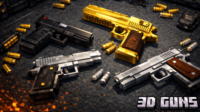
Ferous 3D Gun is an innovative Minecraft Bedrock Edition addon that introduces a diverse arsenal of realistic 3D firearms, featuring both single and unique dual-wielding weapon mechanics. Developed by the vibrant modding community to enhance combat experiences, this addon aims to fundamentally transform how players interact with their world in recent game versions, such as 1.20.x, by providing dynamic and highly detailed weaponry.
Beyond merely adding new items, Ferous 3D Gun fundamentally transforms the combat landscape of Minecraft. It integrates advanced gunplay, offering players unprecedented tactical depth in engagements against hostile mobs and other players in PvP. Compared to simpler weapon addons, Ferous 3D Gun stands out with its intricate crafting system for dual weapons, nuanced damage mechanics (2x damage but -10 per ammo for dual guns), and immersive visual and auditory effects, pushing the boundaries of what's possible in Bedrock combat. This evolution addresses the community's growing demand for more sophisticated and immersive combat systems, bringing a feel reminiscent of modern shooters into the blocky world of Minecraft.
Key Features and Highlights
The Ferous 3D Gun addon boasts a comprehensive set of features designed to revolutionize combat in Minecraft. Here are the most prominent:
- Realistic 3D Weapon Models: Each firearm is meticulously designed with high-fidelity 3D models, offering unparalleled visual detail compared to vanilla Minecraft weapons. These models include intricate textures for grips, magazines, and scopes, enhancing immersion.
- Advanced Firing Mechanics: Weapons aren't just for show; they come with sophisticated firing mechanics. This includes unique sound effects for each gun, muzzle flash visual effects, and subtle recoil animations that add to the realistic feel of combat.
- Unique Dual-Wielding System: A standout feature allowing players to equip and fire two guns simultaneously. While this significantly boosts firepower, it also introduces a slight decrease in accuracy, demanding strategic use and adding a layer of tactical depth.
- Intuitive Dual Gun Crafting: Creating a dual weapon setup is straightforward. Players simply need two single guns of the same type and combine them in a crafting table, making powerful dual-wielding accessible without complex recipes.
- Diverse Ammunition Types: The addon introduces various ammunition types, each specific to different firearms. Crafting these requires distinct resources, adding a resource management element to sustained combat.
- Immersive Sound and Visual Effects: From the distinct roar of a heavy machine gun to the crisp crack of a pistol, sound design is paramount. Visuals like shell casings ejecting and dynamic muzzle flashes further enhance the realistic combat experience.
- Enhanced PvP Experience: With a wide array of weapons and the unique dual-wielding capability, player-versus-player combat becomes significantly more dynamic and tactical. Players can develop unique loadouts and strategies to outmaneuver opponents.
- Improved Survival Combat: In survival mode, the added firearms provide a significant advantage against hordes of zombies, skeletons, and other hostile mobs. Players can defend their bases more effectively and explore dangerous biomes with newfound confidence.
- Detailed Weapon Statistics: Each weapon comes with specific attributes for damage, accuracy, and rate of fire. For instance, dual guns deliver 2x damage but with a -10 damage reduction per ammo, requiring players to understand these trade-offs.
- Balanced Crafting System: The crafting recipes for both weapons and their respective ammunition are carefully balanced. They are challenging enough to feel rewarding but not so complex that they detract from the gameplay flow, maintaining Minecraft's survival ethos.
- Regular Updates & Community Support: The developers are committed to providing continuous updates, addressing bugs, introducing new weaponry, and refining existing features based on community feedback, ensuring a constantly evolving and optimized gameplay experience.
- Easy Integration and Compatibility: Designed for seamless integration, the addon is easy to install and works harmoniously with existing Minecraft Bedrock worlds, minimizing conflicts and maximizing player convenience.
- Weapon Modifiers (Potential): While not explicitly stated, some advanced weapon addons allow for attachments or modifications. Ferous 3D Gun's realistic approach suggests potential for future expansions like scopes or silencers, adding another layer of customization.
- Strategic Recoil Management: Though subtle, the recoil mechanics mean that rapid firing, especially with dual weapons, might require players to adjust their aim or stance, adding a skill element to weapon mastery.
How to Download and Install Ferous 3D Gun
Installing the Ferous 3D Gun addon for Minecraft Bedrock Edition is a straightforward process. Follow these steps carefully to ensure a smooth setup. Please verify that you have a compatible version of Minecraft Bedrock (1.20.x or newer) before proceeding.
- Step 1: Download the Addon File (.mcpack or .mcaddon): Begin by downloading the Ferous 3D Gun addon file directly from the trusted IQMOD website. You'll find the direct download button at the bottom of this page. Ensure the file extension is either .mcpack or .mcaddon.
- Step 2: Double-Click the Downloaded File: Once the download is complete, locate the file in your downloads folder. Simply double-click on the downloaded .mcpack or .mcaddon file. This action will automatically launch Minecraft and initiate the addon import process.
- Step 3: Activate the Addon in World Settings: After a successful import (you'll see 'Import Started' then 'Import Finished' messages in Minecraft), either create a new world or edit an existing one. Navigate to the world settings and locate the 'Resource Packs' and 'Behavior Packs' sections.
- Step 4: Enable Resource and Behavior Packs: In the 'Resource Packs' section, find and activate 'Ferous 3D Gun'. Repeat this process in the 'Behavior Packs' section to enable the corresponding behavior pack. Activating both is crucial for all weapon mechanics and models to function correctly.
- Step 5: Launch the Game and Enjoy: With both packs activated, save your world settings and launch the game. The Ferous 3D Gun addon should now be active in your world, allowing you to craft and wield the new realistic firearms.
For a more comprehensive guide on installing various types of Minecraft mods and addons, check out our Minecraft Mods Installation Guide on IQMOD.
System Requirements and Compatibility
To ensure optimal performance and compatibility with the Ferous 3D Gun addon, please review the following requirements:
- Minecraft Version: 1.20.x and newer. It is always recommended to use the latest stable version of Minecraft Bedrock Edition for the best experience and compatibility.
- Mod Loader: None Required. As Ferous 3D Gun is a native Bedrock Edition addon, it does not require any additional mod loaders such as Forge or Fabric.
- Platform: Bedrock Edition. This addon is specifically designed for Minecraft Bedrock Edition, which includes versions for Windows 10/11, Xbox, PlayStation, Nintendo Switch, and Mobile devices.
- Dependencies: None. Ferous 3D Gun functions as a standalone addon and does not require any other mods or addons to be installed alongside it.
Pro Tips for Using Ferous 3D Gun
To master the Ferous 3D Gun addon and dominate your Minecraft world with its advanced weaponry, consider these expert tips:
- Strategic Weapon Switching: Don't stick to just one weapon type. Utilize single guns for long-range precision shots and situations requiring high accuracy, while reserving your dual-wielded firearms for intense close-quarters combat where sheer firepower is paramount. For example, snipe enemies from a distance with a single rifle, then switch to dual SMGs when clearing a mob-infested cave.
- Efficient Ammunition Management: Ammunition is a finite resource. Learn the crafting recipes for each ammo type and ensure you stock up sufficiently before embarking on long exploration trips or engaging in PvP battles. Crafting a dedicated ammo chest or utilizing shulker boxes for organized storage can be a game-changer.
- Mastering Dual Gun Accuracy: Dual-wielding offers incredible damage but comes with reduced accuracy. Practice aiming with dual guns in a controlled environment, like a custom target range in your world. Learn to compensate for bullet spread by adjusting your movement or getting closer to your targets to maximize your hit rate.
- Develop Unique PvP Loadouts: The addon opens up a plethora of new PvP strategies. Experiment with different combinations of weapons and armor. Do you prefer an aggressive, dual-wielding rush? Or a more stealthy, precise approach with a single, high-damage rifle? Find a playstyle that suits you and refine your loadouts accordingly.
- Exploiting Damage Mechanics: Understand the dual gun's damage rule: 2x damage but -10 per ammo. This means dual guns are exceptionally devastating against high-health targets like bosses or heavily armored players. However, against very weak enemies, some of that damage might be 'overkill' and less efficient than a single, precise shot. Use them wisely to maximize your damage output and resource efficiency.
- Explore Every Weapon Type: Don't limit yourself to just one or two weapons. Craft and experiment with every firearm the addon offers to understand its unique strengths, weaknesses, and optimal use cases. You might discover a particular weapon is incredibly effective against certain mob types or in specific environmental conditions, like a shotgun for confined spaces or a pistol for quick, precise defense.
Is Ferous 3D Gun Safe and Free?
Yes, the Ferous 3D Gun addon is completely safe and free to use. All files available on IQMOD have been thoroughly scanned and verified to ensure they are free from any malicious software, viruses, or other harmful elements that could compromise your device or game. We are committed to providing high-quality, trustworthy content to the Minecraft community. You can download this addon with full confidence, without concerns about hidden costs or security risks, as it is offered entirely free of charge to enhance your gameplay.
Why Download from IQMOD?
When you choose to download the Ferous 3D Gun addon from IQMOD, you are ensuring a reliable and superior experience. We pride ourselves on offering:
- Direct Download Links: Say goodbye to intrusive ads and confusing redirects. At IQMOD, you get direct, instant download links for the addons you want, ensuring a hassle-free process.
- Constantly Updated Content: We meticulously ensure that all our addons, including Ferous 3D Gun, are regularly updated to be compatible with the latest Minecraft versions and include the newest features and bug fixes.
- Unmatched Security: Every single file is rigorously scanned for viruses and malware, providing you with a completely safe downloading environment.
- Exceptional Support: Should you encounter any issues during download or installation, our dedicated IQMOD support team is readily available to assist you and provide the necessary guidance.
Elevate your Minecraft experience today. Download the Ferous 3D Gun addon now and unleash the power of realistic 3D weaponry!
Ferous 3D Gun Mod for Minecraft - Download & Install Minecraft Mod Screenshots
View images and verify quality before download
Image Gallery


Ferous 3D Gun Mod for Minecraft - Download & Install Technical Information
Learn technical details, version, and supported platform
Technical Specifications

Your Own Minecraft Server! 🎮
Start your own server with friends on BisectHosting — insane performance, one-click mod installs, and 24/7 support. Use the discount code and start at the lowest price!
Download and Share
Download for free or share it with friends
Additional Files Required
This mod requires additional files to work properly
Get the advantage!
Subscribe for early access to exclusive mods and direct downloads without timers or ads.
Mod not opening in Minecraft? This applies to Bedrock edition only (mobile/console) — the issue is your file manager, not the mod. Use our app IQ OpenMC to open the file and it will give you the option to open it in Minecraft directly. (Java players don't need this step)