

Elemental Weapons Expansion Addon for MC Bedrock - Download
Download Elemental Weapons Expansion Addon for Minecraft Bedrock. Adds 15+ unique elemental katanas with distinct combat abilities. Achievements friendly, supports MC 1.20.80+. Get it free from IQMOD!
Everything About Elemental Weapons Expansion Addon for MC Bedrock - Download
Read the full article about the mod
What is Elemental Weapons Expansion [ Achievements Friendly]?
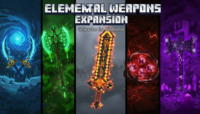
The Elemental Weapons Expansion is an innovative addon for Minecraft Bedrock designed to revolutionize your combat experience by introducing a unique collection of elemental katanas. This addon adds over 15 distinct katana types, each imbued with special abilities and visual effects that reflect its elemental nature, all while maintaining full compatibility with the game's achievement system. Developed with meticulous care, it integrates seamlessly with the latest versions of Minecraft Bedrock, ensuring a stable and enjoyable gameplay experience for all players.
Minecraft has always been a sandbox for creativity, and over time, players seek new ways to enhance their adventures. The Elemental Weapons Expansion fills this need by offering a fresh dimension to combat and exploration. Instead of relying on conventional swords, this addon empowers you to forge weapons that interact dynamically with the environment and grant unique tactical advantages in battles against mobs or even in multiplayer skirmishes. It's more than just adding weapons; it's an invitation to rethink your approach to combat, emphasizing strategy and versatility in choosing the right weapon for every situation, making you feel like a legendary warrior wielding the very forces of nature.
Key Features and Highlights
- Fire Katana: This legendary weapon engulfs your enemies in flames. Upon striking a mob, it immediately sets them ablaze, dealing damage over time. It can also be used to illuminate dark areas or melt snow and ice, adding a functional utility beyond combat.
- Ice Katana: The Ice Katana stands out with its power to slow down enemies and temporarily freeze them. On impact, foes are significantly decelerated, giving you crucial time to maneuver or escape. It can also freeze water blocks, making water crossings much easier.
- Thunder Katana: Command the power of lightning! Each strike from this katana has a chance to summon a lightning bolt, hitting the target and nearby enemies for massive area-of-effect damage. Perfect for clearing out large groups of hostile mobs.
- Earth Katana: This robust katana grants you the ability to deliver powerful knockback with every hit, pushing enemies away and creating breathing room in critical situations. Additionally, its special ability can summon a temporary earthen shield around the player, reducing incoming damage.
- Wind Katana: Light and swift, the Wind Katana significantly boosts your attack speed and grants a temporary jump boost. This makes it ideal for fast-paced combat and aerial maneuvers, allowing you to outmaneuver slower, ground-bound adversaries with ease.
- Light Katana: A sacred weapon that illuminates your path and banishes darkness. This katana deals extra damage to undead creatures and can temporarily blind enemies, giving you a tactical advantage in pitch-black environments.
- Void Katana: A mysterious weapon that allows you to manipulate space itself. Its special ability enables short-range teleportation or grants temporary invisibility, making it perfect for surprise attacks or escaping perilous encounters.
- Matching Elemental Armor Sets: Beyond the katanas, the addon introduces unique armor sets for each element. Each armor piece not only provides excellent protection but also grants passive bonuses aligned with its element, such as fire resistance with the Fire Armor or increased movement speed with the Wind Armor.
- Advanced Crafting System: The addon features a new crafting system that requires exploration to gather rare elemental ores and components. You'll need to construct a special "Elemental Forge" to craft these powerful weapons and armors.
- Full Achievement Compatibility: Unlike many modifications, Elemental Weapons Expansion is designed to be "Achievements Friendly," meaning you can still earn Minecraft achievements while using this addon, preserving the core game experience.
- High-Quality 3D Models and Textures: Each katana and armor piece is meticulously designed with high-quality 3D models and textures, adding stunning visual appeal to the game and making every weapon feel unique and formidable.
- Enhanced Survival Balance: All weapons and armor have been carefully balanced for survival gameplay. They are powerful, but obtaining them requires effort and exploration, ensuring that progression feels rewarding and doesn't break the game's core balance.
- Continuous Updates and Community Support: The addon developers are committed to providing regular updates, adding new content, improving existing features, and fixing any bugs, while actively listening to community feedback to ensure an excellent user experience.
- Strategic Gameplay Encouragement: The addon encourages players to think strategically about weapon choice. Facing a horde of zombies? The Thunder Katana is ideal. Battling a single, powerful foe? The Ice Katana will help you control the fight. This variety adds significant depth to combat.
- Data Pack Integration: The addon is delivered as a data pack for Minecraft Bedrock, ensuring easy installation and broad compatibility with different game versions, making future updates smoother and more accessible to all players.
How to Download and Install Elemental Weapons Expansion [ Achievements Friendly]
Installing the Elemental Weapons Expansion addon in Minecraft Bedrock is a straightforward process. Ensure you have the latest version of Minecraft Bedrock installed on your device and an active internet connection to download the files. This addon does not require any additional mod loaders like Forge or Fabric as it's designed as a native addon for the game.
- Download the Addon File: Begin by downloading the "Elemental Weapons Expansion.mcaddon" file from the trusted IQMOD website. Make sure you are downloading from the direct and secure link we provide to ensure no malicious files are present.
- Open the Downloaded File: Once the download is complete, simply double-click on the ".mcaddon" file you've downloaded. Your operating system will automatically recognize the file type and launch Minecraft. The game will then begin importing the addon automatically, displaying "Import Started..." followed by "Import Successful" once completed.
- Create a New World or Edit an Existing One: From the Minecraft main menu, select "Play," then "Create New World" or edit an existing world by clicking the pencil icon next to its name.
- Activate Resource and Behavior Packs: Within the world settings screen, navigate to the "Resource Packs" and "Behavior Packs" sections. Find "Elemental Weapons Expansion" under "My Packs" and click to activate it. Ensure it is activated in both sections (Resources and Behaviors) for the addon to function correctly.
- Enable Experimental Gameplay Features: This addon requires certain experimental features to be enabled for full functionality. In the world settings, go to the "Game" section and ensure options like "Holiday Creator Features," "Custom Biomes," and "Upcoming Creator Features" are toggled ON.
- Start Playing: After activating everything, click "Create" to generate a new world or "Play" to enter your modified world. You will now find the elemental katanas and their components available within the game.
For more detailed troubleshooting or manual installation guides, check out our comprehensive Minecraft Mods Installation Guide.
System Requirements and Compatibility
- Minecraft Version: 1.20.80+ (For optimal performance and compatibility, the latest stable version is recommended).
- Mod Loader: None (Functions as a direct Addon for Minecraft Bedrock).
- Platform: Minecraft Bedrock Edition (Windows 10/11, Xbox, Mobile, Nintendo Switch, PS4/PS5).
- Dependencies: No additional mods or addons required.
Pro Tips for Using Elemental Weapons Expansion [ Achievements Friendly]
To maximize your experience with the Elemental Weapons Expansion addon, consider these advanced tips:
- Diversify Your Arsenal: Don't rely on just one katana. Craft several types and keep them in your inventory. The Fire Katana is excellent for dark caves, while the Ice Katana is indispensable for crowd control. Use the Thunder Katana against large groups of zombies, and the Earth Katana for defense against sudden creeper attacks.
- Explore for Elemental Resources: Actively search for the new ores and resources introduced by the addon in different biomes. You might find fire-related ores in the Nether and ice-related ones in snowy biomes. These resources are crucial for crafting stronger katanas and armors.
- Understand Armor Abilities: Each elemental armor set grants unique passive abilities. For instance, the Fire Armor provides fire resistance, making it ideal for Nether exploration. The Wind Armor can boost your movement speed, aiding in quick exploration or evasion.
- Combine Abilities Strategically: Experiment with combining different katana abilities with your combat strategies. For example, use the Ice Katana to slow down a powerful enemy, then switch to the Fire Katana to deal maximum burning damage.
- Enable Experimental Gameplay: Always ensure all "Experimental Gameplay" options are enabled in your world settings. This guarantees that all features of the addon function correctly and prevents any potential gameplay issues.
- Optimize Hotbar Layout: Arrange your elemental katanas in your hotbar in a way that allows for rapid switching during combat. This can provide a critical tactical advantage in fast-paced engagements, letting you adapt to changing threats instantly.
Is Elemental Weapons Expansion [ Achievements Friendly] Safe and Free?
Yes, the Elemental Weapons Expansion addon is completely safe to use and entirely free. All files provided on IQMOD are regularly scanned to ensure they are free from any malware or viruses. We are committed to delivering high-quality, secure content to the Minecraft community. You can download this addon with complete confidence, knowing it will not harm your device or compromise your data. Addons are sourced directly from their original creators or highly reputable sources, and their safety is verified before being made available for download. Our goal at IQMOD is to provide a safe and reliable download experience for all our users.
Why Download from IQMOD?
When you choose to download the Elemental Weapons Expansion addon from IQMOD, you guarantee yourself a hassle-free and secure experience. We provide direct and fast download links, meaning no intrusive ads or unnecessary redirect pages hinder your path. Our addons are regularly updated to be compatible with the latest Minecraft versions, ensuring you always have access to the most current and best available releases. Furthermore, the IQMOD support team is available to assist you with any inquiries or issues you might encounter during installation or usage. Choose IQMOD for unparalleled reliability and a seamless, completely free download experience. Download Elemental Weapons Expansion now and elevate your Minecraft Bedrock adventures!
Elemental Weapons Expansion Addon for MC Bedrock - Download Minecraft Mod Screenshots
View images and verify quality before download
Image Gallery
Elemental Weapons Expansion Addon for MC Bedrock - Download Technical Information
Learn technical details, version, and supported platform
Technical Specifications

Your Own Minecraft Server! 🎮
Start your own server with friends on BisectHosting — insane performance, one-click mod installs, and 24/7 support. Use the discount code and start at the lowest price!
Download and Share
Download for free or share it with friends
Additional Files Required
This mod requires additional files to work properly
Get the advantage!
Subscribe for early access to exclusive mods and direct downloads without timers or ads.
Mod not opening in Minecraft? This applies to Bedrock edition only (mobile/console) — the issue is your file manager, not the mod. Use our app IQ OpenMC to open the file and it will give you the option to open it in Minecraft directly. (Java players don't need this step)