

Copper Plus Mod for Minecraft - Download & Install
Download Copper Plus Mod for Minecraft 1.21 - adds powerful copper tools, armor, and an alloy system. Craft Thunder Swords & Ferro-Copper gear. Free from IQMOD!
Everything About Copper Plus Mod for Minecraft - Download & Install
Read the full article about the mod
What is Copper Plus?
Copper Plus is a unique addon for Minecraft Bedrock Edition, specifically designed to enhance and expand the utility of copper within the game. This mod introduces the ability to craft a full suite of powerful copper tools and armor, alongside an innovative alloy system that allows players to combine copper with other metals, such as gold, to forge new and more potent materials. Compatible with Minecraft version 1.21.101 and beyond, Copper Plus serves as a significant enhancement for players eager to maximize the potential of their in-game resources.
Historically, copper has been an abundant yet underutilized resource in vanilla Minecraft, primarily serving aesthetic purposes in building blocks and decorative items. Copper Plus fundamentally transforms this reality, elevating copper from a mere visual element to a vital component in the journey of survival and adventure. The mod aims to bridge the gap in copper's applications, offering players novel crafting and combat options that add strategic depth and variety to their equipment and weaponry. It represents a forward leap in customizing the Minecraft experience, unlocking new avenues for exploration and innovation within the game's vast world, and providing a fresh incentive to mine this often-overlooked ore in greater quantities.
Key Features and Highlights
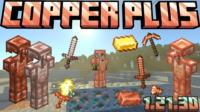
- Comprehensive Copper Toolset: The mod enables the crafting of a complete range of copper tools, including a pickaxe, axe, shovel, sword, and hoe. These tools boast decent durability and moderate mining efficiency, making them an excellent choice for early to mid-game progression, effectively bridging the gap between stone and iron tools with a new, viable option.
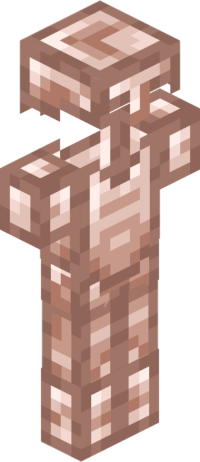
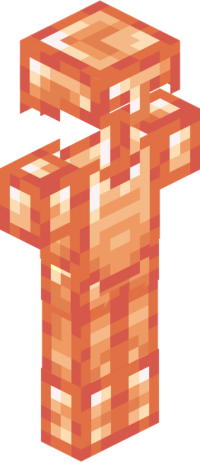
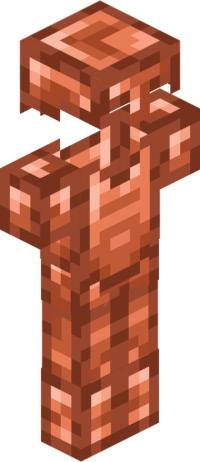
- Protective Copper Armor: Augment your arsenal with robust copper armor, offering moderate damage protection. Players can now craft a copper helmet, chestplate, leggings, and boots, providing an additional tier of defense before advancing to iron or diamond gear, and offering a distinct aesthetic appeal.
- Advanced Alloy System: Copper Plus introduces the "Alloy Table" as a new functional block. This table is the cornerstone of the mod, allowing players to smelt and combine different metals to produce stronger and more effective materials, thereby revolutionizing the crafting process and adding strategic depth to resource management.
- Copper-Gold Alloy: Utilizing the Alloy Table, players can combine copper with gold to create a unique new ingot. This alloy possesses distinctive properties, blending the durability of copper with the inherent value of gold, serving as a crucial ingredient for crafting even more powerful items and giving gold a practical, early-game utility.
- Ferro Copper Material: The mod also features "Ferro Copper," another advanced alloy produced via the Alloy Table. This material is noted for being even more robust and potent than the Copper-Gold Alloy, destined for the creation of high-tier tools and armor with special attributes, making it a desirable resource for endgame players.
- Thunder Sword: One of the most exciting and prominent additions is the "Thunder Sword." This formidable weapon, crafted from the mod's advanced materials (likely Ferro Copper alloys), is designed to inflict substantial damage. It may also possess unique abilities such as summoning lightning upon impact or significantly boosting attack speed, making it a game-changer in challenging combat scenarios.
- New Ingredient - Wax: The mod's description mentions the inclusion of "Wax" as an obtainable item. Wax likely serves as a component in various new crafting recipes, perhaps for polishing copper tools to enhance their properties, or as an essential ingredient in the creation of the powerful Thunder Sword, adding a layer of complexity to item creation.
- Expanded Crafting Recipes: Copper Plus integrates a wide array of new crafting recipes for all its introduced items, including the copper tools, armor, Copper-Gold Alloy, Ferro Copper, and the legendary Thunder Sword. These recipes are seamlessly incorporated into Minecraft's existing crafting interface, making them intuitive to learn and use.
- Balanced Gameplay Integration: The mod is meticulously designed to ensure balanced gameplay. While introducing powerful new gear, it carefully calibrates their properties to align with the progression stage at which players can acquire them, preventing the game from becoming overly easy or unfairly difficult, and maintaining the core Minecraft challenge.
- Broad Compatibility: Copper Plus is engineered for compatibility with most other addons and data packs available for Minecraft Bedrock Edition. This ensures a smooth gaming experience without conflicts, allowing players to seamlessly integrate it with their existing modded setups.
- Continuous Updates: The developers are committed to regularly updating the mod to support the latest Minecraft Bedrock Edition versions, introducing new content, features, and promptly addressing any bugs or issues that may arise, ensuring the mod remains relevant and functional.
- Enhanced Visuals and Aesthetics: While adding new items, the mod maintains the quintessential Minecraft art style. Subtle visual enhancements ensure that the new copper tools and armor integrate naturally and appear appealing within the game's environment, enhancing overall immersion.
- Seamless Integration: Once installed, Copper Plus integrates effortlessly into your existing Minecraft worlds. There's no need to start a new world to enjoy its features; all new materials and crafting options will become available within your current save, saving you time and effort.
- Encourages Exploration: By making copper a far more valuable and versatile resource, the mod incentivizes players to actively explore caves and mines in search of copper ore deposits. This adds a renewed sense of purpose and value to exploration activities, making every mining trip more rewarding.
- Efficient Copper Farming: With the increased importance of copper, players can now strategically design and build automated or semi-automated copper farms. This could involve using copper golems (if available through other addons) or mob traps that drop copper, ensuring a consistent supply of this valuable resource and adding a strategic dimension to base building and resource management.
How to Download and Install Copper Plus
Installing the Copper Plus mod is a straightforward process, especially since it functions as an addon for Minecraft Bedrock Edition. First, ensure you have Minecraft version 1.21.101 or newer installed on your device. Follow these steps to successfully install the mod and begin enjoying its new features:
- Download the Mod File: Start by downloading the Copper Plus file, typically in ".mcaddon" or ".mcpack" format, from a trusted source like IQMOD. Make sure to save the file in an easily accessible location on your device, such as your Downloads folder, and always verify the source to ensure file integrity.
- Open the Mod File: Once the download is complete, simply double-click on the ".mcaddon" or ".mcpack" file you've downloaded. Your operating system will automatically recognize and open it using your Minecraft game application. You might need to confirm Minecraft as the default application for these file types if prompted.
- Import the Mod into Minecraft: Upon opening the file, a message will appear within the game indicating that the import process for the Behavior Pack and Resource Pack components of the mod has begun. Wait until you see a confirmation message stating "Copper Plus successfully imported" at the top of your screen, signaling a successful installation.
- Activate the Mod in a New or Existing World:
- For a New World: When creating a new world, navigate to the "Behavior Packs" and "Resource Packs" sections in the world settings. Activate the Copper Plus pack from both sections. It is crucial to also enable any "Experimental Gameplay" toggles or "Creator Features" that the mod might require for full functionality, as many Bedrock addons rely on these.
- For an Existing World: Open the settings for the existing world you wish to add the mod to. Go to the "Behavior Packs" and "Resource Packs" sections and activate the Copper Plus pack for both. Remember to save your changes before exiting the world settings to ensure the mod is applied correctly.
- Start Playing: Once the mod is activated in your world, launch the game. You will find that all the new features, such as copper tools, armor, and the Alloy Table, are now available for you to explore and utilize within your Minecraft adventure. Begin by gathering copper and exploring the new crafting possibilities.
For a comprehensive guide on troubleshooting or general mod installation, refer to our Minecraft Mods Installation Guide on IQMOD.
System Requirements and Compatibility
- Minecraft Version: 1.21.101 or newer (Bedrock Edition). Ensure your game is updated to the latest version for optimal performance and compatibility.
- Mod Loader: No additional mod loader is required; it installs directly as an addon within Minecraft Bedrock. This simplifies the installation process significantly compared to Java Edition mods.
- Platform: Bedrock Edition (compatible with Windows 10/11, Xbox, PlayStation, Nintendo Switch, Android, iOS). The mod functions across all platforms that support Minecraft Bedrock.
- Dependencies: Copper Plus does not require any other mods or addons to function correctly. It is a standalone enhancement, making it easy to integrate into any setup.
Pro Tips for Using Copper Plus
To get the most out of the Copper Plus mod and enjoy a truly enriched gameplay experience, consider these advanced tips:
- Prioritize Copper Mining: With copper's newfound utility, make it a priority to mine significant quantities of it early in your game. Copper ore deposits are abundant in deeper caves and mountainous biomes. Invest in a copper pickaxe early on to expedite your copper collection efforts, as it offers a good balance of speed and durability for its tier.
- Establish a Copper Farm: As you progress, consider designing and building an automated or semi-automated copper farm. This could involve utilizing copper golems (if available through other addons) or mob traps that drop copper, ensuring a consistent and plentiful supply of this valuable resource, freeing you from constant manual mining and allowing focus on other endeavors.
- Invest in the Alloy Table: Do not overlook the Alloy Table. It is your gateway to crafting the most powerful items in this mod. Place it in a secure location within your base and dedicate a nearby chest to store readily available copper and gold for smelting, streamlining your advanced crafting processes.
- Master the Thunder Sword: The Thunder Sword is likely the mod's ultimate late-game weapon. Carefully research its crafting components, as it may require rare materials or multi-step crafting processes. Wielding it in battles against bosses or formidable mobs will significantly turn the tide in your favor, making tough encounters manageable.
- Mix and Match Armor: Feel free to combine pieces of copper armor with other types of gear. For example, you might use a copper helmet and boots alongside an iron or diamond chestplate and leggings to achieve a balanced blend of protection and resource cost, allowing for flexible defensive strategies.
- Stockpile Wax: If the mod introduces wax as an item, make sure to collect and store it diligently. Often, new items that seem inconsequential at first become crucial components for advanced recipes or significant upgrades later in the game, so having a good supply will ensure you're prepared for future crafting needs.
Is Copper Plus Safe and Free?
Yes, the Copper Plus mod is completely safe to use and entirely free. All mods and addons available on IQMOD undergo rigorous scanning and verification processes to ensure they are free from any malicious software, viruses, or other issues that could harm your device or disrupt your game. We are committed to providing reliable and free content to the Minecraft community. You can download this mod with absolute confidence from IQMOD, knowing you are getting a clean, secure, and up-to-date version. Enjoy your enhanced Minecraft experience without any concerns about safety or hidden costs, as your security is our top priority.
Why Download from IQMOD?
When you choose to download the Copper Plus mod from IQMOD, you are ensuring yourself the best possible experience. We provide direct and fast download links, completely free from intrusive advertisements and annoying pop-ups that hinder your download process. All our mods are regularly updated to be compatible with the latest Minecraft versions, guaranteeing you access to the newest features and bug fixes. Furthermore, we offer dedicated technical support to assist you with any questions or issues you might encounter during installation or use, ensuring a smooth and enjoyable experience. Don't waste your time searching elsewhere; download Copper Plus from IQMOD now and elevate your Minecraft adventure without limits!
Copper Plus Mod for Minecraft - Download & Install Minecraft Mod Screenshots
View images and verify quality before download
Image Gallery


Copper Plus Mod for Minecraft - Download & Install Technical Information
Learn technical details, version, and supported platform
Technical Specifications

Your Own Minecraft Server! 🎮
Start your own server with friends on BisectHosting — insane performance, one-click mod installs, and 24/7 support. Use the discount code and start at the lowest price!
Download and Share
Download for free or share it with friends
Additional Files Required
This mod requires additional files to work properly
Get the advantage!
Subscribe for early access to exclusive mods and direct downloads without timers or ads.
Mod not opening in Minecraft? This applies to Bedrock edition only (mobile/console) — the issue is your file manager, not the mod. Use our app IQ OpenMC to open the file and it will give you the option to open it in Minecraft directly. (Java players don't need this step)