

Construction Wan(d)'s Mod for Minecraft - Download & Install
Download Construction Wan(d)'s Mod for Minecraft. Build massive structures with precision and speed using advanced patterns and modes. Supports Survival and Creative. Free download from IQMOD!
Everything About Construction Wan(d)'s Mod for Minecraft - Download & Install
Read the full article about the mod
What is Construction Wan(d)'s?
Construction Wan(d)'s is an innovative Minecraft addon designed to revolutionize the building process, allowing players to construct intricate structures with unparalleled speed and precision. This mod introduces powerful wands that enable placing blocks in advanced patterns and various modes, making large-scale construction quick and efficient, and it is fully compatible with recent Minecraft versions like 1.20.1.
This mod stands out as an indispensable tool for architects and builders within the Minecraft universe, offering a seamless construction experience that transcends the limitations of manual block placement. Whether you're erecting a colossal castle, an entire city, or simply a detailed farm, Construction Wan(d)'s provides the necessary tools to accomplish your goals with unprecedented speed and accuracy. It injects a new layer of creativity and productivity into the game, making it a must-have addition for any serious builder or player looking to save time and effort.
Key Features and Highlights
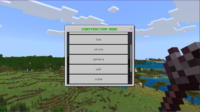
- Advanced Pattern Placement: The mod offers a diverse array of pre-defined building patterns, including straight lines, walls, circles, spheres, hollow cubes, and even complex 3D shapes. Players can select the pattern that best suits their project and apply blocks across vast areas with a single click. For instance, you can effortlessly construct a 50-block long wall in mere seconds.
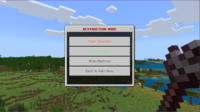
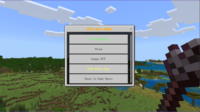
- Multiple Construction Modes: Beyond static patterns, the mod introduces dynamic modes for block placement. These include a "Fill" mode to quickly populate a designated area, a "Replace" mode to swap existing block types with new ones, a "Mirror" mode for perfectly symmetrical constructions, and a "Copy/Paste" mode to duplicate and relocate sections of your build.
- Survival and Creative Integration: The mod's functionalities adapt based on your game mode. In Creative, you'll enjoy unlimited reach, instantaneous placement, and access to all patterns and modes without resource constraints. In Survival, wands require specific crafting recipes, have a limited range, and may consume resources, adding a balanced challenge to their powerful utility.
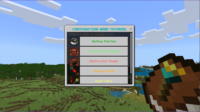
- Intuitive Graphical User Interface (GUI): Construction Wan(d)'s boasts an easy-to-navigate GUI that allows players to effortlessly switch between patterns, modes, and select desired block types. Typically accessed by right-clicking with a wand, this interface provides comprehensive control over your construction project, minimizing guesswork.
- Customizable Block Selection: Players can utilize virtually any block available in Minecraft, including those from other mods, with their construction wands. This grants boundless creative freedom, enabling the design of structures from common cobblestone to rare decorative blocks, ensuring your vision is never limited by material.
- Visual Projection System: The wands incorporate a clear visual projection system that outlines the area where blocks will be placed before execution. This pre-visualization helps players anticipate the final outcome, preventing errors and allowing for precise adjustments to range and direction, ensuring optimal accuracy.
- Performance Optimized: The mod is engineered for efficiency, ensuring minimal impact on your game's frame rate (FPS), even when constructing incredibly large structures. It utilizes optimized algorithms for rapid and efficient block placement, maintaining a smooth gameplay experience.
- Balanced Crafting (Survival): For Survival mode players, the construction wands require specific, balanced crafting components. This makes them valuable tools to earn through gameplay progression, rather than easily acquired overpowered items, integrating them seamlessly into the Minecraft economy.
- Achievement Compatibility: Unlike some modifications that disable achievements, Construction Wan(d)'s ensures that all in-game achievements remain enabled in your world. This means you can leverage the benefits of rapid construction without sacrificing your progress or the satisfaction of earning milestones.
- Multiplayer Support: The mod is fully compatible with multiplayer servers, empowering teams and communities to collaborate on massive building projects with significantly enhanced efficiency. Server administrators can manage permissions if necessary, ensuring fair play.
- Regular Updates and Support: Construction Wan(d)'s benefits from consistent developer support and regular updates. This commitment ensures ongoing compatibility with the latest Minecraft versions, continuous introduction of new features, and performance enhancements, keeping the mod fresh and functional.
How to Download and Install Construction Wan(d)'s
To install Construction Wan(d)'s mod, you will first need a compatible mod loader for your specific Minecraft version, such as Fabric. This process is straightforward and will enable you to enjoy all the fantastic features this mod has to offer.
- Download Fabric Loader: Visit the official Fabric website (fabricmc.net) and download the Fabric Installer. Ensure you select the installer version that matches your desired Minecraft version, for example, 1.20.1.
- Install Fabric: Run the Fabric Installer you just downloaded. A simple window will appear. Confirm that the correct Minecraft version is selected, then click the "Install" button. The installer will create a new profile in your Minecraft launcher.
- Download Construction Wan(d)'s Mod: Now, it's time to download the mod file itself. Navigate to the Construction Wan(d)'s download page on IQMOD. Locate the direct download link for the mod, ensuring it is compatible with both your Minecraft version and the Fabric loader you've installed. The mod file will typically be a .jar file.
- Move the Mod File to Your Mods Folder: After downloading the .jar file for the mod, locate your Minecraft game directory. You can usually access this by opening your Minecraft launcher, going to "Installations," hovering over your Fabric profile, and clicking the folder icon that appears. Inside your Minecraft directory, find a folder named "mods." If it doesn't exist, create one. Drag and drop the downloaded .jar file into this "mods" folder.
- Launch Minecraft: Open your Minecraft launcher. From the profile dropdown menu (usually in the bottom-left corner), select the Fabric profile you just installed (e.g., "fabric-loader-1.20.1"). Click "Play" to start the game. The Construction Wan(d)'s mod should now be successfully installed and active in your worlds.
For a complete guide, check out our Minecraft Mods Installation Guide.
System Requirements and Compatibility
- Minecraft Version: 1.20.1 (and likely compatible with newer versions)
- Mod Loader: Fabric Loader (requires Fabric API)
- Platform: Java Edition
- Dependencies: Fabric API (essential for most Fabric mods to function)
Pro Tips for Using Construction Wan(d)'s
To maximize your efficiency and creativity with Construction Wan(d)'s mod, consider these advanced tips:
- Pre-plan Complex Builds: Before embarking on massive projects like intricate castles or sprawling cities, sketch out a simple blueprint on paper or experiment in Creative mode. This helps visualize the final outcome and determine the most effective patterns and modes for each section, saving significant time during actual construction.
- Leverage Mirror Mode for Symmetry: When building structures that demand perfect symmetry, such as a building facade or a castle wing, utilize the "Mirror" mode. Define a central point, and your wand will automatically replicate your construction on the opposite side, eliminating tedious manual measurement and alignment.
- Utilize Copy/Paste for Repetitive Elements: Do you have a tower or a wall segment you want to duplicate multiple times? Employ the "Copy/Paste" function. Select the region you wish to copy, then paste it into new locations. This is ideal for quickly creating rows of identical pillars or recurring architectural features.
- Careful Block Selection for Replace Mode: When using "Replace" mode, be precise in selecting the blocks you intend to swap. You can rapidly replace specific blocks (e.g., grass with gravel) over a large area. This feature is incredibly useful for terraforming or altering primary building materials without demolishing and rebuilding.
- Adjust Range and Precision: In Survival mode, your wand's range might be limited. Use this to your advantage by focusing on smaller, manageable sections. In Creative, you can significantly extend the range, but be cautious not to accidentally build colossal structures. Practice adjusting the range for optimal control and precision.
- Combine with Other Building Mods: Construction Wan(d)'s integrates beautifully with other mods that add new blocks or design tools. For instance, you can use the construction wands to lay down the massive foundational structures, then employ furniture or decorative mods to add the intricate, finer details to your builds.
Is Construction Wan(d)'s Safe and Free?
Yes, Construction Wan(d)'s mod is completely safe to use and entirely free to download. At IQMOD, we are committed to providing thoroughly vetted and malware-free mods to ensure a secure and enjoyable gaming experience for all our users. All files are rigorously scanned before being made available for download, and the mod is sourced from trusted origins and its original developers. You can download this mod with complete confidence, enjoying its fantastic features without any concerns about the security of your device or Minecraft account.
Why Download from IQMOD?
When you choose to download Construction Wan(d)'s from IQMOD, you guarantee yourself the best possible experience. We offer direct and lightning-fast download links, completely free from the intrusive ads and pop-ups often found on other sites. We ensure all our mods are constantly updated to maintain compatibility with the latest Minecraft versions and deliver optimal performance. Furthermore, the IQMOD support team is always available to assist you with any questions or issues you might encounter during installation or use. Don't waste your time sifting through untrustworthy sources; download Construction Wan(d)'s from IQMOD now and start building like a pro!
Construction Wan(d)'s Mod for Minecraft - Download & Install Minecraft Mod Screenshots
View images and verify quality before download
Image Gallery


Construction Wan(d)'s Mod for Minecraft - Download & Install Technical Information
Learn technical details, version, and supported platform
Technical Specifications

Your Own Minecraft Server! 🎮
Start your own server with friends on BisectHosting — insane performance, one-click mod installs, and 24/7 support. Use the discount code and start at the lowest price!
Download and Share
Download for free or share it with friends
Get the advantage!
Subscribe for early access to exclusive mods and direct downloads without timers or ads.
Mod not opening in Minecraft? This applies to Bedrock edition only (mobile/console) — the issue is your file manager, not the mod. Use our app IQ OpenMC to open the file and it will give you the option to open it in Minecraft directly. (Java players don't need this step)