

Comforts Mod for Minecraft - Download & Install
Download Comforts Mod for Minecraft – adds 16 colored sleeping bags and hammocks that preserve your spawn point. Ideal for adventurers and exploration. Get it free from IQMOD!
Everything About Comforts Mod for Minecraft - Download & Install
Read the full article about the mod
What is Comforts?
Comforts is a highly practical Minecraft mod that introduces sleeping bags and hammocks to the game. These items function similarly to traditional beds by allowing players to skip through the night or day, but with a crucial distinction: they do not set a player's spawn point upon use. This innovative feature ensures that your designated home base spawn point remains undisturbed, providing peace of mind for adventurers. Developed by TheIllusiveC4, Comforts supports various Minecraft versions and mod loaders like Fabric, Forge, and Quilt.
The mod addresses a common dilemma faced by explorers and builders who venture far from their main base. Standard beds, while convenient for skipping night, can inadvertently change a player's spawn point to a dangerous or inconvenient location. Comforts eliminates this risk, offering a portable, stackable, and safe alternative. Its introduction has been widely welcomed in the modding community for enhancing gameplay convenience and strategy, especially for long-distance expeditions and temporary encampments.
Key Features and Highlights
- Sleeping Bags: These versatile items allow players to skip the night cycle without resetting their spawn point. They are incredibly useful for adventurers who need to pass the night safely in remote locations, avoiding hostile mobs and preserving their home spawn.
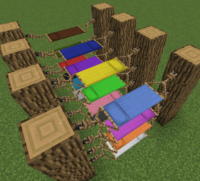
- Hammocks: Functioning as an 'inverse bed,' hammocks allow players to skip the day cycle and turn it into night. This unique feature is perfect for players who prefer night-time activities, such as mob farming, exploring dark caves, or simply enjoying the game's nocturnal ambiance.
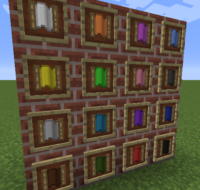
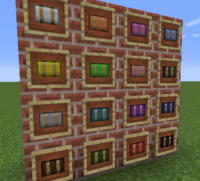
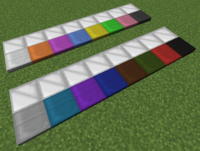
- 16 Vibrant Colors: Both sleeping bags and hammocks are available in all 16 standard Minecraft dye colors. This allows for extensive customization, enabling players to match their gear to their aesthetic preferences, differentiate items, or color-code their temporary camps.
- Stackable Sleeping Bags: A standout feature, sleeping bags are stackable up to 64 per inventory slot. This makes them incredibly efficient for inventory management, allowing adventurers to carry multiple bags without sacrificing precious space for resources and tools.
- Spawn Point Preservation: The core benefit of Comforts is its ability to let you sleep or skip time without altering your designated spawn point. Your last activated bed at your home base remains your respawn location, providing a safety net for all your explorations.
- Highly Portable: Due to their stackability and compact nature, sleeping bags are the ultimate portable shelter. They can be deployed and picked up instantly, making them ideal for setting up temporary safe zones anywhere in the Minecraft world.
- Quick Time Skip: Using a sleeping bag or hammock is instantaneous. Simply right-click on the placed item, and the time will fast-forward, allowing you to quickly transition between day and night cycles without any delays.
- Resource-Efficient Crafting: Crafting sleeping bags requires relatively simple materials (wool and string), and since they are stackable, you'll need fewer resources overall compared to crafting multiple beds for similar utility.
- Broad Compatibility: Comforts mod is designed to be compatible with a wide range of Minecraft versions, typically from 1.16.5 up to the latest releases, and supports major mod loaders like Fabric, Forge, and Quilt, ensuring accessibility for most players.
- Seamless Integration: The design and functionality of Comforts items blend naturally with vanilla Minecraft, offering an enhanced experience without feeling out of place. The crafting recipes are intuitive and fit within the game's existing mechanics.
- Avoid Night Dangers: By using a sleeping bag, players can safely bypass the perilous night, avoiding encounters with creepers, zombies, and other hostile mobs, thus preserving health and inventory.
- Strategic Gameplay Opportunities: Hammocks offer strategic advantages for players focused on specific game mechanics. For example, quickly turning day into night can optimize mob farm efficiency or accelerate certain time-sensitive processes.
- Multiplayer Friendly: In multiplayer environments, Comforts provides individual players with the flexibility to manage their own sleep cycles without affecting the collective spawn point, which can be particularly useful in large-scale adventures or server events.
- No Dependencies: The Comforts mod is a standalone addition, meaning it does not require any other mods to function, simplifying the installation process and reducing potential conflicts with other installed mods.
- Aesthetic Choice: The array of colors available for both items allows players to make aesthetic choices that reflect their personal style or the theme of their build, adding a touch of personalization to their survival tools.
How to Download and Install Comforts
To successfully download and install the Comforts mod, you'll first need to ensure you have the appropriate mod loader (Forge, Fabric, or Quilt) installed for your specific Minecraft version. Follow these detailed steps:
- Install a Mod Loader: If you haven't already, download and install a mod loader like Forge, Fabric, or Quilt that matches your desired Minecraft version. You can find official download links on their respective websites (e.g., files.minecraftforge.net or fabricmc.net). Ensure you select the correct version for your game.
- Download the Comforts Mod File: Navigate to the Comforts mod download page on IQMOD.ME. Select the version of the mod that corresponds to your installed mod loader (Forge, Fabric, or Quilt) and your Minecraft version. Click the direct download link to save the
.jarfile to your computer. - Locate Your Minecraft 'mods' Folder: After installing your mod loader, launch Minecraft once with the mod loader profile selected to generate the necessary folders. Then, close the game. To find your 'mods' folder, type
%appdata%/.minecraft/modsinto your Windows search bar or navigate to~/Library/Application Support/minecraft/modson macOS. - Place the Mod File into the Folder: Drag and drop the downloaded Comforts
.jarfile into the 'mods' folder you located in the previous step. Ensure the.jarfile is directly inside the 'mods' folder and not within any subfolders. - Launch Minecraft with Mod Loader Profile: Open your Minecraft Launcher again. Make sure the profile for your installed mod loader (e.g., 'Forge' or 'Fabric Loader') is selected before clicking 'Play.' Comforts should now be successfully installed and active in your game.
For a complete guide, check out our Minecraft Mods Installation Guide.
System Requirements and Compatibility
- Minecraft Version: Compatible with Minecraft versions 1.16.5 through 1.19.2 (Fabric), 1.19.3 (Forge), and various newer versions.
- Mod Loader: Forge, Fabric, Quilt.
- Platform: Java Edition.
- Dependencies: Comforts mod does not require any other mods to function, making it a standalone addition to your game.
Pro Tips for Using Comforts
To maximize your comfort and efficiency with the Comforts mod in Minecraft, consider these advanced tips for integrating sleeping bags and hammocks into your gameplay:
- Emergency Shelter in Dangerous Dimensions: Always carry a stack of sleeping bags when venturing into the Nether or the End. While you can't sleep in these dimensions, having a sleeping bag allows you to quickly establish a temporary safe zone on the Overworld side before re-entering, or to simply pass the night in a safe spot without returning to your main base.
- Strategic Day/Night Cycling with Hammocks: Utilize hammocks not just for aesthetics, but for strategic time manipulation. If you're building a mob farm that's more efficient at night, a hammock allows you to instantly switch to night, accelerating your farming process. Conversely, if you need daylight for construction, sleep through the night with a sleeping bag.
- Color-Coded Camps: Leverage the 16 available colors to organize your temporary bases or differentiate purposes in multiplayer. For instance, a red sleeping bag might signify a 'danger zone' camp, while a green one marks a 'safe resource' spot. In team play, each member can have a unique color.
- Combine with Inventory Management Mods: Enhance the utility of stackable sleeping bags by pairing Comforts with inventory management mods like Shulker Box Tooltips or Backpacks. This allows for even more efficient storage and quick access to your portable shelters, ensuring you're always prepared.
- Temporary Spawn Point Protection (Caution): While Comforts preserves your main spawn point, you can still use a regular bed to set a temporary spawn point for a specific, dangerous task (e.g., a boss fight) and then rely on sleeping bags for general time skipping, returning to your main base spawn after the task is complete (or if you die). This offers a nuanced approach to spawn management.
- Aesthetic Integration in Builds: Don't just view sleeping bags and hammocks as purely functional. Their diverse color palette and unique models (compared to beds) make them excellent decorative elements. Integrate them into adventure maps, custom bases, or role-playing scenarios to add realism and a touch of lived-in charm to your builds.
Is Comforts Safe and Free?
Absolutely, the Comforts mod is both safe and completely free to download and use. At IQMOD.ME, we prioritize the safety and security of our users. All mods, including Comforts, undergo thorough checks to ensure they are free from malware, viruses, or any harmful software. We are committed to providing reliable, high-quality content sourced from trusted developers. You can download Comforts and other mods from our platform with complete confidence, knowing you're getting a secure and free gaming enhancement.
Why Download from IQMOD?
IQMOD.ME is your premier destination for downloading Minecraft mods, offering a seamless and reliable experience for the Comforts mod. We provide direct, high-speed download links, free from intrusive ads or annoying pop-ups, ensuring you get your mod without hassle. Our content is consistently updated to guarantee compatibility with the latest Minecraft versions, and our dedicated support team is always ready to assist with any questions or issues you may encounter. Don't wait – download the Comforts mod from IQMOD now and embark on your adventures with unparalleled convenience and security!
Comforts Mod for Minecraft - Download & Install Minecraft Mod Screenshots
View images and verify quality before download
Image Gallery
Comforts Mod for Minecraft - Download & Install Technical Information
Learn technical details, version, and supported platform
Technical Specifications

Your Own Minecraft Server! 🎮
Start your own server with friends on BisectHosting — insane performance, one-click mod installs, and 24/7 support. Use the discount code and start at the lowest price!
Download and Share
Download for free or share it with friends
Get the advantage!
Subscribe for early access to exclusive mods and direct downloads without timers or ads.
Mod not opening in Minecraft? This applies to Bedrock edition only (mobile/console) — the issue is your file manager, not the mod. Use our app IQ OpenMC to open the file and it will give you the option to open it in Minecraft directly. (Java players don't need this step)