

Biomes O' Plenty Mod for Minecraft - Download & Install
Download Biomes O' Plenty Mod - adds 70+ unique biomes and hundreds of new blocks/plants to Minecraft. Explore diverse worlds! Free from IQMOD!
Everything About Biomes O' Plenty Mod for Minecraft - Download & Install
Read the full article about the mod
What is Biomes O' Plenty?
Biomes O' Plenty is a monumental Minecraft mod designed to vastly expand the game's world generation by introducing dozens of new, unique, and vanilla-esque biomes across the Overworld, Nether, and End dimensions. This mod transforms exploration into an unparalleled adventure, adding a slew of new plants, flowers, trees, and building blocks that seamlessly integrate with the new environments. It requires GlitchCore for Minecraft 1.20.4 and above, Fabric API for the Fabric version, and TerraBlender (Forge, NeoForge, Fabric) for Minecraft 1.20.1 (mod version 19.0.0.91+) and later versions.
For over a decade, Biomes O' Plenty has stood as one of the most beloved and essential world generation mods in the Minecraft community. Its enduring popularity stems from its commitment to delivering an authentic yet vastly diversified Minecraft experience. Unlike simpler biome mods, Biomes O' Plenty doesn't just add a few new areas; it introduces a comprehensive overhaul of world generation, ensuring that every new seed offers unique landscapes and challenges. From towering Redwood Forests to vibrant Lavender Fields and mysterious Fungi Forests, the mod consistently delivers fresh content that encourages endless exploration. Its profound impact on gameplay lies in its ability to reignite the sense of discovery, compelling players to venture further, adapt to new environments, and utilize the unique resources found within each distinct biome, making every playthrough feel new and exciting.
Key Features and Highlights
- Expansive Biome Diversity: Biomes O' Plenty introduces over 70 distinct biomes to Minecraft's Overworld, Nether, and End dimensions. This massive expansion means players will encounter a breathtaking array of landscapes, from serene meadows to treacherous volcanic regions, ensuring that no two exploration trips feel the same.
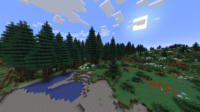
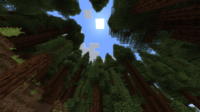
- Rich Overworld Environments: Discover a wealth of new Overworld biomes such as the majestic Redwood Forests with their colossal trees, the vibrant Lavender Fields bursting with purple flora, or the dense Bamboo Forests. Other notable additions include the tranquil Origin Valley, the colorful Mystical Forest, and the resource-rich Oasis, each offering unique aesthetics and resources.
- Dynamic Nether Transformation: The Nether receives a significant overhaul with biomes like the fiery Volcano Valleys, the eerie Fungi Forests, and various other hellish landscapes. These additions make the Nether a more diverse and challenging dimension to explore, providing new opportunities for resource gathering and base building.
- Revitalized End Dimension: Even the often-overlooked End dimension is enhanced with new biomes, encouraging further exploration after defeating the Ender Dragon. These new End biomes offer unique terrain generation and potential resources, giving players more reasons to return to this final frontier.
- New Flora and Fauna: The mod introduces numerous new tree types, including the towering Redwoods, lush Mangrove, and delicate Sakura trees, providing extensive options for builders. Additionally, hundreds of new flowers, grasses, and other plant life adorn the new biomes, adding to their visual richness and ecological diversity.
- Unique Building Blocks: With each new biome comes a variety of corresponding building blocks. This includes new wood types, unique soil blocks, distinct stone variations, and decorative foliage. These additions empower players to create structures that perfectly blend with, or dramatically contrast against, the diverse landscapes.
- Seamless World Generation: Biomes O' Plenty integrates seamlessly with Minecraft's existing world generation system. It can be configured to generate worlds exclusively with its biomes or to blend them with vanilla biomes, providing a natural and cohesive world map that feels both familiar and refreshingly new.
- Exclusive Resources and Items: Some biomes may contain unique ores, plants, or other resources not found in vanilla Minecraft. These exclusive items can be used in crafting new tools, food, or decorative blocks, encouraging players to explore specific biomes to gather rare materials.
- Enhanced Exploration Mechanics: The sheer variety of biomes fundamentally changes the exploration experience. Players are constantly rewarded with new sights, challenges, and opportunities, making every journey across their world a genuine adventure rather than a repetitive trek through familiar terrain.
- Extensive Compatibility: Designed with compatibility in mind, Biomes O' Plenty works well with most other Minecraft mods, especially those that don't extensively alter world generation. Its use of libraries like TerraBlender ensures better integration with other mods that add new blocks or items.
- Customizable World Types: For players who desire more control, the mod offers various world types and configuration options. You can fine-tune biome generation rates, enable or disable specific biomes, and even create custom world presets to tailor your Minecraft experience exactly to your preferences.
- Stunning Visuals: The new biomes are not just geographically diverse; they are visually stunning. From cascading waterfalls in mountainous regions to glowing flora in mystical forests, the mod adds a layer of aesthetic beauty that significantly enhances Minecraft's graphical appeal.
- Renewed Gameplay Experience: Biomes O' Plenty breathes new life into Minecraft, making even seasoned players feel like they are rediscovering the game. The vast new worlds offer fresh challenges for survival, unique inspirations for building, and endless possibilities for adventure.
- Active Development & Community: The mod benefits from active development, with regular updates ensuring compatibility with the latest Minecraft versions and continuous addition of new content. This commitment to ongoing support guarantees a stable and evolving gameplay experience.
How to Download and Install Biomes O' Plenty
Installing Biomes O' Plenty requires a few extra steps due to its dependencies on other core libraries. Ensure you have all prerequisites downloaded before proceeding with the installation.
- Step 1: Download Required Dependencies: Before downloading Biomes O' Plenty itself, you must acquire its necessary libraries. For Forge/NeoForge users, download TerraBlender. For Fabric users, you'll need both TerraBlender and Fabric API. Additionally, for Minecraft 1.20.4 and above, you will require GlitchCore. Ensure all downloaded dependency files are compatible with your specific Minecraft version.
- Step 2: Install Your Chosen Mod Loader: If you haven't already, install the appropriate Mod Loader (Forge, Fabric, or NeoForge) for your desired Minecraft version. Visit the official Forge or Fabric websites, download their respective installers, and run them to set up the necessary profile in your Minecraft Launcher.
- Step 3: Download Biomes O' Plenty Mod: Navigate to the Biomes O' Plenty page on IQMOD and download the mod's .jar file. Crucially, select the version that matches your Minecraft version and your chosen mod loader (Forge/Fabric). Always aim for the latest stable release for the best experience.
- Step 4: Place Mod Files into the 'mods' Folder: Locate your Minecraft installation directory. On Windows, you can typically find this by typing
%appdata%\.minecraftinto your file explorer's address bar. Inside the.minecraftfolder, find a folder namedmods. If it doesn't exist, create it. Move all the .jar files you downloaded (Biomes O' Plenty, GlitchCore, TerraBlender, Fabric API) into thismodsfolder. - Step 5: Launch Minecraft and Verify: Open your Minecraft Launcher. Make sure the profile for your installed Forge or Fabric loader (from Step 2) is selected. Launch the game. If the installation was successful, you should be able to select a 'Biomes O' Plenty' world type when creating a new world, and the new biomes will begin to generate.
For a complete guide, check out our Minecraft Mods Installation Guide.
System Requirements and Compatibility
- Minecraft Version: 1.20.4+ (with GlitchCore), 1.20.1+ (mod version 19.0.0.91+ with TerraBlender)
- Mod Loader: Forge, NeoForge, Fabric
- Platform: Java Edition
- Dependencies: GlitchCore (for 1.20.4+), TerraBlender (for all supported versions), Fabric API (for Fabric versions)
Pro Tips for Using Biomes O' Plenty
To maximize your enjoyment and get the most out of Biomes O' Plenty, consider these advanced tips:
- Choose the Right World Type: When creating a new world, always select the 'Biomes O' Plenty' world type. This ensures that your entire world generates using the mod's diverse biomes, providing the richest exploration experience. If you use the default world type, Biomes O' Plenty biomes might appear less frequently or blend awkwardly.
- Strategic Base Location: Instead of settling in a vanilla biome, scout for a unique Biomes O' Plenty biome that inspires you. Building a base in a towering Redwood Forest, a serene Lavender Field, or a dramatic Volcanic Valley can offer breathtaking views and unique architectural opportunities, integrating the natural beauty into your constructions.
- Leverage New Resources: Pay close attention to the new wood types (e.g., Sakura, Mangrove), stone variations, and unique foliage. These aren't just cosmetic; they offer new crafting possibilities and aesthetic choices for your builds. Experiment with different wood combinations or incorporate unique plants into your landscaping.
- Explore with a Purpose: Don't just wander aimlessly. Each new biome might hold unique resources, rare mobs (if combined with other mods), or distinctive features. For example, some biomes might be ideal for specific farm types, while others could be rich in a particular new ore. Plan your expeditions to target specific biomes for their unique offerings.
- Experiment with Custom Generation: Dive into the mod's configuration files if you want a tailored experience. You can adjust the spawn rates of specific biomes, disable ones you don't like, or even create entirely custom biome generation presets. This level of control allows you to craft your ideal Minecraft world.
- Combine with Shaders and Resource Packs: Biomes O' Plenty truly shines when paired with high-quality shaders and resource packs. Shaders can dramatically enhance the atmosphere, lighting, and water effects, making the already beautiful biomes even more immersive. Resource packs can further refine the textures of new blocks and plants, creating a cohesive and stunning visual experience.
Is Biomes O' Plenty Safe and Free?
Yes, Biomes O' Plenty is completely safe and free to download and use. All mods available on IQMOD are rigorously scanned and vetted to ensure they are free from malicious software or viruses. We are committed to providing content only from trusted sources and reputable mod developers. You can confidently download Biomes O' Plenty and other mods from our platform without any concerns about the security of your device or personal data. The mod requires no payments or subscriptions and is freely accessible to everyone.
Why Download from IQMOD?
IQMOD is your premier destination for downloading Biomes O' Plenty and other Minecraft mods, thanks to the unparalleled advantages we offer. We provide direct, secure download links, free from intrusive advertisements and annoying pop-ups that waste your time and potentially compromise your device. All mods on our platform are consistently updated to ensure compatibility with the latest Minecraft versions, guaranteeing the best possible gameplay experience. Furthermore, IQMOD offers dedicated technical support to assist you with any installation or usage issues you might encounter. Download Biomes O' Plenty from IQMOD today and unlock endless new Minecraft worlds!
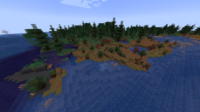
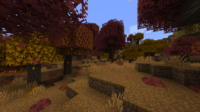
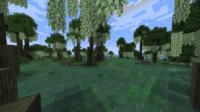
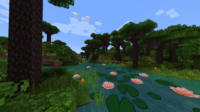
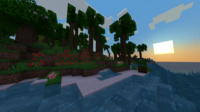
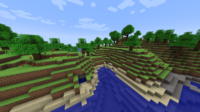
Biomes O' Plenty Mod for Minecraft - Download & Install Minecraft Mod Screenshots
View images and verify quality before download
Image Gallery


Biomes O' Plenty Mod for Minecraft - Download & Install Technical Information
Learn technical details, version, and supported platform
Technical Specifications

Your Own Minecraft Server! 🎮
Start your own server with friends on BisectHosting — insane performance, one-click mod installs, and 24/7 support. Use the discount code and start at the lowest price!
Download and Share
Download for free or share it with friends
Get the advantage!
Subscribe for early access to exclusive mods and direct downloads without timers or ads.
Mod not opening in Minecraft? This applies to Bedrock edition only (mobile/console) — the issue is your file manager, not the mod. Use our app IQ OpenMC to open the file and it will give you the option to open it in Minecraft directly. (Java players don't need this step)