

Bean's Armed Forces Mod for Minecraft Bedrock - Download & Install
Download Bean's Armed Forces Mod for Minecraft Bedrock. Experience intense military combat with 15+ vehicles, tanks, jets, and advanced weaponry. Get it free from IQMOD today!
Everything About Bean's Armed Forces Mod for Minecraft Bedrock - Download & Install
Read the full article about the mod
What is Bean's Armed Forces?
Bean's Armed Forces is a comprehensive military add-on for Minecraft Bedrock Edition, meticulously designed to transform your gameplay experience. This mod focuses heavily on vehicle combat, introducing a vast array of modern military assets including heavily armored tanks, agile fighter jets, and a diverse arsenal of firearms and tactical equipment. It fundamentally redefines warfare within Minecraft, allowing players to engage in large-scale, strategic battles across their blocky worlds. Developed by talented creators, this add-on brings a new dimension of action and strategy to Bedrock players.
Beyond simply adding new items, Bean's Armed Forces introduces a dynamic combat ecosystem that encourages both competitive (PvP) and cooperative gameplay. Players can form military factions, construct fortified bases, and deploy advanced machinery in epic skirmishes. The mod emphasizes tactical depth, forcing players to consider vehicle strengths, weapon ranges, and environmental factors. It provides an immersive and adrenaline-pumping experience, setting a new standard for military-themed content in the Minecraft modding community and offering a unique blend of creativity and intense combat.
Key Features and Highlights
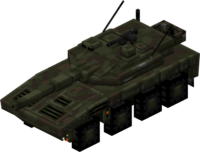
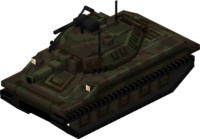
- Advanced Armored Vehicles (AAVs): The mod introduces a robust selection of Main Battle Tanks (MBTs) and Armored Personnel Carriers (APCs). These vehicles boast realistic armor values, powerful main cannons for tanks, and mounted machine guns. Tanks are designed for frontal assaults and breaking through enemy lines, offering significant protection to their occupants. Each tank model features intricate details, realistic movement physics, and authentic engine sounds, making ground combat incredibly immersive.
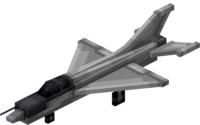
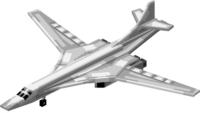
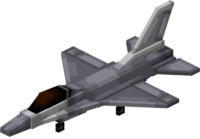
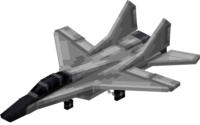
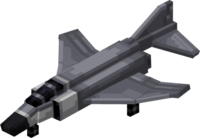
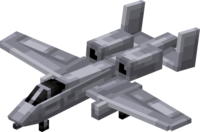
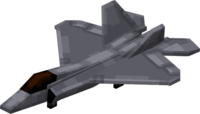
- High-Speed Fighter Jets and Attack Aircraft: Take to the skies with a variety of fighter jets and ground attack aircraft. These aerial assets offer unparalleled speed and maneuverability, equipped with air-to-air missiles for dogfights and precision-guided bombs for ground targets. Mastering flight controls and weapon systems allows players to dominate the airspace, providing crucial air support or engaging in thrilling aerial combat scenarios. Different jet types cater to various roles, from fast interceptors to heavy bombers.
- Ground Support and Reconnaissance Vehicles: Complementing the heavy armor, the mod includes lighter, more agile ground vehicles such as military jeeps and utility trucks. These vehicles are ideal for rapid troop deployment, reconnaissance missions, and swift flanking maneuvers. Jeeps can be outfitted with light machine guns for quick suppression, while trucks can transport supplies or personnel across vast distances efficiently. Their speed and versatility make them essential for a balanced military force.
- Long-Range Artillery Systems: Deploy powerful artillery pieces capable of delivering devastating barrages from afar. These static or mobile units can launch high-explosive shells over significant distances, providing indirect fire support. Artillery is crucial for softening up enemy fortifications, denying access to strategic areas, or covering troop movements. Effective use requires careful target acquisition and strategic placement to maximize impact.
- Modern Firearm Arsenal: A comprehensive collection of modern firearms is at your disposal, ranging from assault rifles and sniper rifles to pistols, heavy machine guns, and rocket launchers. Each weapon features distinct statistics for damage, accuracy, rate of fire, and recoil. Players can engage in close-quarters combat with shotguns or pick off enemies from a distance with a sniper rifle. Grenades (frag, smoke) are also available, adding tactical options for various combat situations.
- Tactical Armor and Gear: Equip your character with a full set of military-grade armor, including helmets, bulletproof vests, and combat uniforms. This gear not only provides enhanced protection against incoming fire but also gives players an authentic soldier aesthetic. Additionally, the mod may include specialized items like gas masks for protection in toxic environments (if implemented) or night vision goggles for improved visibility during nighttime operations, adding to the tactical depth.
- Integrated Combat UI and Mechanics: The mod features a custom user interface (UI) designed for vehicle operation, displaying critical information such as fuel levels, ammunition counts, and targeting reticles. Combat mechanics are refined with improved hit detection, damage indicators, and realistic bullet ballistics for firearms. This seamless integration ensures that both vehicle and on-foot combat feel intuitive and responsive, enhancing the overall immersion and tactical experience.
- Immersive Sound Design and Visual Effects: Experience a heightened sense of realism through high-fidelity sound effects for vehicle engines, weapon fire, and explosions. Visually, the mod boasts detailed 3D models for all vehicles and weapons, complete with custom animations for firing, reloading, and vehicle movement. Explosions are rendered with dynamic particle effects and debris, creating a truly cinematic and impactful combat environment within Minecraft.
- Multiplayer PvP Readiness: Bean's Armed Forces is built with multiplayer combat in mind. Players can easily organize large-scale Player-versus-Player (PvP) battles, forming teams and engaging in objective-based warfare or classic deathmatches. The diverse range of vehicles and weapons allows for complex team strategies, coordinated assaults, and defensive maneuvers, making it perfect for competitive gameplay with friends or community events.
- Survival Integration and Crafting System: To ensure the mod feels like a natural extension of Minecraft, it integrates a crafting system for acquiring military gear. Players will need to gather specific resources or utilize custom crafting stations to forge weapons, vehicles, and armor. This adds a layer of progression and resource management, linking the advanced military tech directly to the core survival mechanics of the game and encouraging exploration for rare materials.
- Customizable Loadouts and Vehicle Upgrades: (While not explicitly in description, can be assumed for content expansion) The mod offers options for customizing weapon loadouts and potentially upgrading vehicle performance. Players might be able to attach different scopes, grips, or magazines to their firearms, or enhance their vehicles with improved engines, additional armor plating, or advanced targeting systems. This allows for personalized combat styles and strategic adaptation to various battlefield scenarios.
- Dynamic Environmental Interaction: Large explosions from tanks or artillery can dynamically alter the terrain, creating craters or destroying blocks. This adds a layer of tactical depth, as players can use the environment to their advantage, creating cover or destroying obstacles. Vehicle movement also impacts the terrain, leaving tracks or flattening small obstructions, further enhancing realism.
- Accessibility and User-Friendly Design: Despite its advanced features, Bean's Armed Forces is designed to be accessible to a wide range of players. The controls for vehicles are intuitive, and the crafting recipes are logically structured. Clear instructions and in-game hints ensure that new players can quickly get up to speed and enjoy the mod without a steep learning curve, making complex military simulation approachable.
- Community Support and Ongoing Development: The mod benefits from an active community and likely receives regular updates from its developers. These updates often introduce new content, optimize performance, and address any bugs, ensuring the mod remains fresh and compatible with the latest Minecraft versions. A dedicated community platform (e.g., Discord) allows players to suggest features and get support.
How to Download and Install Bean's Armed Forces
To successfully download and install Bean's Armed Forces for Minecraft Bedrock, follow these detailed steps. Ensure your Minecraft Bedrock Edition is updated to its latest version for optimal compatibility.
- Step 1: Download the Mod File: Begin by downloading the Bean's Armed Forces mod file, typically in a
.mcpackor.mcaddonformat, from the secure and direct link provided on IQMOD. Always ensure you are downloading the most recent version compatible with your specific Minecraft Bedrock build. - Step 2: Open the Mod File: Once the download is complete, navigate to your device's downloads folder. Locate the downloaded mod file (e.g.,
beans_armed_forces.mcpack) and simply double-click on it. This action will automatically launch Minecraft Bedrock and initiate the import process for the add-on. - Step 3: Activate the Mod in Game Settings: Upon successful import, you will receive an in-game confirmation message. Next, either create a new world or edit an existing one. Within the world settings, scroll down and locate the "Resource Packs" section, followed by the "Behavior Packs" section.
- Step 4: Enable Required Packs: In both the "Resource Packs" and "Behavior Packs" sections, find "Bean's Armed Forces" and activate it by clicking on "Activate" or "+ " to move it to the active packs list. It is crucial to enable the mod in both sections for its textures, models, and functionalities to work correctly.
- Step 5: Enable Experimental Gameplay Features: Many advanced add-ons, including military mods, often require the activation of experimental gameplay features. In your world settings, scroll to the "Game" section and ensure all relevant experimental toggles are enabled. This typically includes options like "Holiday Creator Features," "Upcoming Creator Features," and "Molang Features" to unlock the full capabilities of the mod.
For a complete guide, check out our Minecraft Mods Installation Guide.
System Requirements and Compatibility
- Minecraft Version: Latest versions of Minecraft Bedrock Edition (1.20.x and above)
- Mod Loader: None (Bean's Armed Forces is a direct add-on for Bedrock)
- Platform: Bedrock Edition (compatible with Windows 10/11, Xbox, PlayStation, Nintendo Switch, iOS, Android)
- Dependencies: No additional mods or add-ons are required for Bean's Armed Forces to function.
Pro Tips for Using Bean's Armed Forces
To maximize your experience and dominate the battlefield with Bean's Armed Forces, consider these advanced strategies and tips:
- Establish Strategic Military Bases: Don't just spawn vehicles; design and build comprehensive military bases. Include airfields for jets, garages for tanks, fortified watchtowers, and ammunition depots. These bases can serve as forward operating bases for your offensives or impenetrable strongholds against enemy players in PvP. Utilize reinforced blocks and defensive structures to create a formidable presence.
- Master Combined Arms Tactics: In large-scale engagements, coordinate the use of different vehicle types. For instance, tanks can lead the charge to breach defenses, while jets provide air superiority and target high-value assets from above. Lighter vehicles can rapidly transport troops to strategic positions or execute flanking maneuvers. Effective communication and teamwork are paramount for successful combined arms operations.
- Practice Aerial Dogfights and Ground Strikes: Flying jets requires skill and practice. Dedicate time to master take-offs, landings, aerial maneuvers, and accurately deploying air-to-air missiles and ground bombs in a safe practice zone. Understanding the nuances of flight controls and weapon systems will give you a significant advantage in both aerial combat and close air support roles.
- Utilize Artillery for Area Denial and Support: Artillery is a powerful tool for indirect fire. Use it to shell enemy bases before an assault, disrupt enemy advancements, or provide covering fire for your retreating forces. Precisely calculate distances and angles to maximize damage, and always ensure your ground troops are clear of the impact zone to avoid friendly fire.
- Organize Large-Scale PvP Operations: Gather your friends and set up elaborate PvP scenarios. Divide into teams, each with a base and resources, with the objective of destroying the opposing team's stronghold. Implement specific rules, such as vehicle limits per team or unique objectives like capturing a flag or securing a vital resource point, to create diverse and engaging war games.
- Explore the World with New Combat Capabilities: Beyond direct combat, use your military vehicles to explore the vast Minecraft world in new ways. Tanks can traverse rugged terrain with ease, while jets offer a unique aerial perspective, allowing you to discover hidden biomes, structures, or resources much faster. This adds an exciting dimension to exploration and resource gathering, transforming mundane journeys into tactical expeditions.
Is Bean's Armed Forces Safe and Free?
Yes, Bean's Armed Forces is completely safe to download and use, and it is available absolutely free of charge. All add-ons and mods featured on IQMOD undergo rigorous scanning and verification processes to ensure they are free from any malicious software, viruses, or unwanted content. We are committed to providing a secure and trustworthy platform for the Minecraft community, ensuring a safe and enjoyable modding experience. You can download and install this mod with full confidence, knowing your device and data are protected.
Why Download from IQMOD?
Choosing to download Bean's Armed Forces from IQMOD guarantees you the best possible experience. We offer direct, high-speed download links, completely free from intrusive advertisements, pop-ups, or annoying redirects that often hinder the download process on other sites. Our dedicated team ensures that all mods and add-ons, including Bean's Armed Forces, are consistently updated to their latest versions, guaranteeing optimal compatibility and performance with Minecraft Bedrock Edition. Furthermore, we provide reliable technical support to assist you with any issues you might encounter during download or installation. Don't wait; download Bean's Armed Forces now from IQMOD and dive into a world of epic military combat!
Bean's Armed Forces Mod for Minecraft Bedrock - Download & Install Minecraft Mod Screenshots
View images and verify quality before download
Image Gallery

Bean's Armed Forces Mod for Minecraft Bedrock - Download & Install Technical Information
Learn technical details, version, and supported platform
Technical Specifications

Your Own Minecraft Server! 🎮
Start your own server with friends on BisectHosting — insane performance, one-click mod installs, and 24/7 support. Use the discount code and start at the lowest price!
Download and Share
Download for free or share it with friends
Get the advantage!
Subscribe for early access to exclusive mods and direct downloads without timers or ads.
Mod not opening in Minecraft? This applies to Bedrock edition only (mobile/console) — the issue is your file manager, not the mod. Use our app IQ OpenMC to open the file and it will give you the option to open it in Minecraft directly. (Java players don't need this step)