

Applied Energistics 2 Mod for Minecraft - Download & Install
Download Applied Energistics 2 Mod for Minecraft! Revolutionize storage with digital networks, energy conversion, and instant transport. Adds 100+ new items. Get it free from IQMOD!
Everything About Applied Energistics 2 Mod for Minecraft - Download & Install
Read the full article about the mod
What is Applied Energistics 2?
Applied Energistics 2 (AE2) is a comprehensive technology mod for Minecraft that introduces a unique, network-based digital storage and automation system. It revolves around the fascinating concept of converting matter into pure energy and vice versa, enabling instantaneous item, fluid, and energy transportation. Developed by the Applied Energistics team, AE2 is compatible with various Minecraft versions, including 1.12.2, 1.16.5, 1.18.2, 1.19.2, and 1.20.1.
This mod fundamentally transforms how players manage their resources by replacing traditional chest-based storage with a futuristic, highly scalable digital network. AE2 has become a cornerstone of many major modpacks, setting a high standard for automation and sophisticated resource management within the Minecraft modding community. Its deep mechanics and robust functionality offer unparalleled control over your in-game inventory and production lines.
Key Features and Highlights
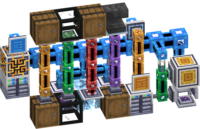
- ME Network Core: The central nervous system of AE2, the ME Network allows you to link various devices together to form a cohesive, centralized storage and processing system. It efficiently manages channels for connectivity and provides instantaneous access to all stored items, fluids, and power across your entire base.
- ME Storage Cells: These are the digital heart of your storage. Available in tiers (1K, 4K, 16K, 64K, 256K), each cell can store thousands of items and up to 63 distinct item types. This system offers unparalleled storage capacity and organization compared to conventional chest setups, making inventory management effortless.
- ME Drives: These blocks house your ME Storage Cells. Each ME Drive can hold up to 10 storage cells, allowing for massive expansion of your network's capacity in a compact and organized manner. You can easily hot-swap cells as needed to manage your digital inventory.
- ME Terminals: These user interfaces provide instant access to your entire ME Network inventory. With intuitive search, sorting, and crafting functionalities, terminals like the Crafting Terminal (which integrates a crafting grid) and Pattern Terminal (for programming automation) are essential for interacting with your digital storage.
- Advanced Automated Crafting: AE2 revolutionizes crafting by allowing you to fully automate complex recipes. Using Pattern Providers, Molecular Assemblers, and Crafting CPUs, you can program intricate crafting chains, and the network will automatically produce items as needed, significantly reducing manual labor.
- Item, Fluid, and Energy Transport: Beyond storage, AE2 excels at transportation. Its robust cable system can transfer items, fluids, and power (Forge Energy / RF) between machines and your ME Network. This allows for seamless integration with other tech mods, creating fully automated production lines.
- ME IO Ports: These ports act as bridges between your ME Network and traditional Minecraft inventories or other modded storage solutions (like chests, furnaces, or barrels). They enable automated transfer of items into or out of your network, simplifying resource consolidation.
- ME Interfaces: Essential for inter-mod communication, ME Interfaces allow your AE2 network to interact directly with external machinery. They can provide ingredients to a processing machine or pull finished products from it, making your AE2 network the central hub of your automated factory.
- P2P Tunnels: A powerful solution for advanced channel management, P2P Tunnels allow you to transmit multiple channels through a single link. This is invaluable for extending your network over long distances or across dimensions while efficiently managing channel usage, preventing network overloads.
- Security and Wireless Access: AE2 offers security features through the Security Terminal, allowing you to define user permissions for your network. The Wireless Access Terminal grants remote access to your entire ME system from anywhere in your world, providing unmatched convenience for managing resources on the go.
- Annihilation and Formation Planes: These specialized blocks automate the placement and removal of blocks. Annihilation Planes can break blocks and deposit them into your network, while Formation Planes place blocks from your network into the world, making them perfect for large-scale construction or automated mining operations.
- Unique Mod Resources: AE2 introduces key resources like Certus Quartz and Fluix Crystals, which are integral to almost all crafting recipes within the mod. Charged Certus Quartz, obtained by charging regular Certus Quartz, is crucial for more advanced components.
- Quartz Grindstone: An early-game, hand-cranked machine that doesn't require power. It's used to process Certus Quartz into dust and can also double ore output (e.g., iron ore into two iron ingots via dust processing), offering an efficient start to resource management.
- Spatial IO: A truly unique feature, Spatial IO allows you to store entire sections of your world (e.g., rooms, small builds) within a Spatial Storage Cell. These stored chunks can then be moved and re-placed elsewhere, opening up new possibilities for modular building and base relocation.
How to Download and Install Applied Energistics 2
Installing Applied Energistics 2 typically requires a mod loader like Forge or Fabric. Follow these steps carefully to ensure a successful installation:
- Install a Mod Loader (Forge or Fabric): First, ensure you have the correct mod loader installed for your desired Minecraft version (e.g., Forge 1.20.1 or Fabric 1.20.1). Visit the official Forge or Fabric website, download the appropriate installer for your version, run it, and follow the prompts. This will create a new profile in your Minecraft launcher.
- Download Applied Energistics 2: Navigate to the Applied Energistics 2 download page on IQMOD.me. Make sure to select the version that matches your installed Minecraft version and mod loader. Click on the secure, direct download link provided.
- Locate Your Minecraft 'mods' Folder: After the download completes, you will have a .jar file. Open your Minecraft installation directory. On Windows, you can usually do this by typing %appdata% into the search bar, then navigating to the .minecraft folder. Inside .minecraft, look for a folder named 'mods'. If it doesn't exist, create it.
- Place the Mod File: Move the downloaded Applied Energistics 2 .jar file into the 'mods' folder you located or created in the previous step. Ensure there are no incompatible mod files in this folder that could cause conflicts.
- Launch Minecraft: Open your Minecraft launcher. From the version selection drop-down menu, choose the Forge or Fabric profile that was created during the mod loader installation (it will typically be named forge-[version] or fabric-loader-[version]). Click 'Play' to start the game. If installed correctly, Applied Energistics 2 should appear in the in-game mods list.
For a complete guide, check out our Minecraft Mods Installation Guide.
System Requirements and Compatibility
- Minecraft Version: Compatible with multiple versions including 1.12.2, 1.16.5, 1.18.2, 1.19.2, 1.20.1.
- Mod Loader: Requires either Forge or Fabric (select the version compatible with your chosen mod loader).
- Platform: Java Edition.
- Dependencies: Does not require additional core mods beyond the mod loader itself, but integrates seamlessly with other tech mods like IndustrialCraft 2, Thermal Expansion, and Ender IO.
Pro Tips for Using Applied Energistics 2
To master Applied Energistics 2 and unlock its full potential, consider these advanced tips:
- Start Small and Scale Up: Don't try to build an enormous, complex network immediately. Begin with a single ME Controller, a few cables, an ME Drive with a small storage cell, and a Crafting Terminal. This provides a foundational understanding before you expand into automation.
- Master Channel Management: Regular ME Cables support 8 channels, Smart Cables show channel usage, and Dense Cables support 32 channels. Plan your network layout carefully to avoid running out of channels, and strategically use P2P Tunnels to extend connectivity efficiently without excessive cable runs.
- Prioritize Power Generation: An AE2 network, especially with extensive automation, consumes significant amounts of Forge Energy (FE) or Redstone Flux (RF). Invest early in robust power generation solutions, such as advanced generators from other tech mods, to ensure your network runs smoothly.
- Automate Intermediate Components: Don't just automate final products. Program your Pattern Providers to automatically craft common intermediate components (e.g., circuits, wires, machine frames). This ensures you always have these building blocks ready for larger projects.
- Utilize Security and Wireless Access: Once you can craft a Wireless Access Terminal, link it to an ME Security Terminal. This enables remote access to your entire network from anywhere, allowing you to manage inventory, craft items, and monitor systems without having to return to your base.
- Leverage Spatial IO for Mobile Bases: For adventurous players, Spatial IO offers the unique ability to 'store' and move entire sections of your base. Design modular rooms or small factories that can be packed into a Spatial Storage Cell and deployed in new locations, ideal for nomadic playstyles.
Is Applied Energistics 2 Safe and Free?
Yes, Applied Energistics 2 is completely safe and free to download and use. It is actively developed and maintained by a dedicated community, and all versions undergo rigorous checks for malware or viruses. At IQMOD, we ensure that all mod files are thoroughly scanned and sourced from trusted developers, providing direct and secure download links. You can download and install Applied Energistics 2 with complete confidence, knowing you're getting a clean and legitimate file.
Why Download from IQMOD?
Downloading Applied Energistics 2 from IQMOD guarantees a seamless and secure experience. We provide direct, high-speed download links, free from intrusive ads or deceptive redirects often found elsewhere. Our mod files are consistently updated to ensure compatibility with the latest Minecraft versions, such as Applied Energistics 2 1.20.1 and Applied Energistics 2 1.19.2, offering you the most current features and bug fixes. Our dedicated support team is also available to assist with any questions or issues you might encounter during installation or gameplay. Choose IQMOD for reliable downloads and an enhanced Minecraft adventure. Download Applied Energistics 2 now and revolutionize your Minecraft world!
Applied Energistics 2 Mod for Minecraft - Download & Install Minecraft Mod Screenshots
View images and verify quality before download
Image Gallery
Applied Energistics 2 Mod for Minecraft - Download & Install Technical Information
Learn technical details, version, and supported platform
Technical Specifications

Your Own Minecraft Server! 🎮
Start your own server with friends on BisectHosting — insane performance, one-click mod installs, and 24/7 support. Use the discount code and start at the lowest price!
Download and Share
Download for free or share it with friends
Get the advantage!
Subscribe for early access to exclusive mods and direct downloads without timers or ads.
Mod not opening in Minecraft? This applies to Bedrock edition only (mobile/console) — the issue is your file manager, not the mod. Use our app IQ OpenMC to open the file and it will give you the option to open it in Minecraft directly. (Java players don't need this step)