

Advance Tactical Gear Mod for Minecraft - Download & Install
Download Advance Tactical Gear Mod, bringing 15+ highly detailed military-style armor sets, tools, and weapons to Minecraft. Enhance your roleplay and combat. Get it free from IQMOD now!
Everything About Advance Tactical Gear Mod for Minecraft - Download & Install
Read the full article about the mod
What is Advance Tactical Gear?
Advance Tactical Gear is a premier Minecraft Bedrock addon designed to immerse players in a modern military aesthetic, providing highly detailed individual operator gear while maintaining Minecraft's core visual style. This addon focuses on delivering a comprehensive set of tactical armor, functional tools, and lightweight weaponry, transforming your in-game character into a well-equipped soldier or operative ready for any mission. It's built to be compatible with the latest versions of Minecraft Bedrock Edition, offering an enhanced roleplay and combat experience.
This addon represents a significant leap for enthusiasts of military simulation and roleplaying within the Minecraft universe. Unlike generic item additions, Advance Tactical Gear offers a cohesive suite of equipment that allows players to embody their roles with greater depth and realism. It stands out in the Minecraft modding community due to its meticulous attention to detail in armor and gear design, making it an ideal choice for those looking to enhance their combat and exploration aspects of the game with a modern military touch, without introducing heavy vehicles or destructive weapons that might drastically alter the vanilla game feel.
Key Features and Highlights
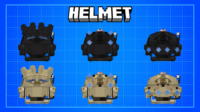
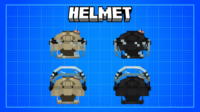
- Highly Detailed 3D Armor Models: The mod introduces an extensive collection of armor sets, each featuring incredibly detailed 3D models. Every piece, from helmets to boots, is meticulously crafted to reflect modern military gear while seamlessly blending with Minecraft's blocky aesthetic. Details include straps, pouches, and realistic camouflage patterns, providing an immersive feel.
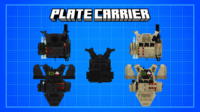
- Diverse Armor Sets for Varied Missions: Advance Tactical Gear isn't limited to a single type of protection. It offers a wide array of armor sets tailored for different operational requirements. Players can choose from lightweight reconnaissance gear for stealth and speed, medium assault armor for balanced offense and defense, or heavy-duty protection for intense combat scenarios. This versatility allows players to equip themselves appropriately for any mission.
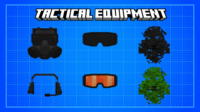
- Functional Tactical Tools: Beyond mere aesthetics, the mod integrates practical tactical tools that enhance player capabilities. These can include night vision goggles for low-light environments, walkie-talkies for coordinated multiplayer communication, helmet-mounted flashlights for exploration, and tactical backpacks to expand inventory space. Each tool is designed to provide a tangible advantage in combat and exploration.
- Lightweight Weaponry for Close-Quarters Combat: The mod focuses on individual, lightweight firearms and melee weapons that complement the tactical gear. This may include combat knives for silent takedowns, pistols for close-range engagements, and small grenades for tactical suppression. These weapons are effective in their intended roles, offering strategic combat options rather than overwhelming destructive power.
- Customization Options for Personalized Loadouts: Players have the ability to customize certain aspects of their gear. This could involve changing camouflage patterns on armor, adding small attachments like laser sights or flashlights to weapons, or selecting different helmet configurations. This level of personalization allows each player to create a unique loadout that reflects their playstyle.
- Enhanced Roleplay Experience: With its realistic details and diverse gear, the mod significantly boosts roleplaying possibilities. Players can create intricate military scenarios, rescue missions, or tactical exploration operations with friends, adding a new layer of depth and narrative to their Minecraft adventures.
- Vanilla-Friendly Art Style: Despite adding realistic elements, the mod is carefully designed to integrate smoothly with Minecraft's original art style. Textures are clean and simple, and designs are balanced so they don't feel out of place in the blocky world, preserving the core Minecraft experience.
- Increased Realism in Gameplay: This addon introduces a layer of realism to Minecraft by simulating the experience of wearing modern military equipment. Players feel more prepared for encounters and challenges, heightening the excitement and stakes of the game.
- Additional Tactical Clothing: Beyond the primary armor sets, the mod may feature a range of tactical clothing that can be worn underneath armor or independently. This includes combat shirts, camouflage pants, and utility vests, completing the overall military aesthetic.
- Practical Backpacks for Extended Exploration: The addon often includes tactical backpacks with increased storage capacity, enabling players to carry more resources and tools during long exploration missions or extended combat engagements, all designed with a consistent military look.
- Advanced Helmets with Integrated Tech: Helmets are not just for protection; some might feature integrated technologies such as heads-up displays (HUDs) for vital information or built-in night vision capabilities, significantly enhancing the player's tactical awareness.
- Durable Military Boots: The mod adds military-grade boots designed to potentially increase movement speed or provide additional protection against fall damage, making them essential for navigating rugged terrain.
- Precise Tactical Gloves: Tactical gloves offer hand protection and may provide slight improvements in mining speed or aiming accuracy, adding a strategic dimension to the overall gear set.
- Improved Defensive Capabilities: Each piece of tactical gear contributes to an overall defensive system, making the player more resilient in battles against mobs or other players, effectively mitigating incoming damage.
- Environmental Adaptability: The tactical gear helps players adapt to various environments, whether it's dense forests, arid deserts, or dark caves, making exploration safer and more efficient.
How to Download and Install Advance Tactical Gear
Installing the Advance Tactical Gear addon for Minecraft Bedrock Edition is a straightforward process. All you need is the mod file (typically a .mcaddon or .mcpack file) and a compatible version of Minecraft Bedrock. Follow these steps to get your tactical gear ready for action:
- Download the Mod File: First, download the Advance Tactical Gear addon file from a trusted source like IQMOD. Ensure the file has a .mcaddon or .mcpack extension. The file will usually be saved in your device's downloads folder (whether it's a PC, smartphone, or tablet).
- Directly Open the File: Once the download is complete, simply tap or double-click the .mcaddon file you downloaded. Your device should automatically recognize the file type and launch Minecraft.
- Import the Addon into the Game: Upon launching Minecraft, a message will appear at the top of the screen indicating that the pack import process has begun. Wait until you see a message stating 'Successfully imported Pack'. If you encounter issues, ensure you have the latest Minecraft version and the file is not corrupted.
- Activate the Addon in a New or Existing World: Once imported, you can activate the addon in either a new world or an existing one.
- From the main menu, select 'Play', then 'Create New', then 'Create New World'.
- In the new world settings, navigate to the 'Resource Packs' and 'Behavior Packs' sections.
- In both sections, locate and activate the 'Advance Tactical Gear' pack. Ensure it's active in both to function correctly.
- Make sure to enable 'Experimental Gameplay' options like 'Holiday Creator Features' and 'Molang Features' if the mod requires them.
- Press 'Create' to generate the world.
- From the main menu, select 'Play', then click the pencil icon (Edit) next to the world you wish to modify.
- Navigate to the 'Resource Packs' and 'Behavior Packs' sections and activate the 'Advance Tactical Gear' pack.
- Save changes and enter the world.
- Start Playing: With the addon activated, you can now enter your world and begin exploring all the new tactical armor, tools, and weapons. You'll find them either in the Creative Inventory or through crafting if the addon introduces specific recipes for them.
To activate in a new world:
To activate in an existing world:
For a complete guide, check out our Minecraft Mods Installation Guide.
System Requirements and Compatibility
- Minecraft Version: 1.20+ (newer versions are always recommended for optimal performance and compatibility)
- Mod Loader: None (works directly with Minecraft Bedrock)
- Platform: Bedrock Edition (Windows 10/11, Xbox, Mobile, Nintendo Switch, PS4/PS5)
- Dependencies: None (operates as a standalone addon)
Pro Tips for Using Advance Tactical Gear
To maximize your experience with the Advance Tactical Gear addon in Minecraft, here are some pro tips to help you immerse yourself deeper into the military-themed gameplay:
- Plan Your Tactical Loadout: Before embarking on any exploration or combat mission, carefully plan your gear. Do you need lightweight armor for stealth and speed in dense forests, or heavy armor for confronting hordes of zombies in dark caves? Choose the appropriate armor type and tools (like night vision goggles) to enhance your chances of success.
- Integrate Gear into Roleplay Scenarios: Use the addon to create intricate roleplay scenarios with your friends. You can assign roles (sniper, medic, assault) and establish a military base of operations. This deepens the experience and makes every mission more engaging and challenging.
- Establish Integrated Forward Operating Bases: Design a fully functional military base within your world, complete with training areas, gear storage, and command centers. This base can serve as a launchpad for all your tactical operations and provide a secure haven.
- Utilize Tactical Tools Wisely: Make the most of every tool the addon provides. For example, use binoculars to scout enemies from a safe distance before engaging, or employ helmet-mounted flashlights to explore dark caves without needing to constantly hold a torch.
- Practice with Lightweight Weaponry: Although they are lightweight weapons, they require precision. Practice aiming with pistols and using combat knives for close-quarters combat to hone your fighting skills and become proficient in individual engagements.
- Adapt to Diverse Environments: Tactical gear offers advantages in different environments. In deserts, you might prefer lighter armor that doesn't impede movement, while in snowy biomes, you might need gear that provides additional cold protection (if supported by the mod). Consider your mission environment and select the most suitable gear.
Is Advance Tactical Gear Safe and Free?
Yes, the Advance Tactical Gear addon is completely safe and free to download and use. At IQMOD, we are committed to providing high-quality, thoroughly vetted content to ensure the safety of your devices and your gaming experience. All files we offer are routinely scanned for any malicious software or viruses to guarantee a secure and clean gaming environment. This addon is available entirely free of charge, meaning there are no hidden costs or in-app purchases. You can enjoy all its features without any financial constraints, making it a valuable addition to your Minecraft adventures. Downloading from IQMOD ensures you receive the original, updated version of the addon, far from unreliable sites that may contain harmful files.
Why Download from IQMOD?
IQMOD is the leading destination for downloading Minecraft addons, and we pride ourselves on delivering an unparalleled download experience for Advance Tactical Gear. When you download from our site, you gain access to direct, fast links, completely free from intrusive ads and pop-ups that spoil the user experience. We guarantee that all addons, including this one, are constantly updated to be compatible with the latest Minecraft versions, ensuring optimal performance and compatibility. Our dedicated support team is always available to answer your queries and assist you with any issues you might encounter during installation or use. Choose IQMOD to ensure you get a safe, fast, and reliable download experience. Download Advance Tactical Gear now and embark on unrivaled military adventures in Minecraft!
Advance Tactical Gear Mod for Minecraft - Download & Install Minecraft Mod Screenshots
View images and verify quality before download
Image Gallery



Advance Tactical Gear Mod for Minecraft - Download & Install Technical Information
Learn technical details, version, and supported platform
Technical Specifications

Your Own Minecraft Server! 🎮
Start your own server with friends on BisectHosting — insane performance, one-click mod installs, and 24/7 support. Use the discount code and start at the lowest price!
Download and Share
Download for free or share it with friends
Get the advantage!
Subscribe for early access to exclusive mods and direct downloads without timers or ads.
Mod not opening in Minecraft? This applies to Bedrock edition only (mobile/console) — the issue is your file manager, not the mod. Use our app IQ OpenMC to open the file and it will give you the option to open it in Minecraft directly. (Java players don't need this step)