

Vibrant VSL Shader Texture Pack for Minecraft - Download
Download Vibrant VSL Shader Texture Pack for Minecraft. Experience cinematic golden daylight, deep bluish nights, and stunning God-rays. Balances performance with high-end visuals. Get it free from IQMOD!
Everything About Vibrant VSL Shader Texture Pack for Minecraft - Download
Read the full article about the mod
What is Vibrant VSL Shader?
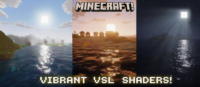
Vibrant VSL Shader is a resource pack specifically designed for Minecraft Bedrock Edition that transforms your in-game world into a breathtaking cinematic experience. This shader introduces stunning realistic lighting effects, including soft golden daylight, deep atmospheric bluish nights, and hyper-visible God-rays. It is engineered to strike a perfect balance between smooth performance and high-end visuals, making every block in your Minecraft world appear smoother, more vibrant, and more alive.
Unlike many demanding shaders, Vibrant VSL Shader focuses on delivering exquisite aesthetics while maintaining a stable frame rate, making it accessible to a wide range of devices running Minecraft Bedrock. Its popularity stems from its ability to impart a unique, realistic ambiance to environments, from dense forests to vast oceans, making players feel as if they are stepping into their own animated film. It's a game-changer for players seeking a visual upgrade without compromising the fluid gameplay experience that Minecraft is known for.
Key Features and Highlights
- Cinematic Lighting Transformation: Vibrant VSL Shader overhauls Minecraft's default lighting system, introducing a cinematic touch that adds depth and drama to every scene. Expect soft, even illumination that makes every corner of your world look like a movie still, with subtle color grading that enhances environmental details never seen before.
- Soft Golden Daylight: Experience a warm, inviting golden glow during the daytime. The sun casts a gentle, natural light that bathes the landscape, creating dynamic shadows and nuanced color transitions that evolve with the time of day, adding a sense of realism and warmth to your daily adventures.
- Deep Atmospheric Bluish Nights: As day turns to night, the sky transforms into a canvas of deep, mysterious blues. This not only enhances visual beauty but also intensifies the atmosphere, making nocturnal exploration more thrilling and immersive. Artificial lights, such as torches, interact beautifully with this blue tint, creating striking visual contrasts.
- Hyper-Visible Volumetric God-Rays: Witness breathtaking scenes where rays of light pierce through blocks and trees, creating incredibly realistic God-rays (or volumetric light effects). These visible light shafts add a three-dimensional depth to forests and caves, amplify the beauty of sunrises and sunsets, and make natural landscapes feel significantly more dynamic and alive.
- Optimized Performance & Visuals Balance: Despite its significant visual enhancements, Vibrant VSL Shader is designed to be relatively lightweight. It achieves an excellent balance between delivering high-quality graphics and maintaining acceptable frame rates, making it suitable for many different devices running Minecraft Bedrock Edition.
- Smooth and Vibrant Block Textures: The shader refines the appearance of block surfaces, smoothing out jagged edges and adding a touch of vibrancy. Default game textures appear more detailed and richer, contributing to an overall more cohesive and appealing look for your Minecraft world.
- Dynamic and Realistic Shadows: The shader introduces dynamic, moving shadows that react to various light sources, whether it's the sun or a torch. These shadows provide a sense of depth and volume to objects and blocks, changing in intensity and direction based on the light's angle, significantly boosting visual realism.
- Enhanced Water Reflections: Water bodies become more transparent and realistic, featuring accurate reflections of the sky and surrounding environment. You might also observe subtle ripple effects that make water surfaces appear more lively and interactive within the world.
- Reworked Sky and Volumetric Clouds: Minecraft's sky is revamped to be more beautiful, featuring realistic volumetric clouds that drift slowly across the horizon. These clouds add depth and variety to overhead views and interact naturally with the shader's lighting.
- Subtle Bloom Effect: The shader adds a gentle bloom effect to bright lights, causing light sources like lava and torches to appear as if they are softly glowing, further enhancing the visual ambiance and making night scenes more captivating.
- Anti-Aliasing: Vibrant VSL Shader helps reduce jagged edges on blocks and objects, making the overall image appear smoother and cleaner, thereby reducing visual strain and improving clarity.
- Custom Fog Implementation: The shader can introduce custom fog effects that enhance the visual depth of distant landscapes and create mysterious atmospheres in certain areas, contributing to the overall cinematic experience.
- Bedrock Edition Compatibility: This shader is specifically engineered to work seamlessly with Minecraft Bedrock Edition, ensuring excellent compatibility and stable performance across supported devices.
- Comprehensive Visual Overhaul: Beyond just lighting, the shader delivers a wide array of visual improvements covering colors, shadows, and environmental details, making it a comprehensive resource pack for elevating your gameplay experience.
How to Download and Install Vibrant VSL Shader
To ensure Vibrant VSL Shader works correctly, please follow these steps carefully. This shader is designed for Minecraft Bedrock Edition and requires specific settings to function optimally.
- Download the Resource Pack File: First, download the Vibrant VSL Shader file from the direct download link on IQMOD. The file is typically in
.mcpackor.zipformat. If it's a.zipfile, you might need to manually extract it to get the resource pack folder. - Install the Resource Pack:
- If it's an
.mcpackfile: Simply double-click the downloaded file. Minecraft Bedrock will automatically import the resource pack. A confirmation message will appear in-game indicating successful import. - If it's a
.zipfile (after extraction): Move the folder containing the shader files into your Minecraft'sresource_packsfolder. On Windows, this is typically located atC:\Users\YourUsername\AppData\Local\Packages\Microsoft.MinecraftUWP_8wekyb3d8bbwe\LocalState\games\com.mojang\resource_packs.
- If it's an
- Activate the Resource Pack In-Game: Open Minecraft Bedrock Edition. Navigate to the "Settings" menu, then select "Global Resources" from the left-hand menu. In the "My Packs" section, locate Vibrant VSL Shader and activate it by clicking on it and then clicking "Activate". Crucially, ensure that the Vibrant VSL pack is positioned at the top of your active resource packs list for its effects to apply correctly.
- Enable "Technical PreviewDeferred Rendering": This is a critical step. Go back to "Settings" then "Video". Look for the "Technical PreviewDeferred Rendering" option (it might be under advanced or experimental settings) and make sure to turn it ON. This option is essential for advanced shaders to function on Bedrock.
- Restart Minecraft (If Necessary): In some cases, you might need to completely restart Minecraft after activating the shader and changing settings to ensure all modifications are applied correctly. After restarting, enter your world and enjoy the new cinematic visuals.
For a complete guide, check out our Minecraft Mods Installation Guide, which offers detailed instructions for all types of add-ons and resource packs.
System Requirements and Compatibility
- Minecraft Version: Compatible with the latest versions of Minecraft Bedrock Edition (1.20 and above). Always ensure your game is updated for optimal compatibility.
- Mod Loader: No specific mod loader (like Forge or Fabric) is required, as it is a direct resource pack for Bedrock Edition.
- Platform: Minecraft Bedrock Edition on Windows 10/11, Xbox, PlayStation, Nintendo Switch, or mobile devices.
- Dependencies: No additional mods are required to run Vibrant VSL Shader. It functions as a standalone resource pack.
Pro Tips for Using Vibrant VSL Shader
To get the most out of your Vibrant VSL Shader experience, here are some advanced tips to help you fully utilize its capabilities:
- Optimize Video Settings: While the shader aims for a balance between performance and visuals, you might need to experiment with your video settings. If you experience frame rate drops, try reducing your Render Distance or disabling other non-conflicting graphical effects. Finding your personal sweet spot will ensure a smooth, beautiful experience.
- Combine with Other Texture Packs: Vibrant VSL Shader can be layered with other texture packs to create a truly unique look. Always ensure Vibrant VSL Shader is at the top of your active resource packs list to guarantee its lighting effects are applied correctly over other textures. Experiment with realistic or simplistic texture packs for the best synergy.
- Explore Diverse Biomes: Don't limit yourself to one area! Explore forests, mountains, caves, and oceans. You'll notice how the shader dramatically alters the ambiance in each environment, especially during sunrises, sunsets, or rainstorms. Open, expansive areas are particularly good for showcasing the stunning God-rays.
- Capture Stunning Screenshots: With such breathtaking visual enhancements, you'll naturally want to capture many screenshots. Use camera mode (F1 on PC) to snap gorgeous landscapes or cinematic moments. Share your creations with friends and the Minecraft community to showcase the shader's beauty.
- Check for Updates: Shader developers frequently update their creations to improve performance, add new features, or fix bugs. Regularly visit the Vibrant VSL Shader page on IQMOD to check for the latest versions and keep your pack updated for the best experience.
- Leverage Ray Tracing (if applicable): If your device supports ray tracing and your Minecraft version is compatible, enabling ray tracing in conjunction with Vibrant VSL Shader can elevate the visual experience to an entirely new level, offering even more realistic lighting and reflections.
Is Vibrant VSL Shader Safe and Free?
Yes, Vibrant VSL Shader is completely safe to download and use, and it is available for free. At IQMOD, we are committed to providing high-quality, thoroughly vetted Minecraft content, ensuring it is free from any malware or viruses. All resource packs and shaders are meticulously scanned before being uploaded to guarantee a safe and reliable experience for all our users. You can download this shader and other add-ons with full confidence, knowing you are getting them from a trusted and transparent source.
As a leading portal for the Minecraft community, the safety and privacy of our users are paramount. We do not provide links that require surveys or intrusive advertisements, but rather offer direct and free access to the content you are looking for. Enjoy enhancing your Minecraft world without any worries about the security of your device.
Why Download from IQMOD?
IQMOD stands as the premier destination for Arabic and English-speaking Minecraft players seeking the best mods, resource packs, and shaders. When you choose to download Vibrant VSL Shader from IQMOD, you benefit from several exclusive advantages:
- Direct and Secure Download Links: We provide instant, direct download links, free from annoying advertisements or pop-ups that disrupt your experience.
- Always Updated Content: We ensure all resource packs and shaders are regularly updated to be compatible with the latest Minecraft versions, guaranteeing you the best performance and compatibility.
- Thorough Security Scanning: Every file on our website is rigorously scanned for viruses and malware, offering you complete peace of mind.
- Technical & Community Support: The IQMOD team is always ready to assist you with any installation or usage issues, alongside an active community where you can exchange experiences.
- Enhanced User Experience: Our intuitive website design makes finding and downloading add-ons easy and enjoyable, with clear and comprehensive information for each addition.
Don't miss the opportunity to transform your Minecraft world into a visual masterpiece. Download Vibrant VSL Shader now from IQMOD and embark on an unparalleled gaming journey!
Vibrant VSL Shader Texture Pack for Minecraft - Download Minecraft Mod Screenshots
View images and verify quality before download
Image Gallery
Vibrant VSL Shader Texture Pack for Minecraft - Download Technical Information
Learn technical details, version, and supported platform
Technical Specifications

Your Own Minecraft Server! 🎮
Start your own server with friends on BisectHosting — insane performance, one-click mod installs, and 24/7 support. Use the discount code and start at the lowest price!
Download and Share
Download for free or share it with friends
Get the advantage!
Subscribe for early access to exclusive mods and direct downloads without timers or ads.
Mod not opening in Minecraft? This applies to Bedrock edition only (mobile/console) — the issue is your file manager, not the mod. Use our app IQ OpenMC to open the file and it will give you the option to open it in Minecraft directly. (Java players don't need this step)