

Simple Visuals Texture Pack for Minecraft - Download & Install
Download Simple Visuals Texture Pack for Minecraft - enhances graphics with cleaner colors and sharper details without altering original style. Compatible with Bedrock, supports x16/x32. Get it free from IQMOD!
Everything About Simple Visuals Texture Pack for Minecraft - Download & Install
Read the full article about the mod
What is Simple Visuals?
Simple Visuals is a meticulously crafted, lightweight texture pack for Minecraft Bedrock Edition, designed to elevate your game's aesthetics without deviating from its beloved vanilla style. This pack primarily focuses on delivering cleaner colors, sharper details, and an overall more polished visual experience, all while rigorously preserving Minecraft's classic charm. It's an ideal choice for players who seek a refreshed, more immersive world through subtle yet impactful visual upgrades that do not compromise game performance.
Within the vast Minecraft modding community, Simple Visuals distinguishes itself by offering a refined alternative to heavy shaders or drastic texture overhauls. Unlike modifications that fundamentally alter the game's art direction, Simple Visuals enhances existing elements, making every block and biome feel more vibrant and defined. Its design philosophy centers on subtlety and optimization, ensuring that players across various devices can enjoy a superior visual fidelity without encountering performance bottlenecks, thus making it a highly accessible and appreciated visual enhancement.
Key Features and Highlights
- Cleaner, More Vibrant Colors: Simple Visuals re-tunes Minecraft's default color palette, making hues appear richer, brighter, and more distinct. This isn't about changing the core colors of blocks but about refining them to be more appealing and cohesive. You'll notice grass, leaves, and water with a fresh, crisp look that enhances the overall natural environment.
- Sharper and Defined Details: The pack significantly improves the sharpness of textures across the game world. From the subtle grain of dirt blocks to the intricate patterns on cobblestone and the distinct lines of player tools and armor, every detail is rendered with greater clarity. This enhancement provides a more immersive visual experience, making each element of your world feel more refined and deliberate.
- Polished Overall Aesthetic: Simple Visuals aims for a cohesive and elegant look throughout Minecraft. This is achieved through a combination of subtle texture adjustments and refined lighting cues that work in harmony to create a smooth, visually pleasing environment. The pack removes much of the visual 'noise' found in vanilla textures, resulting in a cleaner and more professional appearance.
- Preservation of Classic Minecraft Charm: A core principle of Simple Visuals is to enhance without overhauling. Despite its numerous improvements, the pack is meticulously designed to retain the iconic pixelated art style and familiar feel of Minecraft. Players will feel they are experiencing an upgraded version of the game they love, rather than an entirely different one, ensuring the nostalgic charm remains intact.
- Subtle Visual Upgrades: The pack excels in delivering nuanced visual enhancements that might seem minor individually but collectively create a profound impact. Examples include slightly softened block edges, improved shadow gradations for more realistic depth, and delicate water reflections, all contributing to a smoother and more aesthetically pleasing visual flow.
- Zero Performance Impact: One of the most significant advantages of Simple Visuals is its commitment to performance. Unlike many graphic-intensive shaders, this texture pack is engineered to be extremely lightweight, ensuring it runs smoothly on a wide range of devices capable of running Minecraft Bedrock. Players can enjoy enhanced visuals without worrying about lag or frame rate drops.
- x16 and x32 Resolution Options: Simple Visuals offers flexibility with two distinct resolution options: x16 and x32. The x16 resolution provides noticeable visual improvements while maintaining compatibility with lower-end devices. The x32 option delivers even sharper details and greater clarity for players with more capable hardware, allowing users to choose the best balance for their system.
- Refined Lighting and Shadows: While not a full shader, Simple Visuals subtly tweaks the game's default lighting system. These adjustments result in softer, more natural light sources and less harsh shadows, adding depth and realism to scenes without requiring significant GPU resources. This creates a more pleasant and immersive ambient light.
- Enhanced Water and Glass Textures: The textures for water and glass are revamped to appear more transparent and realistic. Water gains subtle reflections and smoother animations, while glass blocks become clearer and less distorted, offering unobstructed views and a more sophisticated look for architectural builds.
- Improved Sky and Celestial Bodies: The pack redesigns the sky textures, making stars more prominent and twinkly, and the moon and sun appear with more detailed and appealing designs. This transforms both day and night cycles into more captivating and enchanting visual experiences within your Minecraft world.
- Smoother Environmental Effects: Weather effects such as rain, snow, and fog are enhanced to look more realistic and fluid. Rain appears denser and more impactful, while snow textures are finer, adding to the overall atmosphere and depth of the visual experience during various weather conditions.
- Cleaned-up User Interface (UI): Simple Visuals extends its refinement to the game's user interface. Subtle changes to icons and menus result in a cleaner, more streamlined UI that complements the polished in-game visuals, providing a consistent and aesthetically pleasing experience from the loading screen to active gameplay.
- Consistent Updates and Compatibility: Simple Visuals is regularly updated to ensure full compatibility with the latest versions of Minecraft Bedrock Edition. This commitment means players can consistently enjoy the pack's visual enhancements, knowing it is optimized and stable across new game releases.
- Easy Activation and Deactivation: Activating Simple Visuals is straightforward, done directly through the in-game resource pack menu. Similarly, removing or swapping the pack is just as easy, offering players complete flexibility to customize their visual experience at any time without hassle.
How to Download and Install Simple Visuals
Installing the Simple Visuals Texture Pack for Minecraft Bedrock is a simple and straightforward process. Ensure you have Minecraft Bedrock Edition installed on your device (Windows 10, mobile, console).
- Step 1: Download the Texture Pack File: First, download the Simple Visuals Texture Pack file from the secure, direct link provided on IQMOD. The file will typically be in
.mcpackformat. If it's a.zipfile, you'll need to extract it to get the main pack folder. - Step 2: Import the File into Minecraft: If the file is in
.mcpackformat, simply double-click it after downloading. Minecraft will automatically open and begin the import process. A message like "Simple Visuals successfully imported" will appear upon completion. If it's a.zipfile, extract its contents and copy the resulting folder (which should containmanifest.jsonand atexturesfolder) into your Minecraftresource_packsdirectory (typically located atC:\Users\YourUsername\AppData\Local\Packages\Microsoft.MinecraftUWP_8wekyb3d8bbwe\LocalState\games\com.mojang\resource_packson Windows). - Step 3: Activate the Texture Pack in Settings: Once imported, launch Minecraft Bedrock Edition. From the main menu, navigate to 'Settings'. Then, scroll down to the 'Global Resources' or 'Resource Packs' section, depending on your game version. You should find Simple Visuals listed among your available packs.
- Step 4: Enable the Pack for Your World(s): Click on Simple Visuals and then select 'Activate' to move it to your active packs list. You can activate it globally to apply to all your worlds, or you can enable it for specific worlds by going into a world's settings and selecting 'Resource Packs' from there.
- Step 5: Enjoy the Enhanced Visuals: After activation, load into your world. You should immediately notice the visual enhancements Simple Visuals provides, such as cleaner colors, sharper details, and an overall more polished look. In some cases, a game restart might be required for the changes to fully apply.
For a complete guide, check out our Minecraft Mods Installation Guide.
System Requirements and Compatibility
- Minecraft Version: Compatible with the latest versions of Minecraft Bedrock Edition (1.20+ recommended). Always ensure you are running an up-to-date version of Minecraft for optimal compatibility.
- Mod Loader: No mod loader (such as Forge or Fabric) is required as this is a texture pack for Bedrock Edition.
- Platform: Bedrock Edition (Windows 10, Xbox, PlayStation, Nintendo Switch, Android, iOS).
- Dependencies: No additional mods or resource packs are required for Simple Visuals to function. It operates as a standalone visual enhancement.
Pro Tips for Using Simple Visuals
To maximize your experience with the Simple Visuals Texture Pack, consider these advanced tips that can further enhance your gameplay and visual enjoyment:
- Experiment with x16 vs. x32 Resolutions: If your device can handle it, try the x32 version of Simple Visuals for even finer details and sharper textures. If you experience any lag, switch back to the x16 version. This flexibility allows you to balance visual quality with performance seamlessly. Often, both options are included in the download or available as separate files.
- Combine with Lightweight Shaders: While Simple Visuals isn't a shader itself, it pairs beautifully with very lightweight shaders that focus on subtle lighting or water effects without drastically altering textures. Look for shaders that enhance dynamic lighting or reflections without heavy performance demands, such as 'Vanilla Plus Shaders' or 'Natural Mystic Shaders' if they are compatible with Bedrock, to further enrich the visual experience.
- Explore Natural Biomes: After enabling the pack, take some time to explore various natural biomes in your worlds. You'll notice how forests, beaches, mountains, and deserts appear more vibrant and detailed due to the cleaner colors and sharper textures. Seek out scenic vistas that will truly shine with these subtle visual upgrades.
- Focus on Building and Design: Use Simple Visuals as inspiration for your architectural projects. The cleaner colors and clearer details of different blocks (like various wood types, stone, terracotta) will help you visualize your builds more accurately, enabling better design choices and more cohesive aesthetic results in your structures.
- Capture Stunning Screenshots and Videos: With the polished and beautiful look Simple Visuals provides, your Minecraft worlds become perfect for capturing high-quality screenshots and videos. Share your creations and adventures with friends or on social media platforms to showcase the enhanced beauty of your Minecraft experience.
- Compatibility with Behavior Packs: Since Simple Visuals is purely a visual resource pack, it is fully compatible with most behavior packs (add-ons) that introduce new gameplay mechanics or items. You can enjoy new content and features while maintaining the enhanced visual fidelity of your game world.
Is Simple Visuals Safe and Free?
Yes, the Simple Visuals Texture Pack is completely safe to use and free to download. This pack has been thoroughly vetted to ensure it contains no malicious software or suspicious files that could harm your device or your Minecraft game. At IQMOD, we are committed to providing reliable and secure content to the gaming community, and we meticulously check all files before making them available for download. You can confidently download Simple Visuals from our website, as we are a trusted and legitimate source for all Minecraft modifications.
Why Download from IQMOD?
When you choose to download Simple Visuals from IQMOD (iqmod.me), you're ensuring a hassle-free and completely secure experience. We provide direct, fast download links, meaning you won't encounter intrusive ads or complicated navigation. All our mods and resource packs are regularly updated to guarantee compatibility with the latest Minecraft versions, and we offer dedicated technical support to assist you with any issues during installation or use. Download Simple Visuals from IQMOD today and give your Minecraft world the visual refresh it truly deserves!
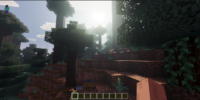
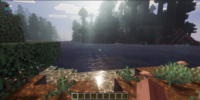
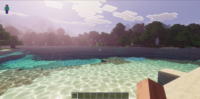
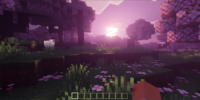
Simple Visuals Texture Pack for Minecraft - Download & Install Minecraft Mod Screenshots
View images and verify quality before download
Image Gallery
Simple Visuals Texture Pack for Minecraft - Download & Install Technical Information
Learn technical details, version, and supported platform
Technical Specifications

Your Own Minecraft Server! 🎮
Start your own server with friends on BisectHosting — insane performance, one-click mod installs, and 24/7 support. Use the discount code and start at the lowest price!
Download and Share
Download for free or share it with friends
Get the advantage!
Subscribe for early access to exclusive mods and direct downloads without timers or ads.
Mod not opening in Minecraft? This applies to Bedrock edition only (mobile/console) — the issue is your file manager, not the mod. Use our app IQ OpenMC to open the file and it will give you the option to open it in Minecraft directly. (Java players don't need this step)