

RPG Damage Indicator Mod for Minecraft - Download & Install
Download RPG Damage Indicator Mod for Minecraft Bedrock 1.21. Adds dynamic, color-coded health bars to all mobs and enemies, RPG-style. Compatible with custom addons. Get it free from IQMOD!
Everything About RPG Damage Indicator Mod for Minecraft - Download & Install
Read the full article about the mod
What is RPG Damage Indicator?
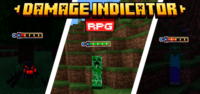
The RPG Damage Indicator addon for Minecraft Bedrock 1.21 and newer versions is a transformative modification that enhances the combat experience by displaying dynamic, color-coded health bars above the heads of all hostile mobs and enemies. Developed by the vibrant Minecraft community, this addon provides players with instant, visual feedback on their opponents' health status, adding a crucial layer of strategy to every encounter.
This addon revolutionizes how players engage with the game's environment, turning combat from a series of blind attacks into a more informed and tactical process. With visible health bars, players can prioritize targets, assess when to retreat or push harder, and plan their engagements more effectively. It introduces a deeper sense of immersion and challenge, making Minecraft feel more akin to traditional RPGs where statistics and clear visual information are paramount for strategic gameplay. Compared to other UI modifications, RPG Damage Indicator focuses purely on combat feedback, ensuring a streamlined and focused enhancement.
Key Features and Highlights
- Dynamic and Visible Health Bars: This core feature brings a significant change to Minecraft combat. The addon displays a health bar directly above each mob or enemy as they enter your line of sight. This bar dynamically changes length and color as the mob takes damage, providing real-time visual feedback on your progress and how close you are to defeating your foe. This makes battles more engaging and less about guesswork.
- Color-Coded Health States: Beyond just displaying a bar, the addon utilizes a smart color-coding system to indicate the mob's health status. Typically, the bar appears green when the mob is at full health, transitions to yellow as health drops to a moderate level, and turns red when the mob is critically low on health. This visual cue allows for quick assessment and rapid strategic adjustments during intense fights.
- Broad Compatibility with Custom Mobs and Addons: One of the most impressive aspects of this addon is its seamless integration with any custom mobs or entities introduced by other addons. Whether you're using unique monster packs or other behavior modifications, the RPG Damage Indicator will still function perfectly, ensuring a consistent and comprehensive combat experience across your modded Minecraft world.
- Clear and Easy-to-Read User Interface: The health bars are designed to be intuitive and uncluttered, making them easy to read even in the heat of fast-paced combat. They avoid complex details or tiny text that could distract you, focusing solely on the essential information: the enemy's remaining health. This user-friendly design enhances gameplay without overwhelming the player.
- Significantly Enhanced Combat Experience: With immediate visual information, combat in Minecraft becomes more strategic and thrilling. You can now make informed tactical decisions, such as switching weapons, timing special abilities, or focusing fire on a particular mob before it becomes a major threat, thereby elevating your overall enjoyment of the game.
- Lightweight Performance Impact: Despite its powerful functionality, the RPG Damage Indicator addon is engineered to be resource-friendly. It causes no noticeable dips in frame rate (FPS) or excessive memory consumption, ensuring a smooth and stable gaming experience even on mid-range devices, allowing you to enjoy the feature without performance worries.
- Universal Hostile Entity Support: The addon isn't limited to traditional hostile mobs like zombies and skeletons. It extends its functionality to cover all hostile entities in the game, including powerful bosses like the Ender Dragon and the Wither, and even animals that can become aggressive under certain conditions. This ensures comprehensive coverage for all combat scenarios.
- Multi-Dimensional Functionality: Whether you're exploring the vast Overworld, venturing into the perilous Nether, or facing the ultimate challenges in the End, the health bars will be present and fully functional in every dimension. This universal compatibility across different dimensions guarantees a consistent and helpful experience wherever your adventures take you.
- Authentic RPG Aesthetic: The addon imbues Minecraft with a functional and aesthetic touch directly inspired by popular role-playing games, where health bars are an integral part of the user interface. This enhances the sense of immersion in a fantastical world filled with adventure and challenges, appealing to players who appreciate the RPG genre.
- Simple Activation and Deactivation: As a Bedrock addon, enabling or disabling it is straightforward through the in-game user interface within your world settings. This flexibility allows players to customize their experience, turning it on when needed for strategic play and off if they prefer the vanilla Minecraft aesthetic.
- Increases Game Challenge and Realism: While providing additional information, the addon paradoxically deepens the sense of challenge and realism in combat. Knowing an enemy's health prompts more thoughtful strategy rather than random attacks, making each victory feel more earned and satisfying.
- Beneficial for Both New and Veteran Players: For new players, the addon aids in better understanding combat mechanics and assessing enemy strength. For veterans, it offers a valuable tool for precise tactical planning and improving combat efficiency, especially in challenging environments like multiplayer servers or hardcore worlds.
- Consistent Updates for Compatibility: The creators of such addons typically ensure regular updates to maintain compatibility with the latest Minecraft Bedrock versions. This means you can generally enjoy the addon without worrying about compatibility issues after game updates.
- No Mod Loader Required: Unlike Java Edition mods, this addon does not require external mod loaders like Forge or Fabric. It installs directly as a behavior/resource pack, making the installation process simple, direct, and accessible to all Bedrock players.
- Enhances Cooperative Gameplay: In multiplayer settings, team members can coordinate more effectively by seeing shared enemy health bars. They can call out targets and focus fire on a single mob to take it down quickly, making teamwork more efficient and enjoyable for group expeditions or boss raids.
How to Download and Install RPG Damage Indicator
Installing Bedrock addons like RPG Damage Indicator is remarkably simple and doesn't require complex software. Follow these steps to enable this addon in your world:
- Download the Addon File: Click on the direct download link provided on the IQMOD page. The file will typically be in
.mcaddonor.mcpackformat. Make sure to save it to an easily accessible folder on your device, such as your default Downloads directory. - Initiate Automatic Installation: Once the download is complete, double-click the
.mcaddonor.mcpackfile you just downloaded. Your device's operating system (whether Windows, Android, iOS, etc.) will automatically open Minecraft and begin the addon import process. A message will appear in the game indicating a successful import. - Create a New World or Edit an Existing One: After successful import, open Minecraft. You can either create a new world and activate the addon there, or modify the settings of an existing world. To do this, select "Create New World" or "Edit" next to the world you wish to use.
- Activate Resource and Behavior Packs: Within the world settings, you'll find "Resource Packs" and "Behavior Packs" sections on the left side. Look for "RPG Damage Indicator Addon" in the "Behavior Packs" section (and sometimes also in Resource Packs). Click on the addon, then press the "Activate" button to enable it. Ensure it's activated in both sections if present.
- Launch the Game and Enjoy: After activating the addon, save your world settings and start playing. Once you enter the world, you will immediately notice health bars appearing above hostile mobs and enemies, fundamentally transforming your combat experience. Enjoy more strategic battles!
For a complete guide, check out our Minecraft Mods Installation Guide.
System Requirements and Compatibility
- Minecraft Version: Minecraft Bedrock Edition 1.21 and newer versions. It is always recommended to update your game to the latest version for optimal performance and compatibility.
- Mod Loader: None. This addon does not require any external mod loader like Forge or Fabric, as it functions directly as a behavior/resource pack within the Minecraft Bedrock environment.
- Platform: Minecraft Bedrock Edition, available on Windows 10/11, Xbox, PlayStation, Nintendo Switch, Android, and iOS.
- Dependencies: No other mods or addons are required to run this addon. It functions completely independently. However, it is designed to be highly compatible with most other addons.
Pro Tips for Using RPG Damage Indicator
To maximize your experience with the RPG Damage Indicator addon, here are some advanced tips that will enhance your combat gameplay:
- Prioritize Targets in Group Encounters: When facing a large group of enemies, use the health indicators to quickly identify and focus on mobs with low health first. This allows you to swiftly eliminate threats and reduce the number of enemies attacking you, making crowd control much more manageable and efficient.
- Leverage During Boss Fights: Health bars become critically important when battling powerful bosses like the Ender Dragon or the Wither. You can precisely monitor your progress, understand when special phases might trigger, and know exactly when to unleash powerful attacks or retreat to heal, optimizing your strategy for these challenging encounters.
- Combine with Custom Mob Addons: If you're using other addons that introduce new mobs or modify existing ones, the damage indicator will seamlessly work with them. This provides clear insight into the strength of new creatures and helps you adapt to their unique challenges, making your modded world feel more cohesive.
- Enhance PvP Strategies: In player-versus-player (PvP) servers, the damage indicator can give you a significant competitive edge. Knowing your opponents' health allows for crucial decision-making on when to aggressively push, when to disengage and heal, or when to pursue a weakened foe for a decisive finish.
- Optimize Resource Usage: By closely monitoring enemy health, you can better judge when to use your standard sword and when to switch to a powerful axe, a potent bow, or even magic items. This helps you conserve weapon durability and utilize your tools more efficiently, ensuring you always have the right gear for the job.
- Aid in Automated Farm Design: If you're constructing mob farms, health bars can be invaluable for assessing the efficiency of your design. You can observe if mobs are taking the intended amount of damage or if adjustments are needed to the damage mechanisms (like fall damage or lava blades) to increase the farm's kill rate and overall productivity.
Is RPG Damage Indicator Safe and Free?
Yes, the RPG Damage Indicator addon is completely safe to use and available for free to all Minecraft Bedrock players. All addons featured on IQMOD are thoroughly vetted and scanned to ensure they are free from any malicious software or suspicious files that could harm your device or compromise your data. We are committed to providing high-quality, reliable content from trusted sources and reputable modding communities. You can download with complete confidence, knowing that you are getting a clean and secure addon that requires no hidden payments or subscriptions.
Why Download from IQMOD?
IQMOD is the premier destination for Minecraft players seeking the best mods and addons, and downloading the RPG Damage Indicator from our site guarantees an unparalleled experience. We offer direct and fast download links, completely free from intrusive ads and frustrating pop-ups that hinder the download process. We ensure all our files are consistently updated to be compatible with the latest Minecraft Bedrock versions, saving you from compatibility issues. Furthermore, our dedicated support team is always ready to assist you should you encounter any difficulties with installation or usage. Choose IQMOD for a seamless, secure, and reliable download experience. Download the RPG Damage Indicator addon now and elevate your Minecraft combat experience to a whole new level!
RPG Damage Indicator Mod for Minecraft - Download & Install Minecraft Mod Screenshots
View images and verify quality before download
Image Gallery


RPG Damage Indicator Mod for Minecraft - Download & Install Technical Information
Learn technical details, version, and supported platform
Technical Specifications

Your Own Minecraft Server! 🎮
Start your own server with friends on BisectHosting — insane performance, one-click mod installs, and 24/7 support. Use the discount code and start at the lowest price!
Download and Share
Download for free or share it with friends
Get the advantage!
Subscribe for early access to exclusive mods and direct downloads without timers or ads.
Mod not opening in Minecraft? This applies to Bedrock edition only (mobile/console) — the issue is your file manager, not the mod. Use our app IQ OpenMC to open the file and it will give you the option to open it in Minecraft directly. (Java players don't need this step)