

Reforged armors v1.25 (Old) Texture Pack for Minecraft - Download & Install
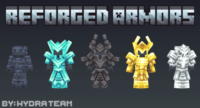
Download Reforged armors v1.25 (Old) Texture Pack for Minecraft, adding 7 high-quality, redesigned armor sets and a unique helmet. Get new PvP aesthetics and a legendary look. Compatible with various versions. Free download from IQMOD!
Everything About Reforged armors v1.25 (Old) Texture Pack for Minecraft - Download & Install
Read the full article about the mod
What is Reforged armors v1.25 (Old)?
Reforged armors v1.25 (Old) is a texture pack for Minecraft that meticulously re-models and redesigns seven core armor sets within the game, alongside introducing a unique helmet and additional corresponding items. This pack is specifically crafted to provide players with enhanced visual aesthetics and a more distinctive gameplay experience, particularly in player-versus-player (PvP) scenarios. It is compatible with various Minecraft versions that support resource packs, offering a fresh visual take on vanilla gear.
This texture pack holds a special place in the Minecraft modding community, offering an artistic overhaul to classic armors, transforming them into pieces with a legendary or heroic feel. Despite the "(Old)" designation in its name, it remains popular due to its high-quality artistry and timeless design, favored by players seeking a unique and distinguished look for their character without altering core gameplay mechanics. It focuses purely on visual enhancements, making it an ideal choice for those who wish to personalize their in-game appearance and gear. It doesn't add new functional items but rather redefines the visual identity of existing ones, making your character stand out.
Key Features and Highlights
- Seven High-Quality Armor Sets: The pack introduces seven distinct armor sets, each meticulously redesigned with enhanced details and superior visual quality. These aren't just simple retextures; they are comprehensive re-models that give each armor type a unique identity, ranging from ancient warrior aesthetics to more fantasy-inspired designs.
- Exclusive Standalone Helmet: In addition to the full armor sets, Reforged armors v1.25 includes a specially crafted helmet. This helmet is designed to complement the overall theme of the re-forged armors, providing a striking headpiece that helps your character stand out in any crowd or combat situation.
- Cohesive Elemental Items: The texture pack also includes new items that visually correspond to the redesigned armor sets, ensuring a consistent and immersive aesthetic for all your equipped gear. These could be subtle changes to tools or other wearable items that complete the visual theme.
- Enhanced Visual Aesthetics (Aesthetics): The primary goal of this pack is to deliver a significant visual upgrade. Armors appear more detailed, polished, and realistic, with artistic touches that make them feel like they belong in a rich fantasy epic. This visual enhancement deepens player immersion into the Minecraft world.
- Optimized for PvP Experience: With its striking and unique designs, this texture pack allows players to showcase their personalized armors in PvP battles, adding an element of flair and intimidation. A distinctive look can boost player confidence and potentially make opponents take notice, enriching the competitive aspect of the game.
- Modifies Vanilla Base Models: Reforged armors v1.25 directly alters the default 3D models of the vanilla Minecraft armors. This means it doesn't introduce entirely new functional armors but rather transforms the existing ones, ensuring broad compatibility with the base game.
- X16 Resolution: Despite the significant visual upgrades, the texture pack maintains the standard X16 pixel resolution of Minecraft. This ensures smooth performance across a wide range of hardware without sacrificing the game's classic feel, while still adding notable detail.
- Not Compatible with Armor Trims: It's important to note that because this texture pack modifies the base armor models, it is explicitly not compatible with the "Armor Trims" feature introduced in newer Minecraft versions. While you won't be able to apply trims, the armors themselves retain their unique and appealing re-forged designs.
- Refreshed Gameplay Perspective: Even for long-time Minecraft players, this texture pack offers a compelling reason to re-explore the game, engaging in combat and resource gathering with a fresh, visually stimulating perspective that revitalizes the experience.
- Easy Installation: As a standard resource pack, its installation is straightforward and does not require any mod loaders (like Forge or Fabric), making it accessible to all players regardless of their technical expertise.
- Ideal for Content Creators: If you're a streamer or YouTuber, this texture pack provides an attractive and distinctive look for your character in videos or live broadcasts, enhancing the visual appeal and uniqueness of your content.
- Personalized Player Identity: The pack allows for greater self-expression within the game, enabling you to choose an armor aesthetic that truly reflects your playstyle or personal preferences, adding a deeper layer of individuality to your Minecraft journey.
- Enduring Community Appeal: Despite its "(Old)" label, this version of Reforged Armors continues to be cherished by the Minecraft community, a testament to its enduring quality and impact on the game's aesthetics.
How to Download and Install Reforged armors v1.25 (Old)
Installing resource packs in Minecraft is a relatively simple process that doesn't require additional software like mod loaders. Follow these steps to download and install Reforged armors v1.25 (Old):
- Step 1: Download the Texture Pack File: Click the direct download button provided on the IQMOD page to get the Reforged armors v1.25 (Old) texture pack file. It will typically be in a .zip format. Make sure to save it to an easily accessible location on your computer.
- Step 2: Open Your Minecraft Resource Packs Folder: Launch Minecraft. From the main menu, navigate to "Options" and then "Resource Packs." On this screen, you'll find a button at the bottom labeled "Open Resource Packs Folder." Click it. This will open a new window displaying your Minecraft "resourcepacks" directory.
- Step 3: Transfer the Downloaded File: Drag and drop the .zip file you downloaded in Step 1 into the "resourcepacks" folder that you opened in Step 2. Do not extract the contents of the .zip file; it should remain in its compressed format.
- Step 4: Activate the Texture Pack In-Game: Return to Minecraft (you might need to close and re-open the Resource Packs screen for it to refresh). You should now see "Reforged armors v1.25 (Old)" listed in the "Available Resource Packs" column on the left. Click the arrow icon next to it to move it to the "Selected Resource Packs" column on the right.
- Step 5: Confirm and Play: Once the texture pack is in the "Selected" column, click the "Done" button at the bottom. Minecraft may take a few moments to reload its assets. Once complete, you can enter any world and start enjoying the newly re-forged armors and enhanced visuals.
For a complete guide, check out our Minecraft Mods Installation Guide.
System Requirements and Compatibility
- Minecraft Version: Compatible with Minecraft Java Edition versions that support resource packs (typically 1.14 and above, but may work with slightly older or newer versions as long as core armor models haven't fundamentally changed). It's always best to test with the version it was originally designed for or nearby versions for optimal compatibility.
- Mod Loader: None required. Resource packs do not need Forge, Fabric, or any other mod loader to function; they utilize Minecraft's built-in resource pack feature.
- Platform: Java Edition. This texture pack is specifically designed for the Java version of Minecraft.
- Dependencies: None. This texture pack operates independently and does not require any other mods or resource packs to be installed.
Pro Tips for Using Reforged armors v1.25 (Old)
To maximize your enjoyment and leverage the full potential of the Reforged armors v1.25 (Old) texture pack in Minecraft, consider these advanced tips:
- Combine with Shaders for Maximum Impact: For a truly breathtaking visual experience, pair Reforged armors with a high-quality shader pack. Shaders will introduce dynamic lighting, realistic shadows, and enhanced reflections that make the intricate details of the re-forged armors truly pop and shimmer. Experiment with lightweight shaders like Sildur's Vibrant Shaders (Lite) for mid-range PCs, or go for visually stunning options like SEUS or BSL Shaders if your system can handle it.
- Showcase in PvP Arenas: The distinctive and often intimidating designs of the re-forged armors are perfect for PvP. Not only will you look unique, but a fearsome appearance can also add to your presence in combat. Take advantage of the visual upgrade to make a statement in any arena or faction war.
- Create Themed Builds and Displays: In your creative worlds or survival bases, design dedicated display areas for your re-forged armor sets. Use armor stands, strategic lighting, and custom backdrops to create an impressive armory or a gallery showcasing the artistic merits of each set. This adds a unique decorative element to your builds.
- Utilize for Roleplay and Storytelling: The distinct aesthetics of these armors lend themselves perfectly to roleplay scenarios or cinematic storytelling. Assign different armor sets to character archetypes within your narratives, enhancing the visual lore and immersion of your Minecraft stories or adventures.
- Mindful Combinations with Other Resource Packs: While Reforged armors focuses on actual armor, you can experiment with other resource packs that modify blocks, tools, or the sky, as long as they don't interfere with armor models. Always test combinations to ensure visual harmony and avoid glitches. For instance, a pack that enhances environmental textures might complement the detailed armors well.
- Understand and Embrace the Lack of Armor Trims: Instead of viewing the incompatibility with armor trims as a drawback, embrace it as a unique design choice of this particular pack. The armors are designed to be complete and striking on their own. Focus on the inherent beauty and intricate details that Reforged armors provides, rather than trying to customize them further with trims.
Is Reforged armors v1.25 (Old) Safe and Free?
Yes, Reforged armors v1.25 (Old) is absolutely safe to use and is available for free download. At IQMOD, we are committed to providing reliable and malware-free Minecraft content. All files available on our platform are rigorously scanned and verified to ensure the safety of your device and your gaming experience. This texture pack, like other resource packs, consists purely of graphical assets and does not contain any executable code that could harm your system. It merely modifies the visual appearance of the game.
You can download it with complete confidence from IQMOD, knowing that you are receiving the authentic and secure version. There are no hidden costs or registration requirements to enjoy this fantastic addition, making it accessible to all Minecraft players looking for an enhanced visual experience without any financial burden or security risks.
Why Download from IQMOD?
Choosing IQMOD for your Reforged armors v1.25 (Old) download offers several compelling advantages, ensuring you have the best possible experience. At IQMOD, we consistently strive to be the leading and most trusted source for high-quality Minecraft content in both Arabic and English.
- Direct and Secure Download Links: We provide you with instant, direct download links, meaning you won't have to navigate through intrusive ad pages or endure lengthy waits to get your files. Downloads are quick, easy, and completely secure.
- Ad-Free Experience: We understand how disruptive pop-up ads can be. Our platform is designed to be free from any intrusive advertisements, guaranteeing you a smooth and enjoyable browsing and downloading experience without interruptions.
- Updated and Verified Content: While this specific pack is marked "Old," we ensure that all files available on our site are the correct, safe versions. For other mods and resource packs, we diligently provide the latest available updates and verify their integrity.
- Dedicated Support: Should you encounter any issues during the download or installation process, our dedicated support team is ready to assist you. We are here to ensure you can enjoy all Minecraft additions without obstacles.
- Vibrant Community: IQMOD is a thriving community hub for Minecraft enthusiasts. You can explore a vast collection of mods, resource packs, maps, and shaders, and connect with fellow players who share your passion.
Don't hesitate! Click the download button now and elevate your Minecraft experience with the Reforged armors v1.25 (Old) texture pack. Let your armors shine and stand out in the expansive world of Minecraft!
Reforged armors v1.25 (Old) Texture Pack for Minecraft - Download & Install Minecraft Mod Screenshots
View images and verify quality before download
Image Gallery


Reforged armors v1.25 (Old) Texture Pack for Minecraft - Download & Install Technical Information
Learn technical details, version, and supported platform
Technical Specifications

Your Own Minecraft Server! 🎮
Start your own server with friends on BisectHosting — insane performance, one-click mod installs, and 24/7 support. Use the discount code and start at the lowest price!
Download and Share
Download for free or share it with friends
Get the advantage!
Subscribe for early access to exclusive mods and direct downloads without timers or ads.
Mod not opening in Minecraft? This applies to Bedrock edition only (mobile/console) — the issue is your file manager, not the mod. Use our app IQ OpenMC to open the file and it will give you the option to open it in Minecraft directly. (Java players don't need this step)