

PvP Practice Bots Mod for Minecraft - Download & Install
Download the PvP Practice Bots mod for Minecraft! Adds customizable training bots to sharpen your combat skills in player-versus-player scenarios. Features a built-in replay system. Get it free from IQMOD!
Everything About PvP Practice Bots Mod for Minecraft - Download & Install
Read the full article about the mod
What is PvP Practice Bots?
PvP Practice Bots is an innovative Minecraft addon specifically designed to help players hone their player-versus-player (PvP) combat skills within the game. This mod allows you to summon highly customizable, intelligent training bots that simulate real opponents, providing an ideal and controlled practice environment. It is compatible with the most recent Minecraft Bedrock Edition versions and requires Beta APIs to be enabled for proper functionality.
In the highly competitive world of Minecraft, mastering PvP combat is a crucial skill for thriving on servers and engaging in various challenges. PvP Practice Bots fills a significant gap by offering a dedicated practice platform that doesn't require other players. Whether you're a beginner looking to learn the ropes or a seasoned veteran aiming to refine your tactics, this addon provides a controlled setting to experiment with different strategies and improve your reaction times. Furthermore, it features a built-in replay system, helping you analyze your performance and identify both strengths and weaknesses, making it an indispensable tool for any player serious about elevating their PvP game.
Key Features and Highlights
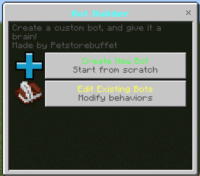
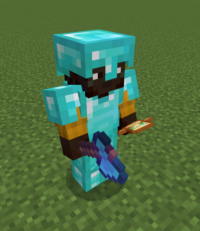
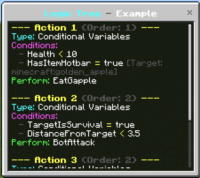
- Customizable Training Bots: The mod allows you to summon training bots with multiple difficulty levels, ranging from very easy for beginners to extremely challenging for experts. You can also specify the gear these bots wear (armor, weapons, tools) to suit particular training scenarios and even modify their combat behaviors to include aggression, defense, or evasion. This deep customization ensures that every training session is tailored to your specific goals.
- Built-in Replay Mod: One of the standout features of this addon is the ability to record your training matches and play them back later. You can watch your fights from different angles, analyze your movements, timing of attacks, and pinpoint mistakes you made. This feature is invaluable for learning from your errors and continuously improving your strategies. The replay system can help you notice small details that might be missed during live gameplay.
- Latest Version Compatibility: The addon is designed to work seamlessly with the most recent Minecraft Bedrock Edition updates, ensuring you get a modern and stable training experience. It requires enabling Beta APIs within your world settings, which allows the addon to access advanced game functionalities and deliver a feature-rich experience without significant compatibility issues.
- Java Combat Support (via external resource): Although primarily a Bedrock addon, the original description mentions its utility alongside external resources like 'Beyonds Java PvP' for players who wish to simulate a Java Edition combat experience. This expands the mod's versatility and makes it useful for players who practice on both platforms or prefer a different combat style.
- Easy Spawning and Modification: Bots can be spawned using a simple chat command (
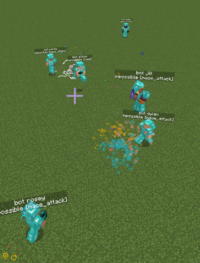
/spawnbot), with optional parameters to specify difficulty and gear directly. This makes the process of setting up a training session quick and straightforward, allowing you to focus on combat rather than complex configurations. For example, typing/spawnbot hard diamond_sword iron_armorcreates a challenging bot. - Diverse Training Scenarios: Whether you want to practice one-on-one combat (1v1), face multiple opponents (1vX), or even train survival against aggressive bots, the addon provides the flexibility to create almost any training scenario you can imagine. This allows you to prepare for a wide range of challenges in real gameplay, from duels to skirmishes.
- Enhance Core PvP Skills: Regular practice with PvP Practice Bots helps improve reaction speed, aiming accuracy, player movement, and attack timing. These core skills are essential for any successful PvP player, and the addon provides a safe environment to develop them without the pressure of losing a real match or affecting your in-game statistics.
- Intuitive User Interface: The addon is designed with a simple and easy-to-use interface, making it accessible to players of all skill levels. You won't waste time learning how to use the addon; instead, you can jump straight into training, spending more time improving and less time configuring.
- Free and Safe to Use: This addon is available completely free of charge, making it accessible to all Minecraft players. Furthermore, it is regularly scanned to ensure it is free from any malicious software or security threats, providing a safe and reliable gaming experience.
- Realistic Combat Simulation: The bots' behaviors are designed to mimic real player actions, providing a realistic training experience. This helps you adapt to various combat styles you might encounter on actual servers, enhancing your predictive capabilities and tactical responses.
- Community Support and Updates: The addon benefits from active support from the player and developer community, ensuring it receives regular updates and bug fixes, along with the addition of new features based on user suggestions. This commitment ensures the addon remains relevant and continuously improves over time.
- Versatile Utility for All Skill Levels: From new players learning the basics of PvP to veterans seeking to fine-tune their most advanced techniques, this addon offers valuable training tools for everyone. It allows you to scale the challenge to match your current skill level and future aspirations.
How to Download and Install PvP Practice Bots
To successfully install and utilize the PvP Practice Bots addon, you must first ensure that Beta APIs are enabled in your Minecraft Bedrock world settings. It is also highly recommended to use the most recent version of Minecraft to guarantee optimal compatibility and performance.
- Download the Addon File: Begin by downloading the PvP Practice Bots file (typically a .mcaddon or .mcpack extension) from the trusted IQMOD website. Always select the latest available version of the addon to ensure it is compatible with your current Minecraft game version.
- Enable Beta APIs: Before opening the downloaded file, launch Minecraft. Then, either create a new world or edit an existing one. Navigate to the 'Experiments' section within the world settings and enable the 'Beta APIs' or 'Holiday Creator Features' option (the exact name might vary slightly depending on your game version). This step is crucial for the addon to function correctly.
- Run the Addon File: After enabling the experimental features, close Minecraft if it's open. Locate and open the downloaded addon file. In most cases, Minecraft will automatically launch and import the addon, displaying a success message. If it doesn't open automatically, you may need to manually rename the file to ensure it has the correct
.mcaddonor.mcpackextension. - Activate the Addon in Your World: Once imported, return to the world settings where you wish to use the addon. In both the 'Behavior Packs' and 'Resource Packs' sections, find 'PvP Practice Bots' and activate it. Ensure that the addon is moved from the 'Available Packs' list to the 'Active Packs' list for both categories.
- Start Training and Summon Bots: Enter the world where you've activated the addon. You can now summon training bots by using the
/spawnbotcommand in the chat. Experiment with adding parameters like/spawnbot easyor/spawnbot mediumto set difficulty, and explore other customization options to enhance your training experience. For advanced customization, consult the addon's wiki for all available commands.
For a complete guide on installing various types of Minecraft mods and addons, check out our Minecraft Mods Installation Guide.
System Requirements and Compatibility
- Minecraft Version: PvP Practice Bots requires the most recent Minecraft Bedrock Edition versions for optimal compatibility and performance. Ensure your game client is fully updated to avoid any potential issues.
- Mod Loader: This addon does not require any external mod loader like Forge or Fabric. It is designed as a direct addon for Minecraft Bedrock Edition and is installed directly as a behavior and resource pack.
- Platform: The addon is primarily designed for the Minecraft Bedrock Edition platform, which includes Windows 10/11 PCs, Xbox consoles, PlayStation consoles, Nintendo Switch, and mobile devices (iOS/Android).
- Dependencies: The sole essential requirement is to enable the 'Beta APIs' or 'Holiday Creator Features' option within your Minecraft world settings, which allows experimental gameplay features to run.
Pro Tips for Using PvP Practice Bots
To get the most out of the PvP Practice Bots addon and transform it into a powerful training tool, here are some advanced tips:
- Analyze Replays Meticulously: Don't just watch replays; analyze them. Look for moments where you took significant damage or missed an opportunity to attack. Observe your footwork, the timing of your jumps, and the effectiveness of your aim. Utilize pause and slow-motion functions to examine intricate details of your combat decisions.
- Train Specific Scenarios: Instead of random combat, focus on particular aspects. Do you want to improve your defense against bows? Summon a bot armed only with a bow. Do you need to practice close-quarters combat? Create a small, enclosed training arena. Specializing your training will lead to faster and more targeted improvements.
- Experiment with Diverse Gear Settings: Vary the armor and weapons the bots wear. Practice against bots wearing full Netherite armor, or bots with no armor at all. This will prepare you to face different types of opponents and loadouts in real-world server environments, making you a more adaptable fighter.
- Integrate with Other Training Environments: Use the addon within custom PvP training maps or specially designed combat arenas. These maps can offer unique terrain and obstacles that add another layer of challenge and realism to your training sessions, simulating diverse battlegrounds.
- Set Daily Training Goals: Establish measurable goals for each training session. For instance, 'I will win 10 1v1 matches against a medium-difficulty bot without using potions' or 'I will practice dodging 80% of the bot's arrows.' Clear goals motivate you and help you track your progress effectively.
- Practice Timing and Strafing: Focus on perfecting the timing of your attacks and your ability to strafe and dodge bot attacks. Try to anticipate their movements and react quickly. This can help you develop more fluid and effective combat strategies for real encounters, turning your evasive maneuvers into offensive opportunities.
Is PvP Practice Bots Safe and Free?
Yes, the PvP Practice Bots addon is completely safe to use and entirely free of charge. All mods and addons available on IQMOD are regularly scanned to ensure they are free from any malicious software or viruses, providing you with a trustworthy and secure download environment. This addon originates from reliable sources and benefits from community support, guaranteeing its stability and safety. It requires no in-game purchases or subscriptions, making it accessible to all Minecraft players who wish to enhance their PvP skills without any additional cost.
Why Download from IQMOD?
When you choose to download the PvP Practice Bots addon from IQMOD, you are choosing quality and reliability. We are committed to providing direct and fast download links, completely free from intrusive advertisements and pop-ups that might disrupt your experience. We ensure that all mods and addons are consistently updated to be compatible with the latest Minecraft versions, guaranteeing you always receive the newest and best version available. Furthermore, the IQMOD support team offers technical assistance for any questions or issues you might encounter during download or installation. Don't waste your time searching unreliable sources; download PvP Practice Bots now from IQMOD and begin your journey towards mastering PvP combat in Minecraft!
PvP Practice Bots Mod for Minecraft - Download & Install Minecraft Mod Screenshots
View images and verify quality before download
Image Gallery

PvP Practice Bots Mod for Minecraft - Download & Install Technical Information
Learn technical details, version, and supported platform
Technical Specifications

Your Own Minecraft Server! 🎮
Start your own server with friends on BisectHosting — insane performance, one-click mod installs, and 24/7 support. Use the discount code and start at the lowest price!
Download and Share
Download for free or share it with friends
Get the advantage!
Subscribe for early access to exclusive mods and direct downloads without timers or ads.
Mod not opening in Minecraft? This applies to Bedrock edition only (mobile/console) — the issue is your file manager, not the mod. Use our app IQ OpenMC to open the file and it will give you the option to open it in Minecraft directly. (Java players don't need this step)