

Neo Texture Pack (Hotfix) Texture Pack for Minecraft - Download & Install
Download Neo Texture Pack (Hotfix) to enhance Minecraft Bedrock 1.20 visuals with a built-in Render Dragon shader. Enjoy colorful UI, PVP mode, FPS counter, and quick settings. Get it free from IQMOD!
Everything About Neo Texture Pack (Hotfix) Texture Pack for Minecraft - Download & Install
Read the full article about the mod
What is Neo Texture Pack (Hotfix)?
Neo Texture Pack (Hotfix) is a comprehensive resource pack designed to revitalize the Minecraft Bedrock Edition experience, specifically for version 1.20. This pack aims to significantly enhance both the visual aesthetics and overall performance of the game by integrating a built-in shader that supports Render Dragon technology, delivering advanced lighting and visual effects without compromising frame rates.
This texture pack represents a valuable addition to the Minecraft modding community, expertly blending simplistic yet refined visuals with high performance. Unlike many traditional resource packs that solely focus on graphical fidelity, Neo Texture Pack offers a suite of practical features that enrich daily gameplay, such as an improved user interface, performance indicators, and helpful chat tools. This unique combination makes it an ideal choice for players seeking both a visually upgraded experience and smooth, lag-free gameplay, particularly in demanding scenarios like PvP combat or intricate building projects.
Key Features and Highlights
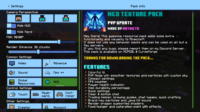
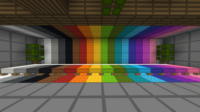
- Colorful UI: Neo Texture Pack completely overhauls the default user interface, introducing a modern and visually appealing design with vibrant, clear colors. This enhancement is not just aesthetic; it significantly improves navigation through menus and makes interacting with inventories, crafting tables, and game settings a more enjoyable and intuitive experience.
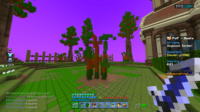
- PVP Mode: Specifically tailored for player-versus-player combat, this mode includes texture adjustments that enhance visibility, reduce visual clutter, and improve the clarity of opponents and items during intense skirmishes, providing a competitive edge.
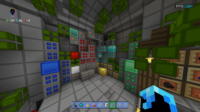
- Smoother Textures and Particles: While maintaining a 16x16 resolution, Neo Texture Pack's textures are meticulously polished to appear smoother and more refined than vanilla Minecraft. Particle effects (such as smoke, water, fire, and explosions) are also enhanced to look more realistic and beautiful without placing a heavy burden on system resources, ensuring a comfortable visual experience.
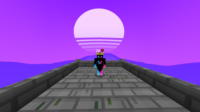
- Custom Sky: The pack introduces a custom-designed sky that is often more vibrant and detailed than the default Minecraft sky. This can include beautifully gradient colors, realistic cloud formations, or stunning celestial effects, profoundly altering the overall atmosphere of your world and adding significant visual depth.
- Compact Settings: This feature provides quick and easy access to essential game settings directly from the gameplay interface. Instead of navigating through multiple menus, you can adjust graphics options, audio, or controls with just a few clicks, saving time and streamlining your user experience.
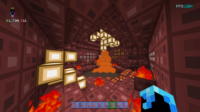
- FPS Counter: An integrated Frames Per Second (FPS) counter is displayed, typically in a corner of the screen, allowing you to monitor your game's performance in real-time. This feature is crucial for players who want to ensure they are getting the best possible performance and helps in identifying any performance bottlenecks.
- Player Health Indicator: A clear and accurate indicator of player health, often numerical or with an easy-to-read visual design, is prominently displayed. This helps in making quick decisions regarding healing or retreating during combat or exploration.
- Item Durability Percentage: This indicator displays the percentage of remaining durability for tools, weapons, and armor directly on the hotbar or when hovered over. It's an invaluable feature for preventing items from breaking unexpectedly and helps in planning for timely replacements or repairs.
- Quick Settings: A set of frequently used settings accessible with a single button press, such as toggling PvP mode, adjusting brightness, or enabling/disabling the built-in shader. This offers a more flexible and responsive gameplay experience.
- Clear & Bottom Chat: This modification improves the appearance of the chat box, making text clearer and easier to read. It also repositions the chat box to the bottom of the screen to minimize interference with your field of view, enhancing communication without obstructing the gameplay.
- Trading Helper: Provides additional information when interacting with villagers, such as optimal trades or item prices, helping you make smarter trading decisions and maximize your resources.
- Brewing Guides: Integrates helpful guides directly into the brewing stand interface, detailing various potion recipes and their ingredients. This feature is perfect for new players or those who forget recipes, making the potion-making process easier and faster.
- Chat Tweaks: These adjustments include general improvements to chat functionalities, such as additional formatting options, easier copy/paste functionality, or chat filters, making interaction with other players more efficient and enjoyable.
- Render Dragon-Supported In-built Shader: The texture pack seamlessly integrates a lightweight shader that leverages Render Dragon technology, delivering dynamic lighting effects, realistic shadows, and improved reflections, all while maintaining the high performance that characterizes the Neo pack.
- Simplistic Aesthetic: Despite its extensive features, the Neo Texture Pack maintains a simplistic (16x16) design that preserves the core essence of vanilla Minecraft but with a clean, modern touch, making it an excellent choice for those who prefer uncluttered textures.
How to Download and Install Neo Texture Pack (Hotfix)
Installing the Neo Texture Pack on Minecraft Bedrock Edition involves a few straightforward steps. Ensure you have Minecraft Bedrock 1.20 or a compatible newer version installed on your device before proceeding. You do not need any specific mod loaders like Forge or Fabric for resource packs, as they are handled directly by the game.
- Download the Texture Pack File: First, download the Neo Texture Pack (Hotfix) file from the IQMOD website. Make sure you are downloading the latest version compatible with Minecraft Bedrock 1.20. The file will typically be in either
.mcpackor.zipformat. - Install .mcpack File (If Applicable): If the file you downloaded is in
.mcpackformat, simply double-click on it. Minecraft will automatically open and begin importing the resource pack. A confirmation message will appear within the game once the import is successfully completed. - Manual Installation (If .zip File): If the file is a
.ziparchive, you will need to extract it manually. Unzip the file to a new folder. Then, you must move this extracted folder into the Minecraft Bedrock resource packs directory. The typical path is:C:\Users\\AppData\Local\Packages\Microsoft.MinecraftUWP_8wekyb3d8bbwe\LocalState\games\com.mojang\resource_packs. Ensure that the main texture pack folder is placed directly inside theresource_packsfolder. - Activate the Texture Pack In-Game: After importing or moving the pack, launch Minecraft Bedrock. From the main menu, navigate to 'Settings', then select 'Global Resources'. In the 'My Packs' section, you will find the Neo Texture Pack. Click on it and then press 'Activate' to move it to the 'Active' section. If you are using other packs, ensure Neo is positioned at the top of the active list for priority.
- Launch and Enjoy: Once the texture pack is activated, you can return to the main menu and start a new world or enter an existing one. You should immediately notice the changes to the user interface, textures, sky, and the integrated shader. Sometimes, a game restart might be necessary for all changes to take full effect.
For a complete guide, check out our Minecraft Mods Installation Guide.
System Requirements and Compatibility
- Minecraft Version: Minecraft Bedrock 1.20 and newer versions that support Render Dragon.
- Mod Loader: No additional mod loader is required. It is installed directly as a resource pack.
- Platform: Bedrock Edition (Windows 10/11, Xbox, PlayStation, Nintendo Switch, Android, iOS).
- Dependencies: No other mods or add-ons are required to run the Neo Texture Pack. It functions independently as a resource pack.
Pro Tips for Using Neo Texture Pack (Hotfix)
To maximize your experience with the Neo Texture Pack and enhance your Minecraft gameplay, consider these advanced tips:
- Optimize Performance: While Neo is designed to be lightweight, you can always fine-tune performance. In Minecraft's video settings, try reducing the Render Distance or turning off unnecessary animations if you experience frame rate drops, especially when using the integrated shader.
- Explore Shader Settings: Since the texture pack comes with a built-in shader, look for any specific shader settings that might be available in the settings menu or within the texture pack files themselves. You might be able to customize aspects like shadow strength or light intensity to suit your preference.
- Leverage PvP Features: If you're a PvP enthusiast, practice utilizing the visual modifications provided by the texture pack. For instance, clearer textures for enemies and items can give you a significant advantage in combat arenas. Experiment with different PvP scenarios to see how Neo enhances your performance.
- Customize Your UI Layout: The colorful UI is more than just an aesthetic feature. Try customizing the arrangement of items in your hotbar to complement the new colors and improved clarity. You might find that the new quick settings change how you interact with the game positively.
- Integrate with Sound Packs: For a fully immersive experience, consider combining the Neo Texture Pack with sound packs that match its simplistic and clean style. This can significantly enhance the overall atmosphere of the game.
- Stay Updated: Regularly check the IQMOD website for updates to the Neo Texture Pack. Developers frequently release updates to fix bugs, improve performance, or add new features, ensuring your experience remains current and optimized.
Is Neo Texture Pack (Hotfix) Safe and Free?
Yes, the Neo Texture Pack (Hotfix) is completely safe to download and use, and it is free for all players. All files available on IQMOD, including this texture pack, are thoroughly scanned to ensure they are free from any malicious software or viruses. We are committed to providing reliable and secure content to ensure a safe gaming experience for the Minecraft community. You can download it with confidence, without worrying about the safety of your device or data.
Why Download from IQMOD?
IQMOD stands as the premier destination for both Arabic and English-speaking players seeking the best Minecraft mods, texture packs, and add-ons. When you download the Neo Texture Pack (Hotfix) from IQMOD, you are guaranteed to receive:
- Direct Download Links: Say goodbye to annoying ads and convoluted download procedures. We provide direct and fast links to get your content.
- Safe and Scanned Files: All files are regularly scanned to ensure they are free from viruses and malware, prioritizing your security.
- Consistent Updates: We ensure that texture packs and add-ons are regularly updated to be compatible with the latest Minecraft versions, keeping your game current.
- Dedicated Support: Our team is available to assist you should you encounter any issues with downloading or installation.
- Optimized User Experience: Our website design focuses on ease of use and quick access to the information you need.
Don't miss the opportunity to rejuvenate your Minecraft world. Download the Neo Texture Pack (Hotfix) now from IQMOD and enjoy a unique visual experience and unparalleled performance!
Neo Texture Pack (Hotfix) Texture Pack for Minecraft - Download & Install Minecraft Mod Screenshots
View images and verify quality before download
Image Gallery

Neo Texture Pack (Hotfix) Texture Pack for Minecraft - Download & Install Technical Information
Learn technical details, version, and supported platform
Technical Specifications

Your Own Minecraft Server! 🎮
Start your own server with friends on BisectHosting — insane performance, one-click mod installs, and 24/7 support. Use the discount code and start at the lowest price!
Download and Share
Download for free or share it with friends
Get the advantage!
Subscribe for early access to exclusive mods and direct downloads without timers or ads.
Mod not opening in Minecraft? This applies to Bedrock edition only (mobile/console) — the issue is your file manager, not the mod. Use our app IQ OpenMC to open the file and it will give you the option to open it in Minecraft directly. (Java players don't need this step)