

Glow Xray Texture Pack for Minecraft - Download & Install
Download Glow Xray Texture Pack for Minecraft! Makes all ores glow brightly, allowing easy detection while mining. Saves time & simplifies underground exploration. Free on IQMOD!
Everything About Glow Xray Texture Pack for Minecraft - Download & Install
Read the full article about the mod
What is Glow Xray?
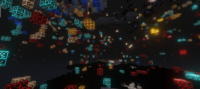
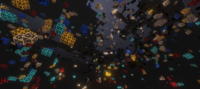
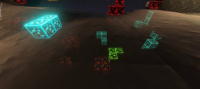
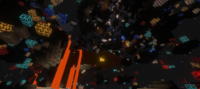
Glow Xray is an innovative custom resource pack for Minecraft Java Edition designed to enhance the mining experience by making all ores glow brightly through other blocks. This allows players to easily spot valuable resources like diamonds, gold, and iron from a distance, significantly streamlining the process of resource gathering and underground exploration. It functions without the need for any mod loaders such as Forge or Fabric and is compatible with the latest Minecraft versions, offering a more efficient and enjoyable mining adventure.
In the vast and blocky world of Minecraft, mining is an indispensable yet often laborious activity. Traditional mining can be time-consuming and frustrating, requiring extensive digging through countless blocks to find rare ores. Glow Xray transforms this by providing a clear visual advantage, making the hunt for resources far more efficient and enjoyable. While Xray packs often spark debate regarding fair play in some communities, Glow Xray's approach of illuminating ores rather than rendering blocks invisible offers a more refined and visually distinct experience. It appeals to players who seek to optimize their gameplay without resorting to overly disruptive visual changes, maintaining some of the game's aesthetic while delivering a powerful functional benefit. Compared to older, more rudimentary Xray packs that simply removed textures, Glow Xray aims for a more integrated look, making it a popular choice for those looking to speed up resource collection or navigate dark caves with ease.
Key Features and Highlights
- Illuminated Ores: Glow Xray renders all major ore types—including diamonds, gold, iron, coal, emerald, Redstone, and Lapis Lazuli—with a distinct, bright glow. This unique visual effect makes them visible through stone, dirt, gravel, and other opaque blocks, ensuring you never miss a valuable deposit. The illumination is carefully designed to be clear and prominent without being overly distracting.
- Effortless Resource Discovery: This texture pack significantly reduces the time and effort typically spent on blind, random digging. Instead of tunneling aimlessly, you can accurately pinpoint the exact locations of ore veins and clusters before you even start breaking blocks, leading to highly efficient and targeted mining operations.
- Broad Compatibility: Glow Xray works seamlessly across all Minecraft environments. Whether you prefer playing in a single-player survival world, joining friends on multiplayer servers, or building freely in creative mode, the pack provides consistent functionality. Its broad compatibility means you can leverage its benefits regardless of your preferred gameplay style, though server rules regarding Xray usage should always be observed.
- Time-Saving Mining: By providing clear visibility of ores, Glow Xray drastically cuts down the time required for resource gathering. This efficiency frees up players to focus on other engaging aspects of Minecraft, such as intricate building projects, extensive farming, exploring new biomes, or engaging in combat, rather than spending hours underground.
- Simplified Underground Exploration: The pack transforms the often dark, confusing, and dangerous underground into a more navigable space. With glowing ores acting as natural beacons, caves, ravines, and abandoned mines become easier to traverse, guiding players toward valuable resources and helping them avoid hidden dangers or getting lost.
- Clear Ore Visibility: The glow effect is specifically optimized for clarity, ensuring that ores are highly distinguishable without causing visual clutter or negatively impacting overall game aesthetics. The colors and intensity of the glow are calibrated to highlight resources effectively without creating an eyesore.
- Reduced Unnecessary Digging: By providing precise locations for ores, Glow Xray minimizes wasteful and unnecessary digging. This not only conserves your tools' durability but also helps maintain the natural beauty of the caves and mining areas, reducing the amount of generated debris and making your mining operations cleaner and more organized.
- Customizable Subpacks (Xray 100): Glow Xray often includes customizable subpacks, such as the 'Xray 100' option. These subpacks allow you to tailor your experience by, for instance, expanding visibility to include non-ore blocks like lava, water, or empty air pockets, which can be invaluable for advanced tunnel planning, avoiding hazards, or finding hidden dungeon spawners.
- Enhanced Visibility of Non-Ore Blocks (Optional): Depending on the chosen subpack, the pack can also highlight other crucial underground elements. This might include monster spawners (for mob farms), chests in dungeons, or even player-made structures, adding layers of strategic advantage beyond just resource gathering.
- Lightweight Performance: The texture pack is engineered to have minimal impact on your system's resources. This ensures a smooth and high-FPS gameplay experience, even on computers with moderate specifications, making it accessible to a wide range of Minecraft players without performance concerns.
- User-Friendly Integration: As a resource pack, Glow Xray integrates directly into Minecraft's native options menu. This makes it incredibly straightforward to activate, deactivate, or switch between different subpacks, even for players who are new to modifying their game.
- Regular Updates and Support: Glow Xray is typically maintained to be compatible with new Minecraft updates, ensuring its longevity and continued utility for players. This means you won't have to constantly search for alternatives every time the game updates.
- PvP Advantage (Situational): While not primarily a PvP mod, in specific competitive scenarios or minigames where rapid resource gathering is a factor, the ability to quickly locate and mine ores can provide a significant competitive edge in crafting superior gear or building defenses faster.
- Simplistic, Functional Design: The pack focuses purely on its core function of ore illumination, avoiding overly complex textures or visual distractions. Its design prioritizes functionality and clarity, maintaining a clean and effective gameplay experience.
How to Download and Install Glow Xray
Installing the Glow Xray Texture Pack in Minecraft Java Edition is a straightforward process that doesn't require any additional software or complex steps. Just follow these instructions carefully to ensure successful activation:
- Download the Glow Xray Texture Pack: Begin by downloading the Glow Xray texture pack file, typically in a .zip format, from a trusted source. Ensure that the version you download is compatible with your current Minecraft Java Edition version. IQMOD provides the latest, safely scanned versions for your convenience.
- Open Minecraft and Navigate to Resource Packs: Launch your Minecraft game (make sure you select the correct game version). From the main menu, click on the "Options" button, then select "Resource Packs" to open the resource pack management screen.
- Open the Resource Pack Folder: On the Resource Packs screen, you will find an "Open Pack Folder" button, usually located in the bottom-left corner. Click this button to open the directory where Minecraft stores all your resource packs.
- Transfer the Texture Pack File: Now, locate the Glow Xray .zip file that you downloaded in the first step. Drag and drop this .zip file directly into the "resourcepacks" folder that you just opened. Do NOT extract the .zip file; leave it in its compressed format.
- Activate the Texture Pack In-Game: Return to your Minecraft game. You might need to click "Done" and then re-enter the "Resource Packs" menu to refresh the list. You should now see Glow Xray listed under "Available Resource Packs" on the left side. Click the arrow icon next to its name to move it to the "Selected Resource Packs" list on the right side. Finally, click "Done" again to save your changes and activate the texture pack.
For a complete guide on installing various types of Minecraft modifications and enhancements, check out our comprehensive Minecraft Mods Installation Guide.
System Requirements and Compatibility
- Minecraft Version: Glow Xray is primarily compatible with the latest Minecraft Java Edition versions, often supporting a range of popular older versions as well. Always check the download page for the specific version compatibility to ensure it works with your game.
- Mod Loader: The Glow Xray texture pack does NOT require any specific mod loader (such as Forge or Fabric) to function. It is installed directly as a standard resource pack through the in-game options menu.
- Platform: This texture pack is specifically designed for Minecraft Java Edition. It may not be directly compatible with Minecraft Bedrock Edition or offer the same functionality on other platforms.
- Dependencies: Glow Xray does not have any required dependencies (other mods needed for it to run). It can be used completely standalone. However, some players may recommend using it in conjunction with OptiFine for enhanced performance and graphical control.
Pro Tips for Using Glow Xray
To maximize your experience with the Glow Xray Texture Pack and ensure smooth, responsible gameplay, consider these advanced tips:
- Practice Responsible and Ethical Use: While Glow Xray is a powerful tool, it is often considered a form of "cheating" on many public Minecraft multiplayer servers. Always review the rules of the server you are playing on before enabling it to avoid potential bans. It is best used in your single-player worlds or on private servers where its use is explicitly permitted.
- Combine with OptiFine for Performance: For the best possible performance and graphical control, it is highly recommended to install OptiFine alongside Glow Xray. OptiFine not only significantly boosts your frame rate (FPS) but also adds advanced graphics customization options that can complement Glow Xray, such as fine-tuning lighting or render distance, leading to a smoother and more visually pleasing experience.
- Experiment with Subpacks: If Glow Xray offers multiple subpacks (like an "Xray 100" option), take the time to experiment with them. These subpacks might provide different levels of visibility, for instance, showing empty cave spaces, water, or lava in addition to just ores. Understanding each subpack will help you tailor your experience to suit your specific goals, whether you're exclusively hunting for diamonds or planning a complex tunnel network.
- Strategic Mining and Exploration: Don't just dig directly to the ores you see. Use Glow Xray as a strategic planning tool. Look for large clusters of ores, or use it to identify natural cave systems and ravines that often contain a wealth of resources. This approach can help you create a more efficient and resource-rich mining operation rather than simply digging in a straight line.
- Always Backup Your Worlds: Before installing any texture pack or mod, especially those that alter the game's visual display, always create a backup of your Minecraft worlds. This ensures that you won't lose any progress in case of an unforeseen issue or if you decide to remove the texture pack.
- Understand the Pack's Limitations: Despite its power, Glow Xray is not an all-seeing magic eye. It may not reveal every single hidden secret or non-ore block in the game. Use it as a powerful aid, but don't completely abandon traditional exploration techniques for a truly comprehensive Minecraft experience. Some highly concealed areas might still require a keen eye and careful search.
Is Glow Xray Safe and Free?
Yes, the Glow Xray texture pack is completely safe to use and available for free. All files provided on IQMOD are rigorously scanned to ensure they are free from any malicious software or viruses that could harm your device. We are committed to offering Minecraft content from trusted sources and regularly verify files to guarantee the safety of our users. This texture pack requires no payment or subscriptions, making it accessible to all players at no additional cost. You can download and install it with confidence, enjoying an enhanced mining experience without concerns about security or hidden fees.
Why Download from IQMOD?
IQMOD stands as the premier destination for Arabic and English-speaking Minecraft players seeking the best mods, resource packs, and game enhancements. When you choose to download the Glow Xray Texture Pack from our platform, you benefit from several exclusive advantages:
- Direct and Secure Download Links: We provide direct, high-speed download links that are free from intrusive ads, pop-ups, and unnecessary redirects, ensuring a smooth and reliable download experience every time.
- Always Updated Content: The IQMOD team is dedicated to consistently updating all mods and resource packs to ensure compatibility with the latest Minecraft versions. This guarantees you always have access to the newest functionalities and bug fixes.
- Rigorous Security Checks: Every file hosted on IQMOD undergoes strict security scanning to confirm it is free from viruses or malware, providing you with a completely safe and worry-free gaming experience.
- Exceptional Customer Support: Should you encounter any issues during the download or installation process, our dedicated support team is readily available to assist you and provide the necessary guidance.
- Comprehensive Community Hub: IQMOD is more than just a download site; it's a vibrant community for Minecraft players. Here, you can find guides, tips, and reviews to help you with every aspect of your Minecraft journey.
Don't waste another moment endlessly searching for ores! Download the Glow Xray Texture Pack from IQMOD now and revolutionize your mining experience, making diamond hunting easier and more exciting than ever before!
Glow Xray Texture Pack for Minecraft - Download & Install Minecraft Mod Screenshots
View images and verify quality before download
Image Gallery






Glow Xray Texture Pack for Minecraft - Download & Install Technical Information
Learn technical details, version, and supported platform
Technical Specifications

Your Own Minecraft Server! 🎮
Start your own server with friends on BisectHosting — insane performance, one-click mod installs, and 24/7 support. Use the discount code and start at the lowest price!
Download and Share
Download for free or share it with friends
Get the advantage!
Subscribe for early access to exclusive mods and direct downloads without timers or ads.
Mod not opening in Minecraft? This applies to Bedrock edition only (mobile/console) — the issue is your file manager, not the mod. Use our app IQ OpenMC to open the file and it will give you the option to open it in Minecraft directly. (Java players don't need this step)