

Free Look Mod for Minecraft - Dynamic 3rd Person View - Download
Download the Free Look Mod for Minecraft to get a dynamic 3rd person view where your character stays still. Perfect for creating stunning thumbnails and cinematic screenshots. Get it free from IQMOD now!
Everything About Free Look Mod for Minecraft - Dynamic 3rd Person View - Download
Read the full article about the mod
What is Free Look Texture Pack | Dynamic 3rd person view | free look?
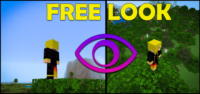
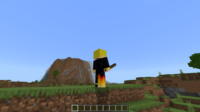
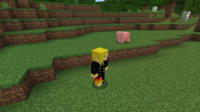
The Free Look Texture Pack, often referred to as the Dynamic 3rd Person View mod, is an innovative addition to Minecraft that revolutionizes how you interact with the third-person perspective in-game. Traditionally, when you move your point of direction in third person, your player's face and body also move, often limiting camera angles and making it challenging to capture dynamic screenshots. This resource pack fundamentally alters this dynamic by allowing you to freely look around your player character while the player itself remains stationary, granting you unprecedented control over your camera angles.
This pack is an indispensable tool for content creators, players who appreciate visual aesthetics, and anyone aiming to capture professional and stunning screenshots or thumbnails. With this feature, you can now photograph your character from any angle you desire without the player's pose or orientation changing. This opens up new horizons for visual creativity within the Minecraft world. Whether you want to showcase your new armor set, or capture a panoramic scene with your character prominently in the foreground, the Free Look Mod provides the flexibility and control needed to realize your artistic vision, transforming ordinary gameplay into cinematic moments.
Key Features
- Dynamic 3rd Person Camera: Experience a more fluid and engaging third-person perspective. The mod allows you to explore your surroundings while your character remains a fixed point of interest within the frame, providing a sense of depth and control previously unavailable in the base game.
- Independent Camera Movement: Gain complete freedom to move the camera around your player character. This empowers you to find the perfect angle for every shot, whether it's an overhead view, a side profile, or a low-angle dramatic shot, without the player's head always following your gaze.
- Static Player Model: Unlike Minecraft's default behavior, this mod ensures your player character stays still and doesn't rotate with camera movements. This makes it ideal for capturing stable, precise images of your character, their equipment, or specific actions without unwanted shifts.
- Ideal for Professional Screenshots: This feature is a dream come true for content creators and in-game photographers. You can now capture high-quality screenshots that truly highlight the beauty of your world, your builds, or unique moments with perfect framing.
- Enhanced Thumbnail Creation: Engaging thumbnails are crucial for video content success. With this mod, you can effortlessly create unique and captivating thumbnails that showcase your character in the best possible light, significantly boosting your video's appeal and click-through rate.
- Improved Visual Experience: The mod adds a new layer of aesthetic appeal and visual detail to the game, making every moment feel more cinematic. This is especially noticeable when exploring scenic areas or complex architectural builds, giving a more polished feel.
- Easy Integration and Activation: The mod is incredibly simple to install, functioning as a regular resource pack. It requires no complex configurations or external launchers. Once activated, its features work immediately, making it accessible to all players regardless of technical expertise.
- Broad Version Compatibility: This resource pack is designed to be compatible with a wide range of Minecraft versions, typically from 1.16.x up to the latest stable releases like 1.20.x. This ensures a large player base can benefit without compatibility concerns.
- Boosts Creativity and Visual Storytelling: The mod provides powerful tools for visual storytelling and creating unique scenes. Whether you're documenting an adventure, showcasing a new build, or setting up a dramatic moment, the camera control unlocks limitless creative possibilities.
- Minimal Performance Impact: Since this pack primarily modifies camera animations and does not introduce complex new objects or game mechanics, it generally has a negligible impact on game performance, allowing for a smooth experience.
- Complements Shaders and Texture Packs: It can be seamlessly combined with high-quality shaders and other texture packs to create truly breathtaking visual experiences. Capture the enhanced beauty of these additions from perfectly framed, professional angles.
- More Immersive Gameplay: The ability to see your character move freely in the game world while independently controlling the camera can heighten your sense of immersion, making the overall gameplay experience more engaging and personal.
How to Install
Installing the Free Look Mod is straightforward, as it functions as a standard Minecraft resource pack. Follow these steps to activate it and start enjoying its unique features:
- Download the Resource Pack: Begin by downloading the Free Look resource pack file (typically a .zip archive) from a reputable source like IQMOD. Ensure you download the version compatible with your Minecraft client.
- Open Minecraft's Resource Packs Folder: Launch Minecraft. From the main menu, navigate to 'Options' > 'Resource Packs' > 'Open Pack Folder'. This action will open the directory where your resource pack files should be placed.
- Transfer the Resource Pack File: Drag and drop the .zip file you downloaded in Step 1 into the 'resourcepacks' folder that you opened in Step 2. It is crucial not to extract or unzip the file; leave it as a .zip archive.
- Activate in-Game: Return to the 'Resource Packs' screen in Minecraft. You should now see 'Free Look' or a similarly named pack listed under 'Available Resource Packs' on the left side. Click on the arrow icon next to it to move it to the 'Selected Resource Packs' list on the right side.
- Confirm and Play: Click 'Done' at the bottom of the screen. The game may take a few moments to reload the resource packs. Once complete, you can start playing and enjoy the new dynamic perspective and free-look camera in third person.
System Requirements
- Minecraft Version Needed: Compatible with Minecraft versions from 1.16.x up to the latest stable releases, such as 1.20.x. For the best experience, using the most recent stable version is always recommended.
- Loader Needed if Applicable: This mod does not require any specific mod loaders like Forge or Fabric, as it functions as a standalone resource pack.
- Any Additional Requirements: No additional software or dependencies are required. The mod works directly with the vanilla Minecraft client.
Tips & Tricks
To get the most out of the Free Look Mod, consider these practical tips:
- Experiment with Diverse Angles: Don't hesitate to explore every possible angle around your character. You might discover unique perspectives that were previously impossible, especially when capturing details of intricate builds or dynamic action sequences.
- Combine with Shaders and Texture Packs: For truly breathtaking visuals, activate this mod alongside a high-quality shader pack and a realistic texture pack. This combination will transform your screenshots into works of art, capturing light and detail in stunning ways.
- Utilize for Storytelling: Think of the mod as a tool for directing your own Minecraft film. You can use it to create cinematic scenes that showcase your in-game progress, adventures, or even role-playing scenarios in a professional and engaging manner.
- Practice Framing: With complete camera freedom, it can initially be challenging to find the perfect frame. Practice positioning your character at different focal points (like the rule of thirds) to create balanced and visually appealing shots.
Why Download This Mod?
Downloading the Free Look Mod will fundamentally change your perception of third-person gameplay in Minecraft and unlock new avenues for creativity. If you're a fan of in-game photography, a content creator seeking to produce more professional and captivating thumbnails and screenshots, or simply a player who appreciates a more dynamic visual experience, this mod is the perfect tool for you. It liberates you from the constraints of the default camera, allowing you to highlight the beauty of your world and character with a cinematic flair. This mod doesn't add any complexity to your gameplay; instead, it offers a simple yet incredibly effective visual and functional enhancement. Make your shots stand out from the crowd and give your content a professional touch with this fantastic resource pack. It's a small investment in your time that yields significant returns in the quality of your visual experience and creative output.
Free Look Mod for Minecraft - Dynamic 3rd Person View - Download Minecraft Mod Screenshots
View images and verify quality before download
Image Gallery
Free Look Mod for Minecraft - Dynamic 3rd Person View - Download Technical Information
Learn technical details, version, and supported platform
Technical Specifications

Your Own Minecraft Server! 🎮
Start your own server with friends on BisectHosting — insane performance, one-click mod installs, and 24/7 support. Use the discount code and start at the lowest price!
Download and Share
Download for free or share it with friends
Get the advantage!
Subscribe for early access to exclusive mods and direct downloads without timers or ads.
Mod not opening in Minecraft? This applies to Bedrock edition only (mobile/console) — the issue is your file manager, not the mod. Use our app IQ OpenMC to open the file and it will give you the option to open it in Minecraft directly. (Java players don't need this step)