

Dynamic First Person Model Addon for Minecraft - Download & Install
Download the Dynamic First Person Model Addon for Minecraft, displaying your full player model in first-person for ultimate realism. Enhance your visual experience with seamless integration and recommended FOV settings. Get it free from IQMOD!
Everything About Dynamic First Person Model Addon for Minecraft - Download & Install
Read the full article about the mod
What is Dynamic First Person Model?
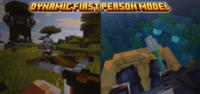
The Dynamic First Person Model addon for Minecraft is a groundbreaking modification that allows players to see their full character model while playing in first-person perspective. This innovative addon, specifically designed for Minecraft Bedrock Edition, significantly enhances immersion and realism by rendering the player's body, arms, and legs seamlessly within the first-person view. Inspired by similar Java Edition mods, its primary goal is to minimize visual glitches and provide a smooth, integrated experience. The creator highly recommends setting your Field of View (FOV) to 70 for the optimal visual experience.
Traditionally, Minecraft's first-person view has been limited to showing only the player's hands and the item they are holding, often breaking the illusion of being a physical entity within the game world. The Dynamic First Person Model addon addresses this by offering a comprehensive solution that displays the entire player model in a way that feels natural and integrated. This not only boosts visual immersion but also opens up new possibilities for content creators, enabling more dynamic and realistic video recordings and screenshots. Every movement your character makes now feels more tangible and connected to your perspective.
Key Features and Highlights
- Full Player Model Visibility: The core feature of this addon is the complete rendering of your player's body, including arms, legs, and torso, when playing in first-person view. This eliminates the 'floating camera' sensation, making you feel truly present in the Minecraft world.
- Enhanced Realism and Immersion: By seeing your character's entire model move and interact with the environment from a true first-person perspective, the level of realism and immersion is dramatically increased. You'll feel more connected to your in-game avatar and the world around you.
- Seamless Visual Integration: The addon is meticulously designed to minimize visual issues such as clipping or unwanted body parts appearing. The goal is to provide a clean, fluid visual experience that avoids distractions and maintains consistency.
- Recommended FOV (70): For the most natural and aesthetically pleasing experience, the addon's creator specifically recommends setting your in-game Field of View (FOV) to 70. This setting helps achieve the intended perspective and reduces potential visual distortions.
- Developer API (
ae_fpm.is_first_person): A valuable feature for addon creators, this function allows other behavior packs to check if the Dynamic First Person Model addon is active. This opens up opportunities for deeper interactions and custom content that can adapt to the presence of this addon. - Vanilla+ Aesthetic: Despite adding a significant visual feature, the addon maintains a 'Vanilla+' aesthetic, meaning it blends perfectly with Minecraft's default art style. It won't feel out of place or incongruous with the game's original design.
- Customization and Cosmetics Compatible: This addon works flawlessly with most custom resource packs and player skins. You can continue to use your favorite character appearance and armor sets, enjoying the enhanced first-person view without compatibility issues.
- Active Development and Bug Reporting: The developer is committed to continuous improvement and actively encourages users to report any bugs or issues they encounter via their Discord channel. This ensures the addon remains updated, stable, and as bug-free as possible.
- Easy and Quick Installation: As a Minecraft Bedrock addon, the installation process is remarkably simple, typically involving just opening an
.mcpackfile. This makes it accessible to all players, regardless of their technical expertise. - Lightweight Performance: The addon is designed to be efficient and not cause significant performance overhead. It aims to provide a smooth gameplay experience even on devices with moderate specifications.
- Dynamic Visual Feedback: Experience more dynamic visual feedback during actions like sprinting, jumping, or attacking, as your character's full body movements are now visible, adding to the tactical and immersive feel of gameplay.
- Ideal for Content Creators: If you're a content creator making Minecraft videos or streaming, this addon is a must-have. It elevates the production quality of your content by offering a more professional and engaging visual perspective for your audience.
How to Download and Install Dynamic First Person Model
Installing the Dynamic First Person Model addon is a straightforward process, as it's a Bedrock Edition resource and behavior pack (addon) and doesn't require any external mod loaders. Follow these simple steps to start enjoying your enhanced first-person experience:
- Download the Addon File: Begin by downloading the addon's
.mcpackfile from the trusted IQMOD website. We always provide the latest versions and direct download links to ensure a hassle-free experience free from intrusive ads. - Open the .mcpack File: Once the download is complete, simply double-click on the
.mcpackfile you've downloaded. Minecraft will automatically open and begin the process of importing the addon into your game. You should see a confirmation message indicating successful import. - Create or Edit a World: To enable the addon, you need to activate it within your world settings. You can either create a new world and activate the addon from the world creation screen before launching, or edit an existing world by accessing its 'Settings' menu.
- Activate Resource and Behavior Packs: Within the world settings, navigate to the 'Resource Packs' and 'Behavior Packs' sections. Look for 'Dynamic First Person Model' in the 'Available Packs' list and activate it by clicking on it and then selecting the 'Activate' button. Ensure it appears in the 'Active Packs' section for both Resource and Behavior packs.
- Adjust Pack Order (Optional but Recommended): Sometimes, the order of resource packs can be crucial. It's recommended to ensure that Dynamic First Person Model is at the top of your active pack list to guarantee its proper functioning and prevent any potential conflicts with other addons.
- Launch Your Game: After activating the addon and confirming its order, save your world settings and launch your game. You will immediately notice the change when you enter first-person view, as your full character model will now be visible.
For a complete guide on troubleshooting or general instructions for installing any mod or addon, check out our Minecraft Mods Installation Guide, which offers detailed information for all types of modifications.
System Requirements and Compatibility
- Minecraft Version: This addon is compatible with the latest versions of Minecraft Bedrock Edition. It is always recommended to keep your game updated to the most recent version for optimal compatibility and performance.
- Mod Loader: This addon does not require any external mod loaders like Forge or Fabric, as it is designed as a direct 'Addon' for Minecraft Bedrock.
- Platform: The addon functions across all platforms that support Minecraft Bedrock Edition, including Windows 10/11, Xbox, PlayStation, Nintendo Switch, Android, and iOS.
- Dependencies: There are no other required addons or mods to run Dynamic First Person Model. It operates completely independently.
Pro Tips for Using Dynamic First Person Model
To get the most out of the Dynamic First Person Model addon and enjoy a truly unique gameplay experience, consider these advanced tips:
- Fine-Tune Your FOV Setting: While the developer recommends an FOV of 70, personal preference plays a role. Start with 70, but don't hesitate to experiment slightly (e.g., 65 or 75) to find the perfect visual comfort zone for your specific setup and screen size.
- Combine with High-Quality Resource Packs: The addon truly shines when paired with high-resolution texture packs that enhance armor and weapon details. You'll notice your character looking even more intricate and realistic thanks to these combined visual upgrades.
- Utilize for Content Creation: If you're a streamer or YouTuber, this addon is invaluable. It brings a professional and engaging aesthetic to your Minecraft content, allowing viewers to better connect with your in-game actions and providing a more dynamic visual experience.
- Integrate with Custom Animation Addons: Seek out other Bedrock addons that modify character animations (like walking, running, or jumping). When combined with Dynamic First Person Model, you'll achieve an incredibly fluid and dynamic visual experience, making every movement feel more natural.
- Actively Report Bugs and Issues: If you encounter any unexpected visual glitches, clipping issues, or other bugs, make sure to report them to the developer. The modding community thrives on user feedback, and your contributions help improve the addon for everyone.
- Explore the Developer Functionality: For addon developers, leverage the
ae_fpm.is_first_personfunction. You can create behavior packs that react to the presence of this addon, perhaps by altering certain visual effects or character behaviors when the first-person model is active, opening doors to unique customizations.
Is Dynamic First Person Model Safe and Free?
Yes, absolutely. The Dynamic First Person Model addon is completely safe and free to use. It has been thoroughly vetted by the IQMOD team to ensure it is free from any malicious software or viruses. We are committed to providing high-quality, trustworthy content to the Minecraft community, and we do not permit the distribution of any files that could pose a risk to your devices or data. Furthermore, being a free addon, you can download and install it without any cost, making this immersive experience accessible to all players.
At IQMOD, we understand the importance of security and trust. That's why we ensure all mods and addons available on our portal are sourced from reputable and verified creators. You can download this addon with complete confidence, knowing that you are receiving a clean and thoroughly checked version. Enjoy your enhanced Minecraft experience without any concerns about the safety of your device.
Why Download from IQMOD?
IQMOD (iqmod.me) stands as the leading Arabic and English portal for Minecraft mods and addons, and downloading Dynamic First Person Model from our platform guarantees you the best possible experience. We provide direct and fast download links, completely free from intrusive advertisements and pop-ups that hinder your browsing. We are dedicated to offering the latest versions of addons, meaning you'll always receive all improvements and bug fixes as soon as they are released.
Moreover, all files on IQMOD are regularly scanned to ensure they are free from any malicious software, providing you with a safe and reliable download environment. Our technical support team is always available to assist you with any questions or issues you might encounter during download or installation. Don't waste your time searching unreliable sources; download Dynamic First Person Model now from IQMOD and dive into ultimate realism in Minecraft Bedrock!
Dynamic First Person Model Addon for Minecraft - Download & Install Minecraft Mod Screenshots
View images and verify quality before download
Image Gallery
Dynamic First Person Model Addon for Minecraft - Download & Install Technical Information
Learn technical details, version, and supported platform
Technical Specifications

Your Own Minecraft Server! 🎮
Start your own server with friends on BisectHosting — insane performance, one-click mod installs, and 24/7 support. Use the discount code and start at the lowest price!
Download and Share
Download for free or share it with friends
Get the advantage!
Subscribe for early access to exclusive mods and direct downloads without timers or ads.
Mod not opening in Minecraft? This applies to Bedrock edition only (mobile/console) — the issue is your file manager, not the mod. Use our app IQ OpenMC to open the file and it will give you the option to open it in Minecraft directly. (Java players don't need this step)