

Custom Crosshairs Texture Pack | 15+ Crosshairs Mod for Minecraft - Download
Download Custom Crosshairs Texture Pack - adds 19 unique designs to enhance PvP and gameplay aesthetics. Compatible with Forge & Standard versions. Get it free from IQMOD!
Everything About Custom Crosshairs Texture Pack | 15+ Crosshairs Mod for Minecraft - Download
Read the full article about the mod
What is Custom Crosshairs Texture Pack | Forge + Standards | 15+ custom crosshairs?
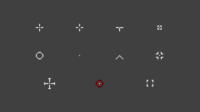
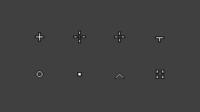
The Custom Crosshairs Texture Pack for Minecraft is a resource pack that introduces a diverse collection of 19 unique crosshair designs into your game. Available in two distinct versions, Forge and Standard, this pack is meticulously crafted to enhance your aiming precision, particularly in PvP combat, while also allowing for a personalized visual aesthetic for your user interface. It serves as an invaluable tool for players of all skill levels, from novices looking to refine their aim to seasoned veterans seeking to customize their gameplay experience.
This texture pack offers a straightforward yet highly effective solution for modifying a critical aspect of Minecraft's gameplay: the crosshair. In competitive environments such as PvP servers, a clear, comfortable, and optimized crosshair can significantly impact a player's performance. Moving beyond the default crosshair, this pack provides an extensive selection of shapes and sizes, ensuring that every player can find a design that perfectly matches their playstyle and visual preferences. Its ease of installation and broad compatibility make it a popular choice among players eager to elevate their game without delving into complex modifications.
Key Features and Highlights
- 19 Unique Crosshair Designs: The pack boasts a comprehensive library of 19 distinct crosshair designs. These range from minimalist shapes like dots and circles to more intricate patterns, some inspired by popular first-person shooter games, ensuring a suitable option for every player.
- Two Versatile Versions (Forge & Standard): To cater to a wider audience, the pack is offered in two main versions. The Standard version is universally compatible with all Minecraft Java Edition installations without requiring any mod loader. The Forge version is optimized for users running Forge, potentially offering enhanced stability or performance benefits within a modded environment.
- Enhanced PvP Performance: Selecting the right crosshair can drastically reduce visual clutter and improve aiming accuracy and consistency. This provides a crucial competitive edge in player-versus-player engagements, allowing for better target acquisition and tracking.
- Improved Game Aesthetics: Beyond its functional benefits, the pack allows for significant visual customization. You can choose a crosshair that complements your existing resource pack or shader setup, adding a unique and personal touch to your overall game interface.
- Effortless Crosshair Switching: The pack is designed for user convenience, allowing for quick and easy swapping between different crosshair designs. This means you can experiment with various options on the fly to find the perfect fit without cumbersome file manipulations.
- Lightweight and Performance-Friendly: As a simple texture pack, it demands minimal system resources and has virtually no impact on game performance or frame rates (FPS). This makes it an ideal addition for players on all hardware configurations.
- Broad Compatibility with Other Resource Packs: Since it modifies a very specific UI element, this texture pack is generally compatible with most other resource packs and shaders, minimizing the risk of conflicts and ensuring a seamless integration into your existing setup.
- Inspired by Popular Gaming Titles: Some crosshair designs draw inspiration from well-known FPS games, offering a familiar and comfortable experience for players transitioning from or enjoying other competitive titles.
- Multi-Version Minecraft Support: The pack is diligently maintained to ensure compatibility with a broad spectrum of Minecraft Java Edition versions, guaranteeing that a large majority of players can utilize its features.
- Potential for Ongoing Updates: Resource pack developers often provide updates to ensure compatibility with the latest Minecraft versions and to introduce new designs or performance enhancements, keeping the pack fresh and relevant.
- Ideal for Content Creators: For streamers and YouTubers, a custom crosshair can make gameplay footage appear more professional and engaging, distinguishing their content from others.
- Assists New Players in Learning: For those new to PvP, a consistent and clear crosshair can aid in understanding aiming mechanics and significantly improve accuracy over time as they practice.
- Flexible Customization Options: The pack offers a high degree of flexibility in customizing your aiming experience, providing greater control over how you interact with the game world.
How to Download and Install Custom Crosshairs Texture Pack | Forge + Standards | 15+ custom crosshairs
Installing resource packs in Minecraft is a straightforward process that requires only a few simple steps. Ensure you have Minecraft Java Edition installed and have downloaded the pack's .zip file. If you plan to use the Forge-specific version, make sure Forge is already installed for your Minecraft client.
- Download the Crosshairs Pack: Begin by downloading the Custom Crosshairs Texture Pack .zip file from the IQMOD website. Be sure to select the correct version (Standard or Forge) that matches your Minecraft setup.
- Open Your Resource Packs Folder: Launch Minecraft. From the main menu, navigate to 'Options,' then 'Resource Packs.' On this screen, you will find a button labeled 'Open Pack Folder.' Click this button to open the directory where your resource packs are stored.
- Transfer the Pack File: Once the resource packs folder is open, drag and drop the downloaded .zip file into this folder. It is crucial not to extract the contents of the .zip file; leave it in its compressed format.
- Activate the Pack In-Game: Return to Minecraft (you might need to close and reopen the Resource Packs screen for it to refresh). You will see the Custom Crosshairs Texture Pack listed under 'Available Resource Packs' on the left side. Click the arrow icon on the pack to move it to the 'Selected Resource Packs' list on the right side.
- Confirm and Apply Changes: After moving the pack to the right, click the 'Done' button. Minecraft may take a few moments to reload its resources and apply the changes. Once complete, your crosshair should be updated to one of the new custom designs.
For a complete guide and troubleshooting tips for any issues you might encounter, check out our Minecraft Mods Installation Guide.
System Requirements and Compatibility
- Minecraft Version: Compatible with most recent Minecraft Java Edition versions, including 1.16.5, 1.18.2, 1.19.4, 1.20.1, and newer versions.
- Mod Loader: The Standard version requires no mod loader. The Forge version requires Forge to be installed for your Minecraft client.
- Platform: Minecraft Java Edition only. This texture pack is not compatible with Minecraft Bedrock Edition.
- Dependencies: No other mods or resource packs are strictly required for this pack to function. It operates independently as a standalone texture pack.
Pro Tips for Using Custom Crosshairs Texture Pack | Forge + Standards | 15+ custom crosshairs
To maximize your experience with the Custom Crosshairs Texture Pack, consider these advanced tips that can significantly enhance your Minecraft gameplay:
- Experiment with All Crosshairs: Don't settle for the first crosshair you like. Systematically try all 19 designs in various gameplay scenarios (PvP, exploration, building) to determine which offers the best visibility, precision, and comfort for your unique playstyle. You might find one crosshair works better with a bow, while another is perfect for sword combat.
- Combine with Other Resource Packs and Shaders: Integrate the crosshairs pack with your favorite shaders and other resource packs. A well-chosen crosshair can perfectly complement your overall game aesthetic and improve your visual experience without impacting performance. Ensure your other packs don't override the crosshair texture to avoid conflicts.
- Practice in PvP Environments: Once you've selected your preferred crosshair, spend dedicated time practicing on PvP servers. This will help you acclimate to the new reticle and gauge its impact on your aiming accuracy in competitive situations. Pay attention to how the crosshair aids in target tracking and projectile leading.
- Adjust In-Game Settings: Tweak your in-game settings such as Field of View (FOV) and GUI Scale. A higher FOV can make the crosshair appear smaller, while GUI Scale can affect its clarity. Find a balance that suits your visual comfort and aiming preferences.
- Contextual Crosshair Switching: Don't be afraid to change your crosshair based on the situation. For instance, you might prefer a small, precise crosshair for long-range engagements and a larger, more prominent one for close-quarters combat or when using specific tools. If possible, create different profiles for quick switching.
- Share and Discuss with the Community: If you discover a particular crosshair that significantly improved your performance, share your insights with friends or in Minecraft communities. Others might benefit from your recommendations, and it could lead to discovering new designs or innovative uses for the pack. Consider linking to the Minecraft versions guide on IQMOD for broader context.
Is Custom Crosshairs Texture Pack | Forge + Standards | 15+ custom crosshairs Safe and Free?
Yes, the Custom Crosshairs Texture Pack is absolutely safe to use and completely free to download. All files available on IQMOD are rigorously scanned and verified to ensure they are free from any malware or viruses. You can download and install this pack with full confidence, knowing it will not harm your device or your Minecraft account. As a simple resource pack that modifies only visual elements and not core game mechanics, it poses no security risks. At IQMOD, we are committed to providing safe and reliable content for the Minecraft community.
Why Download from IQMOD?
IQMOD stands as the premier destination for both Arabic and English-speaking Minecraft players seeking top-tier mods and resources. By choosing to download the Custom Crosshairs Texture Pack from our platform, you are guaranteed to receive the authentic, latest version, directly and without any obstacles. We provide clean, direct download links, free from intrusive advertisements or frustrating redirects that waste your time. Furthermore, our content is regularly updated to ensure compatibility with the newest Minecraft versions. Opt for IQMOD for a seamless, secure, and reliable download experience. Download the Custom Crosshairs Texture Pack now and elevate your Minecraft adventure!
Custom Crosshairs Texture Pack | 15+ Crosshairs Mod for Minecraft - Download Minecraft Mod Screenshots
View images and verify quality before download
Image Gallery
Custom Crosshairs Texture Pack | 15+ Crosshairs Mod for Minecraft - Download Technical Information
Learn technical details, version, and supported platform
Technical Specifications

Your Own Minecraft Server! 🎮
Start your own server with friends on BisectHosting — insane performance, one-click mod installs, and 24/7 support. Use the discount code and start at the lowest price!
Download and Share
Download for free or share it with friends
Get the advantage!
Subscribe for early access to exclusive mods and direct downloads without timers or ads.
Mod not opening in Minecraft? This applies to Bedrock edition only (mobile/console) — the issue is your file manager, not the mod. Use our app IQ OpenMC to open the file and it will give you the option to open it in Minecraft directly. (Java players don't need this step)