

Classic Sky Block World for Minecraft - Download & Install
Download Classic Sky Block World for Minecraft - a timeless survival challenge on a tiny island. Gather resources, expand, and master the iconic cobblestone generator. Get it free from IQMOD!
Everything About Classic Sky Block World for Minecraft - Download & Install
Read the full article about the mod
What is Classic Sky Block?
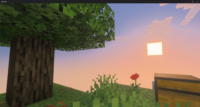
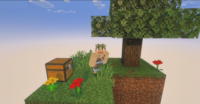
Classic Sky Block is an iconic Minecraft survival map designed to push players' survival skills to their absolute limits. In this world, players spawn on a tiny island floating in an endless void, equipped with only a single tree and a chest containing a few essential resources. The primary objective is to survive, thrive, and expand the island using the extremely limited resources available, emphasizing creativity and resource management. This world is compatible with most versions of Minecraft Java Edition, making it a timeless and accessible experience for a broad audience of players.
The concept of Sky Block first emerged in the Minecraft community many years ago and quickly became one of the most popular and influential survival challenges. It wasn't just a new world to play; it introduced an entirely new gameplay paradigm focused on innovation, recycling, and the core mechanics of the game. Sky Block has inspired countless similar maps and mods, becoming a benchmark for focused survival challenges. It embodies the essence of Minecraft: the ability to build anything from nothing, using only imagination and perseverance, making it an essential experience for any true Minecraft player looking to test their capabilities.
Key Features and Highlights
- The Ultimate Survival Test: Classic Sky Block places you in a situation where every single resource holds immense value. You start with next to nothing, relying heavily on your ability to think creatively and resourcefully to overcome the odds. This challenge focuses on core game mechanics like farming, foraging, crafting, and building, making you rediscover the essence of Minecraft survival.
- Iconic Starting Island: Your adventure begins on a small, floating island typically comprising only a few dozen blocks. This limited space forces you to strategically plan every move, from placing the first blocks to expand your island to managing a tight inventory. It's the perfect environment for learning how to make the most out of what's available.
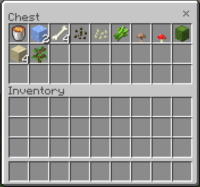
- Strategic Starter Chest: The initial chest contains carefully selected resources vital for your early progression, such as a lava bucket, a water bucket, and some wheat seeds. Every item in this chest is crucial for your initial setup, especially for creating the essential cobblestone generator and starting your farm.
- The Essential Cobblestone Generator: The cobblestone generator is the cornerstone of the Sky Block experience. Using the water and lava from your starter chest, you can construct a simple setup that endlessly produces cobblestone. This resource is the lifeline of your island, providing the blocks needed for expansion, as well as raw materials for furnaces and tools.
- Hunger and Mob Management: Despite being in the void, core Minecraft rules apply. You'll need to manage your hunger level by farming or hunting, and hostile mobs will spawn at night, adding another layer of challenge and requiring you to build a safe shelter or mob farms for resource gathering.
- Infinite Expansion Potential: Despite the humble beginnings, the sky is literally the limit. You can expand your island in any direction, construct multi-level structures, and create automated farms, all using the resources you gather and craft yourself.
- Open Void Exploration and Adventure: You are surrounded by an endless void, providing a unique sense of freedom and simultaneously a constant challenge to avoid falling. This void is also an inspiration for exploration, as you can build bridges to reach other potential islands (in some map variations) or to construct portals to other dimensions.
- Farming and Animal Husbandry: Farming is your primary source of food and renewable resources. Starting with initial wheat seeds, you can develop extensive farms for various crops. You can also attract and breed animals using seeds or grass, providing additional sources of food and raw materials like leather and wool.
- Nether Access and Resources: Once you've gathered enough resources (especially cobblestone and obsidian), you can construct a Nether portal. The Nether offers vital new resources such as quartz and soul sand, as well as new mobs and unique challenges that open new avenues for expanding your floating empire.
- Classic Minecraft Mechanics: This world focuses on the core gameplay of Minecraft, making it ideal for players who enjoy vanilla survival without the complexities of additional mods. Everything relies on your skills in crafting, building, exploring, and surviving.
- Creative Construction Focus: With very few restrictions, players are encouraged to be innovative in designing their island, farms, and mechanisms. Every building decision impacts the sustainability and aesthetics of your floating haven.
- Problem-Solving and Resource Optimization: Every resource has multiple uses, and the challenge lies in how you convert basic resources into advanced ones. For example, how do you turn cobblestone into tools, then into buildings, then into automated farms?
- Self-Sustaining Ecosystem: The ultimate goal is to create a fully self-sustaining ecosystem on your island, where you can produce everything you need without relying on external, non-renewable resources.
- Multiplayer Friendly Design: Classic Sky Block worlds play exceptionally well on servers, where friends can collaborate to build a shared island or compete to see who can achieve the greatest feats.
- Broad Version Compatibility: Classic Sky Block is designed to be flexible and compatible with a wide range of Minecraft Java Edition versions, from older releases like 1.7.10 up to the latest versions such as 1.20.1, ensuring a consistent experience across game updates.
How to Download and Install Classic Sky Block
Installing the Classic Sky Block world in Minecraft Java Edition is a straightforward process that requires only a few steps. Ensure you have a working Minecraft Java Edition installation on your computer before you begin. You will not need any mod loaders like Forge or Fabric, as this is a world file (map), not a mod.
- Download the World File: Begin by downloading the Classic Sky Block world file from a trusted source like IQMOD. The file will typically be downloaded as a compressed archive (a .zip or .rar file).
- Extract the Downloaded File: After downloading, use a file archiver program like WinRAR or 7-Zip to extract the contents of the compressed file. This will yield a folder containing all the world data (usually named 'Classic Sky Block' or similar).
- Locate Your Minecraft 'saves' Folder: Open your Start Menu (Windows) and type
%appdata%, then press Enter. This will open your Roaming folder. Inside this folder, you will find a.minecraftfolder. Open this folder, and within it, you'll find a folder namedsaves. - Move the World Folder: Copy the extracted world folder (e.g., 'Classic Sky Block') and paste it directly into the
savesfolder you located in the previous step. Make sure to move the entire folder, not just its contents. - Launch Minecraft and Play: Open your Minecraft Launcher, and ensure you have selected your preferred Minecraft Java Edition version (such as 1.20.1 or any compatible version). Click the 'Play' button. Once in the game, select 'Singleplayer', and you should find 'Classic Sky Block' listed among your worlds. Select it and start your adventure!
For a complete guide on installing various types of Minecraft content, check out our Minecraft Mods Installation Guide.
System Requirements and Compatibility
- Minecraft Version: Compatible with Minecraft Java Edition from 1.7.10 up to 1.20.1 and beyond. It is recommended to use the latest compatible version for optimal performance and experience.
- Mod Loader: None required (this is a world/map, not a mod that needs a loader).
- Platform: Minecraft Java Edition only (not directly compatible with Bedrock Edition without conversion).
- Dependencies: No additional mods are required to run this world. It can be played purely vanilla.
Pro Tips for Using Classic Sky Block
To maximize your Classic Sky Block experience and its inherent challenges, here are some advanced tips that can help you thrive on your floating island:
- Master the Cobblestone Generator Early: Your absolute top priority is to establish an efficient and protected cobblestone generator. Build a small wall around it to prevent cobblestone from falling into the void. Consider building a simple automated cobblestone generator using pistons and observers (once resources are available) for increased efficiency.
- Preserve Your Starter Tree: The single tree you start with is your most valuable early-game resource. Plant its saplings immediately to ensure a continuous supply of wood. Never chop down all the wood at once; always leave at least one leaf block for saplings to drop, or plant new saplings as soon as you acquire them.
- Strategic Island Expansion: Don't expand your island haphazardly. Plan specific areas for farming, mob farms, and living quarters. Begin by building small platforms around your core island to provide safe space for expanding farms or preventing item loss.
- Construct a Simple Mob Farm: A mob farm is a crucial source of items like string, bones, rotten flesh, and gunpowder. Build a dark room at least 24 blocks above any lit area, with a collection system below. This will encourage mobs to spawn there more frequently.
- Establish Diverse and Sustainable Food Sources: Don't rely solely on wheat. As soon as you acquire additional seeds (like melon or pumpkin seeds from bonus chests or mob drops), set up farms for them. Consider building a small animal pen for breeding (pigs, cows) once you have enough seeds to lure them.
- Access the Nether Early: The Nether can unlock invaluable resources. Aim to acquire obsidian by flowing water over lava and then using a diamond pickaxe (if you manage to craft one) or by carefully breaking cobblestone until you get obsidian. Nether quartz is essential for crafting automation devices.
Is Classic Sky Block Safe and Free?
Yes, the Classic Sky Block world is completely safe and free to download and use. At IQMOD, we ensure that all content we provide is thoroughly scanned for any malicious software or suspicious files. This world is a simple gameplay map that contains no executable code that could harm your device. Sky Block is designed to be a pure, enjoyable gameplay experience, and it has been tested by millions of players worldwide without any issues. You can download it with confidence from IQMOD and enjoy this legendary survival experience without any concerns about safety or hidden costs.
Why Download from IQMOD?
When you choose to download the Classic Sky Block world from IQMOD, you guarantee yourself a smooth and hassle-free experience. We offer direct and fast download links, free from intrusive ads or pop-ups often found on other sites. Our files are regularly updated to ensure compatibility with the latest Minecraft versions and to provide the best possible gameplay experience. Furthermore, the IQMOD support team is always available to assist you with any questions or issues you might encounter during download or installation. Don't waste your time searching for unreliable sources; download the Classic Sky Block world now from IQMOD and begin your legendary survival challenge!
Classic Sky Block World for Minecraft - Download & Install Minecraft Mod Screenshots
View images and verify quality before download
Image Gallery


Classic Sky Block World for Minecraft - Download & Install Technical Information
Learn technical details, version, and supported platform
Technical Specifications

Your Own Minecraft Server! 🎮
Start your own server with friends on BisectHosting — insane performance, one-click mod installs, and 24/7 support. Use the discount code and start at the lowest price!
Download and Share
Download for free or share it with friends
Get the advantage!
Subscribe for early access to exclusive mods and direct downloads without timers or ads.
Mod not opening in Minecraft? This applies to Bedrock edition only (mobile/console) — the issue is your file manager, not the mod. Use our app IQ OpenMC to open the file and it will give you the option to open it in Minecraft directly. (Java players don't need this step)